This is a C Programming Tutorial for people who have a little experience with an interpreted programming language, such as Emacs Lisp or a GNU shell.
Edition 4.02
Copyright © 1987,1999 Mark Burgess
Permission is granted to make and distribute verbatim copies of this manual provided the copyright notice and this permission notice are preserved on all copies.
Every program is limited by the language which is used to write it. C is a programmer's language. Unlike BASIC or Pascal, C was not written as a teaching aid, but as an implementation language. C is a computer language and a programming tool which has grown popular because programmers like it! It is a tricky language but a masterful one. Sceptics have said that it is a language in which everything which can go wrong does go wrong. True, it does not do much hand holding, but also it does not hold anything back. If you have come to C in the hope of finding a powerful language for writing everyday computer programs, then you will not be disappointed. C is ideally suited to modern computers and modern programming.
This book is a tutorial. Its aim is to teach C to a beginner, but with enough of the details so as not be outgrown as the years go by. It presumes that you have some previous aquaintance with programming -- you need to know what a variable is and what a function is -- but you do not need much experience. It is not essential to follow the order of the chapters rigorously, but if you are a beginner to C it is recommended. When it comes down to it, most languages have basically the same kinds of features: variables, ways of making loops, ways of making decisions, ways of accessing files etc. If you want to plan your assault on C, think about what you already know about programming and what you expect to look for in C. You will most likely find all of those things and more, as you work though the chapters.
The examples programs range from quick one-function programs,
which do no more than illustrate the sole use of one simple feature,
to complete application examples occupying several pages. In places
these examples make use of features before they have properly been
explained. These programs serve as a taster of what is to come.
Mark Burgess. 1987, 1999
This book was first written in 1987; this new edition was updated and rewritten in 1999. The book was originally published by Dabs Press. Since the book has gone out of print, David Atherton of Dabs and I agreed to release the manuscript, as per the original contract. This new edition is written in Texinfo, which is a documentation system that uses a single source file to produce both on-line information and printed output. You can read this tutorial online, using either the Emacs Info reader, the standalone Info reader, or a World Wide Web browser, or you can read this same text as a typeset, printed book.
What is C? What is it for? Why is it special?
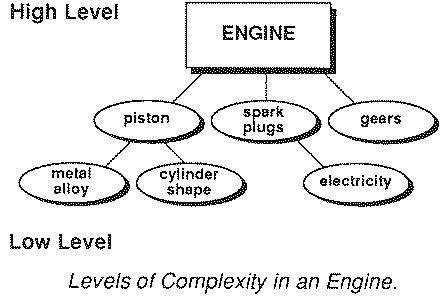
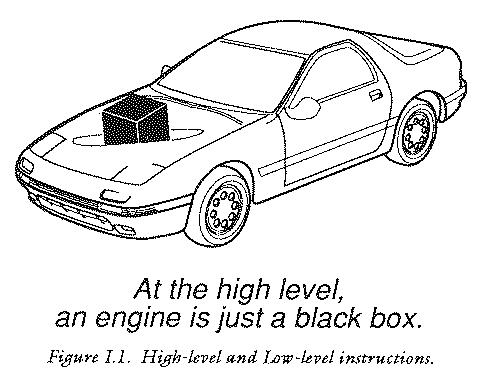
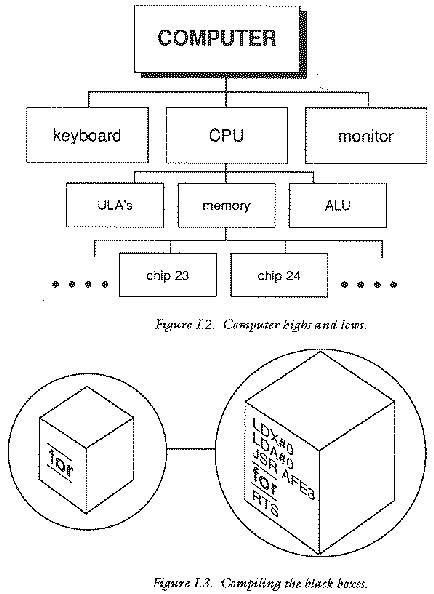
Any kind of object that is sufficiently complicated can be thought of as having levels of detail; the amount of detail we see depends upon how closely we scrutinize it. A computer falls definitely into the category of complex objects and it can be thought of as working at many different levels. The terms low level and high level are often used to describe these onion-layers of complexity in computers. Low level is perhaps the easiest to understand: it describes a level of detail which is buried down amongst the working parts of the machine: the low level is the level at which the computer seems most primitive and machine-like. A higher level describes the same object, but with the detail left out. Imagine stepping back from the complexity of the machine level pieces and grouping together parts which work together, then covering up all the details. (For instance, in a car, a group of nuts, bolts, pistons can be grouped together to make up a new basic object: an engine.) At a high level a computer becomes a group of black boxes which can then be thought of as the basic components of the computer.
C is called a high level, compiler language. The aim of any high
level computer language is to provide an easy and natural way of giving
a programme of instructions to a computer (a computer program). The
language of the raw computer is a stream of numbers called machine
code. As you might expect, the action which results from a single
machine code instruction is very primitive and many thousands of them
are required to make a program which does anything substantial. It is
therefore the job of a high level language to provide a new set of
black box instructions, which can be given to the computer without us
needing to see what happens inside them - and it is the job of a
compiler to fill in the details of these "black boxes" so that the final
product is a sequence of instructions in the language of the computer.
C is one of a large number of high level languages which can be
used for general purpose programming, that is, anything from writing
small programs for personal amusement to writing complex applications. It
is unusual in several ways. Before C, high level languages were
criticized by machine code programmers because they shielded the user
from the working details of the computer, with their black box approach,
to such an extent that the languages become inflexible: in other words,
they did not not allow programmers to use all the facilities which the
machine has to offer. C, on the other hand, was designed to give access
to any level of the machine down to raw machine code and because of this
it is perhaps the most flexible of all high level languages.
Surprisingly, programming books often ignore an important role of
high level languages: high level programs are not only a way to express
instructions to the computer, they are also a means of communication
among human beings. They are not merely monologues to the machine, they
are a way to express ideas and a way to solve problems. The C
language has been equipped with features that allow programs to be
organized in an easy and logical way. This is vitally important for
writing lengthy programs because complex problems are only manageable
with a clear organization and program structure. C allows meaningful
variable names and meaningful function names to be used in programs
without any loss of efficiency and it gives a complete freedom of style;
it has a set of very flexible loop constructions (for,
while, do) and neat ways of making decisions. These
provide an excellent basis for controlling the flow of programs.
Another unusual feature of C is the way it can express ideas concisely. The richness of a language shapes what it can talk about. C gives us the apparatus to build neat and compact programs. This sounds, first of all, either like a great bonus or something a bit suspect. Its conciseness can be a mixed blessing: the aim is to try to seek a balance between the often conflicting interests of readability of programs and their conciseness. Because this side of programming is so often presumed to be understood, we shall try to develop a style which finds the right balance.
C allows things which are disallowed in other languages: this is no defect, but a very powerful freedom which, when used with caution, opens up possibilities enormously. It does mean however that there are aspects of C which can run away with themselves unless some care is taken. The programmer carries an extra responsibility to write a careful and thoughtful program. The reward for this care is that fast, efficient programs can be produced.
C tries to make the best of a computer by linking as closely as possible to the local environment. It is no longer necessary to have to put up with hopelessly inadequate input/output facilities anymore (a legacy of the timesharing/mainframe computer era): one can use everything that a computer has to offer. Above all it is flexible. Clearly no language can guarantee intrinsically good programs: there is always a responsibility on the programmer, personally, to ensure that a program is neat, logical and well organized, but it can give a framework in which it is easy to do so.
The aim of this book is to convey some of the C philosophy in a practical way and to provide a comprehensive introduction to the language by appealing to a number of examples and by sticking to a strict structuring scheme. It is hoped that this will give a flavour of the kind of programming which C encourages.
What to do with a compiler. What can go wrong.
Using a compiler language is not the same as using an interpreted language like BASIC or a GNU shell. It differs in a number of ways. To begin with, a C program has to be created in two stages:
Compiler languages do not usually contain their own editor, nor do they
have words like RUN with which to execute a finished program. You
use a screen editor to create the words of a program (program text) and
run the final program in its compiled form usually by simply typing the
name of the executable file.
A C program is made by running a compiler which takes the
typed source program and converts it into an object file that the
computer can execute. A compiler usually operates in two or more phases
(and each phase may have stages within it). These phases must be
executed one after the other. As we shall see later, this approach
provides a flexible way of compiling programs which are split into many
files.
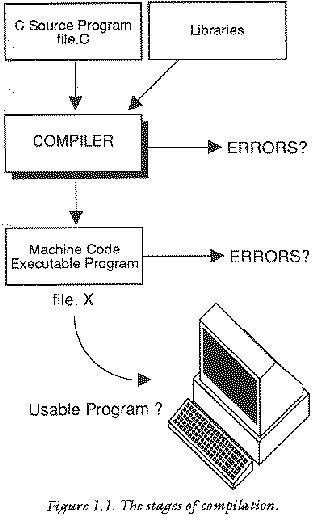
A two-phase compiler works in the following way:
gcc
-c
; the output is one or more .o files.
gcc -o or ld.
To avoid the irritation of typing two or three separate commands (which
are often cumbersome) you will normally find a simple interface
for executing compiler. Traditionally this is an executable
program called cc for C Compiler:
cc filename

gcc filename
On GNU systems, this results in the creation of an executable
program with the default name a.out. To tell the compiler
what you would like the executable program to be called,
use the -o option for setting the name of the object code:
gcc -o program-name filname
For example, to create a program called myprog from a file
called myprog.c, write
gcc -o myprog myprog.c
Errors are mistakes which we the programmers make. There are different kinds of error:
For example, suppose you write sin (x) y = ; in a program instead
of y = sin (x);, which assigns the value of the sin of x
to y. Upon compilation, you would see this error message:
eg.c: In function `main':
eg.c:12: parse error before `y'
(If you compile the program in Emacs, you can jump directly to the error.)
A program with syntax errors will cause a compiler program to stop trying to generate machine code and will not create an executable. However, a compiler will usually not stop at the first error it encounters but will attempt to continue checking the syntax of a program right to the last line before aborting, and it is common to submit a program for compilation only to receive a long and ungratifying list of errors from the compiler.
It is a shock to everyone using a compiler for the first time how a single error can throw the compiler off course and result in a huge and confusing list of non-existent errors, following a single true culprit. The situation thus looks much worse than it really is. You'll get used to this with experience, but it can be very disheartening.
As a rule, look for the first error, fix that, and then
recompile. Of course, after you have become experienced, you will
recognize when subsequent error messages are due to independent problems
and when they are due to a cascade. But at the beginning, just look for
and fix the first error.
If the compilation of a program is successful, then a new file is created. This file will contain machine code which can be executed according to the rules of the computer's local operating system.
When a programmer wants to make alterations and corrections to a C program, these have to be made in the source text file itself using an editor; the program, or the salient parts, must then be recompiled.
One of the reasons why the compiler can fail to produce the executable file for a program is you have mistyped something, even through the careless use of upper and lower case characters. The C language is case dependent. Unlike languages such as Pascal and some versions of BASIC, the C compiler distinguishes between small letters and capital letters. This is a potential source of quite trivial errors which can be difficult to spot. If a letter is typed in the wrong case, the compiler will complain and it will not produce an executable program.
Compiler languages require us to make a list of the names and types of all variables which are going to be used in a program and provide information about where they are going to be used. This is called declaring variables. It serves two purposes: firstly, it provides the compiler with a definitive list of the variables, enabling it to cross check for errors, and secondly, it informs the compiler how much space must be reserved for each variable when the program is run. C supports a variety of variable types (variables which hold different kinds of data) and allows one type to be converted into another. Consequently, the type of a variable is of great importance to the compiler. If you fail to declare a variable, or declare it to be the wrong type, you will see a compilation error.
C programs are constructed from a set of reserved words which provide
control and from libraries which perform special functions. The basic
instructions are built up using a reserved set of words, such as
main, for, if,while, default,
double, extern, for, and int, to name just a
few. These words may not be used in just any old way: C demands that
they are used only for giving commands or making statements. You cannot
use default, for example, as the name of a variable. An attempt
to do so will result in a compilation error.
See All the Reserved Words, for a complete list of the reserverd words.
Words used in included libaries are also, effectively, reserved. If you use a word which has already been adopted in a library, there will be a conflict between your choice and the library.
Libraries provide frequently used functionality and, in practice,
at least one library must be included in every program: the so-called C
library, of standard functions. For example, the stdio library,
which is part of the C library, provides standard facilities for input
to and output from a program.
In fact, most of the facilities which C offers are provided as libraries that are included in programs as plug-in expansion units. While the features provided by libraries are not strictly a part of the C language itself, they are essential and you will never find a version of C without them. After a library has been included in a program, its functions are defined and you cannot use their names.
printf() functionOne invaluable function provided by the standard input/output
library is called printf or `print-formatted'. It provides an
superbly versatile way of printing text. The simplest way to use it is
to print out a literal string:
printf ("..some string...");
Text is easy, but we also want to be able to print out the contents of
variables. These can be inserted into a text string by using a `control
sequence' inside the quotes and listing the variables after the string
which get inserted into the string in place of the control
sequence. To print out an integer, the control sequence %d is used:
printf ("Integer = %d",someinteger);
The variable someinteger is printed instead of %d. The
printf function is described in full detail in the relevant
chapter, but we'll need it in many places before that. The example
program below is a complete program. If you are reading this in Info,
you can copy this to a file, compile and execute it.
/***********************************************************/
/* Short Poem                                              */
/***********************************************************/

#include <stdio.h>

/***********************************************************/

   main ()                    /* Poem */

   {
   printf ("Astronomy is %dderful \n",1);
   printf ("And interesting %d \n",2);
   printf ("The ear%d volves around the sun \n",3);
   printf ("And makes a year %d you \n",4);
   printf ("The moon affects the sur %d heard \n",5);
   printf ("By law of phy%d great \n",6);
   printf ("It %d when the the stars so bright \n",7);
   printf ("Do nightly scintill%d \n",8);
   printf ("If watchful providence be%d \n",9);
   printf ("With good intentions fraught \n");
   printf ("Should not keep up her watch divine \n");
   printf ("We soon should come to %d \n",0);
   }
Astronomy is 1derful \n"
And interesting 2
The ear3 volves around the sun
And makes a year 4 you
The moon affects the sur 5 heard
By law of phy6d great
It 7 when the the stars so bright
Do nightly scintill8
If watchful providence be9
With good intentions fraught
Should not keep up her watch divine
We soon should come to 0
Where is a C program born? How is it created?
The basic control of a computer rests with its operating system. This is a layer of software which drives the hardware and provides users with a comfortable environment in which to work. An operating system has two main components which are of interest to users: a user interface (often a command language) and a filing system. The operating system is the route to all input and output, whether it be to a screen or to files on a disk. A programming language has to get at this input and output easily so that programs can send out and receive messages from the user and it has to be in contact with the operating system in order to do this. In C the link between these two is very efficient.
Operating systems vary widely but most have a command language or shell which can be used to type in commands. Recently the tendency has been to try to eliminate typing completely by providing graphical user interfaces (GUIs) for every purpose. GUIs are good for carrying out simple procedures like editing, but they are not well suited to giving complicated instructions to a computer. For that one needs a command language. In the network version of this book we shall concentrate on Unix shell commands since they are the most important to programmers. On microcomputers command languages are usually very similar in concept, though more primitive, with only slightly different words for essentially the same commands. (This is a slightly superficial view).
When most compiler languages were developed, they were intended to be run on large mainframe computers which operated on a multi-user, time-sharing principle and were incapable of interactive communication with the user. Many compiler languages still have this inadequacy when carried over to modern computers, but C is an exception, because of its unique design. Input and output are not actually defined as a fixed, unchanging part of the C language. Instead there is a standard file which has to be included in programs and defines the input/output commands that are supported by the language for a particular computer and operating system. This file is called a standard C library. (See the next chapter for more information.) The library is standard in the sense that C has developed a set of functions which all computers and operating systems must implement, but which are specially adapted to your system.
The filing system is also a part of input/output. In many operating systems all routes in and out of the computer are treated by the operating system as though they were files or data streams (even the keyboard!). C does this implicitly (it comes from Unix). The file from which C normally gets its input from is called stdin or standard input file and it is usually the keyboard. The corresponding route for output is called "stdout" or standard output file and is usually a monitor screen. Both of these are parts of stdio or standard input output. The keyboard and the monitor screen are not really files, of course, they are `devices', (it is not possible to re-read what has been sent to the monitor", or write to the keyboard.), but devices are represented by files with special names, so that the keyboard is treated as a read-only file, the monitor as a write only file... The advantage of treating devices like this is that it is not necessary to know how a particular device works, only that it exists somewhere, connected to the computer, and can be written to or read from. In other words, it is exactly the same to read or write from a device as it is to read or write from a file. This is a great simplification of input/output! The filenames of devices (often given the lofty title `pseudo device names') depend upon your particular operating system. For instance, the printer might be called "PRN" or "PRT". You might have to open it explicitly as a file. When input is taken solely from the keyboard and output is always to the screen then these details can just be forgotten.
The compiler uses a special convention for the file names, so that we do
not confuse their contents.
The name of a source program (the code which you write) is
filename.c. The compiler generates a file of object code from
this called filename.o, as yet unlinked. The final program,
when linked to libraries is called filename on Unix-like
operating systems, and filename.EXE on Windows derived
systems. The libraries themselves are also files of object code, typically
called liblibraryname.a or liblibraryname.so.
Header files are always called libname.h.
The endings `dot something' (called file extensions) identify the
contents of files for the compiler. The dotted endings mean that the
compiler can generate an executable file with the same name as the
original source - just a different ending. The quad file and the object
file are only working files and should be deleted by the compiler at the
end of compilation. The .c suffix is to tell the compiler that
the file contains a C source program and similarly the other letters
indicate non-source files in a convenient way. To execute the compiler
you type,
cc filenameFor example,
cc foo.c
In order to do anything with a compiler or an editor you need to know a little about the command language of the operating system. This means the instructions which can be given to the system itself rather than the words which make up a C program. e.g.
 ls -l

 less filename

 emacs filename
In a large operating system (or even a relatively small one) it can be a major feat of recollection to know all of the commands. Fortunately it is possible to get by with knowing just handful of the most common ones and having the system manual around to leaf through when necessary.
Another important object is the `panic button' or program interruption key. Every system will have its own way of halting or terminating the operation of a program or the execution of a command. Commonly this will involve two simultaneous key presses, such as CTRL C, CTRL Z or CTRL-D etc. In GNU/Linux, CTRL-C is used.
Plug-in C expansions. Header files.
The core of the C language is small and simple. Special functionality is provided in the form of libraries of ready-made functions. This is what makes C so portable. Some libraries are provided for you, giving you access to many special abilities without needing to reinvent the wheel. You can also make your own, but to do so you need to know how your operating system builds libraries. We shall return to this later.
Libraries are files of ready-compiled code which we can merge with a C
program at compilation time. Each library comes with a number of
associated header files which make the functions easier to use.
For example, there are libraries of mathematical functions, string
handling functions and input/output functions and graphics libraries. It
is up to every programmer to make sure that libraries are added at
compilation time by typing an optional string to the compiler. For
example, to merge with the math library libm.a you would type
cc -o program_name prog.c -lm
when you compile the program.
The -lm means: add in libm. If we wanted to add in the socket
library libsocket.a to do some network programming as well, we
would type
cc -o program_name prog.c -lm -lsocket
and so on.
Why are these libraries not just included automatically? Because it would be a waste for the compiler to add on lots of code for maths functions, say, if they weren't needed. When library functions are used in programs, the appropriate library code is included by the compiler, making the resulting object code often much longer.
Libraries are supplemented by header files which define macros, data types and external data to be used in conjunction with the libraries. Once a header file has been included, it has effectively added to the list of reserved words and commands in the language. You cannot then use the names of functions or macros which have already been defined in libraries or header files to mean anything other than what the library specifies.
The most commonly used header file is the standard input/output library
which is called stdio.h. This belongs to a subset of the standard
C library which deals with file handling. The math.h header file
belongs to the mathematics library libm.a. Header files for
libraries are included by adding to the source code:
#include header.h
at the top of a program file. For instance:
#include "myheader.h"
includes a personal header file which is in the current directory. Or
#include <stdio.h>
includes a file which lies in a standard directory like /usr/include.
The #include directive is actually a command to the C
preprocessor, which is dealt with more fully later, See Preprocessor.
Some functions can be used without having to include library files or special
libraries explicitly since every program is always merged with the
standard C library, which is called libc.
#include <stdio.h>

main ()

{
printf ("C standard I/O file is included\n");
printf ("Hello world!");
}
A program wishing to use a mathematical function such as cos
would need to include a mathematics library header file.
#include <stdio.h>
#include <math.h>

main ()

{ double x,y;

y = sin (x);
printf ("Maths library ready");
}
A particular operating system might require its own special library for certain operations such as using a mouse or for opening windows in a GUI environment, for example. These details will be found in the local manual for a particular C compiler or operating system.
Although there is no limit, in principle, to the number of libraries which can be included in a program, there may be a practical limit: namely memory, since every library adds to the size of both source and object code. Libraries also add to the time it takes to compile a program. Some operating systems are smarter than others when running programs and can load in only what they need of the large libraries. Others have to load in everything before they can run a program at all, so many libraries would slow them down.
To know what names libraries have in a particular operating system you have to search through its documentation. Unix users are lucky in having an online manual which is better than most written ones.
The shape of programs to come.
C is actually a free format language. This means that there are no rules about how it must be typed, when to start new lines, where to place brackets or whatever. This has both advantages and dangers. The advantage is that the user is free to choose a style which best suits him or her and there is freedom in the way in which a program can be structured. The disadvantage is that, unless a strict style is adopted, very sloppy programs can be the result. The reasons for choosing a well structured style are that:
No simple set of rules can ever provide the ultimate solution to writing good programs. In the end, experience and good judgement are the factors which decide whether a program is written well or poorly written. The main goal of any style is to achieve clarity. Previously restrictions of memory size, power and of particular compilers often forced restrictions upon style, making programs clustered and difficult. All computers today are equipped with more than enough memory for their purposes, and have very good optimizers which can produce faster code than most programmers could write themselves without help, so there are few good reasons not to make programs as clear as possible.
What goes into a C program? What will it look like?
C is made up entirely of building blocks which have a particular `shape'
or form. The form is the same everywhere in a program, whether it is the
form of the main program or of a subroutine. A program is made up of
functions, functions are made up of statements and declarations
surrounded by curly braces { }.
The basic building block in a C program is the function. Every C
program is a collection of one or more functions, written in some
arbitrary order. One and only one of these functions in the program must
have the name main(). This function is always the starting point of a C
program, so the simplest C program would be just a single function
definition:
main ()

{
}
The parentheses () which follow the name of the function must be
included even though they apparently serve no purpose at this
stage. This is how C distinguishes functions from ordinary variables.
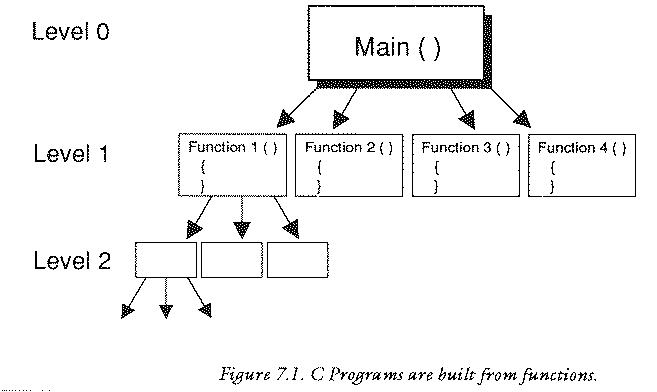
The function main() does not have to be at the top of a program
so a C program does not necessarily start at line 1. It always starts
where main() is. Also, the function main() cannot be called from
any other function in the program. Only the operating system can call
the function main(): this is how a C program is started.
The next most simple C program is perhaps a program which calls a
function do_nothing and then ends.
/******************************************************/
/*                                                    */
/* Program : do nothing                               */
/*                                                    */
/******************************************************/

main()                          /* Main program */

{
do_nothing();
}

/******************************************************/

do_nothing()                 /* Function called */

{
}
The program now consists of two functions, one of which is called by the
other. There are several new things to notice about this
program. Firstly the function do_nothing() is called by typing
its name followed by the characteristic () brackets and a
semi-colon. This is all that is required to transfer control to the new
function. In some languages, words like CALL or PROC are used, or even
a symbol like &. No such thing is needed in C.
The semi-colon is vital however. All instructions in C must end with a
semi-colon. This is a signal to inform the compiler that the end of a
statement has been reached and that anything which follows is meant to
be a part of another statement. This helps the compiler diagnose errors.
The `brace' characters { and } mark out a block
into which instructions are written. When the program meets the closing
brace } it then transfers back to main() where it meets
another } brace and the program ends. This is the simplest way
in which control flows between functions in C. All functions have the
same status as far as a program is concerned. The function main()
is treated just as any other function. When a program is compiled, each
function is compiled as a separate entity and then at the end the linker
phase in the compiler attempts to sew them all together.
The examples above are obviously very simple but they illustrate how control flows in a C program. Here are some more basic elements which we shall cover.
The skeleton plan of a program, shown below, helps to show how the elements of a C program relate. The following chapters will then expand upon this as a kind of basic plan.
/****************************************************/
/*                                                  */
/* Skeleton program plan                            */
/*                                                  */
/****************************************************/

#include <stdio.h>       /* Preprocessor defns */
#include <myfile.c>

#define SCREAM           "arghhhhh"
#define NUMBER_OF_BONES  123

/****************************************************/

main ()                /* Main program & start */

{ int a,b;                     /* declaration */

a=random();
b=function1();
function2(a,b);
}

/****************************************************/

function1 ()                        /* Purpose */

{
....
}

/****************************************************/

function2 (a,b)                     /* Purpose */

int a,b;

{
....
}
Neither comments nor preprocessor commands have a special place in this
list: they do not have to be in any one particular place within the
program.
Annotating programs.
Comments are a way of inserting remarks and reminders into a program without affecting its content. Comments do not have a fixed place in a program: the compiler treats them as though they were white space or blank characters and they are consequently ignored. Programs can contain any number of comments without losing speed. This is because comments are stripped out of a source program by the compiler when it converts the source program into machine code.
Comments are marked out or delimited by the following pairs of characters:
/* ...... comment ......*/
Because a comment is skipped over as though it were a single space, it can be placed anywhere where spaces are valid characters, even in the middle of a statement, though this is not to be encouraged. You should try to minimize the use of comments in a program while trying to maximize the readability of the program. If there are too many comments you obscure your code and it is the code which is the main message in a program.
main ()   /* The almost trivial program */

{

/* This little line has no effect */
/* This little line has none */
/* This little line went all the way down
   to the next line */
/* And so on ... */

}
#include <stdio.h>      /* header file */

#define  NOTFINISHED    0

/**********************************************/

 /* A bar like the one above can be used to */
 /* separate functions visibly in a program */

main ()

{ int i;                /* declarations */

do

   {
   /* Nothing !!! */
   }

while (NOTFINISHED);

}
/* .. to start but forgets the ..*/ to close?
Making black boxes. Solving problems. Getting results.
A function is a module or block of program code which deals with a particular task. Making functions is a way of isolating one block of code from other independent blocks of code. Functions serve two purposes. They allow a programmer to say: `this piece of code does a specific job which stands by itself and should not be mixed up with anyting else', and they make a block of code reusable since a function can be reused in many different contexts without repeating parts of the program text.
Functions help us to organize a program in a simple way; in Kernighan & Ritchie C they are always written in the following form:
identifier (parameter1,parameter2,..)

types of parameters

{ variable declarations

statements..
......
....

}
For example
Pythagoras(x,y,z)

double x,y,z;

{ double d;

d = sqrt(x*x+y*y+z*z);

printf("The distance to your point was %f\n",d);
}
In the newer ANSI standard, the same function is written slightly differently:
Pythagoras(double x, double y, double z)

{ double d;

d = sqrt(x*x+y*y+z*z);

printf("The distance to your point was %f\n",d);
}
You will probably see both styles in C programs.
Each function has a name or identifier by which is used to refer to it
in a program. A function can accept a number of parameters or values
which pass information from outside, and consists of a number
of statements and declarations, enclosed by curly braces { }, which
make up the doing part of the object. The declarations and `type of
parameter' statements are formalities which will be described in good
time.
The name of a function in C can be anything from a single letter to a
long word. The name of a function must begin with an alphabetic letter
or the underscore _ character but the other characters in the
name can be chosen from the following groups:
a .. z
A .. Z
0 .. 9
_
This means that sensible names can easily be chosen for functions
making a program easy to read. Here is a real example function which adds
together two integer numbers a and b and prints the result
c. All the variables are chosen to be integers to keep things
simple and the result is printed out using the print-formatted function
printf, from the the standard library, with a "%d" to indicate that it
is printing a integer.
Add_Two_Numbers (a,b)               /* Add a and b */

int a,b;

{ int c;

c = a + b;
printf ("%d",c);

}
Notice the position of the function name and where braces and semi-colons are placed: they are crucial. The details are quickly learned with practice and experience.
This function is not much use standing alone. It has to be called from somewhere. A function is called (i.e. control is passed to the function) by using its name with the usual brackets () to follow it, along with the values which are to be passed to the function:
main ()

{ int c,d;

c = 1;
d = 53;

Add_Two_Numbers (c,d);
Add_Two_Numbers (1,2);

}
The result of this program would be to print out the number 54 and then the number 3 and then stop. Here is a simple program which makes use of some functions in a playful way. The structure diagram shows how this can be visualized and the significance of the program `levels'. The idea is to illustrate the way in which the functions connect together:
Level 0:        main ()

                  |

Level 1:       DownOne ()

               /      \
              /        \

Level 2:  DownLeft()   DownRight()
Note: not all functions fit into a tidy hierarchy like these. Some functions
call themselves, while others can be called from anywhere in a program.
Where would you place the printf function in this hierarchy?
/***********************************************/
/*                                             */
/* Function Snakes & Ladders                   */
/*                                             */
/***********************************************/

#include <stdio.h>

/***********************************************/
/* Level 0                                     */
/***********************************************/

main ()

{
printf ("This is level 0: the main program\n");
printf ("About to go down a level         \n");

DownOne ();

printf ("Back at the end of the start!!\n");
}

/************************************************/
/* Level 1                                      */
/************************************************/

DownOne ()                    /* Branch out! */

{
printf ("Down here at level 1, all is well\n");

DownLeft (2);
printf ("Through level 1....\n");
DownRight (2);

printf ("Going back up a level!\n);
}

/************************************************/
/* Level 2                                      */
/************************************************/

DownLeft (a)                  /* Left branch */

int a;

{
printf ("This is deepest level %d\n",a);
printf ("On the left branch of the picture\n");
printf ("Going up!!");
}

/************************************************/

DownRight (a)                /* Right branch */

int a;

{
printf ("And level %d again!\n",a);
}
In other languages and in mathematics a function is understood to be something which produces a value or a number. That is, the whole function is thought of as having a value. In C it is possible to choose whether or not a function will have a value. It is possible to make a function hand back a value to the place at which it was called. Take the following example:
bill = CalculateBill(data...);
The variable bill is assigned to a function
CalculateBill() and data are some data which are passed to
the function. This statement makes it look as though
CalculateBill() is a number. When this statement is executed in a
program, control will be passed to the function CalculateBill()
and, when it is done, this function will then hand control back. The
value of the function is assigned to "bill" and the program continues.
Functions which work in this way are said to return a value.
In C, returning a value is a simple matter. Consider the function CalculateBill() from the statement above:
CalculateBill(starter,main,dessert)   /* Adds up values */

int starter,main,dessert;

{ int total;

total = starter + main + dessert;
return (total);
}
As soon as the return statement is met CalculateBill() stops
executing and assigns the value total to the function. If there were
no return statement the program could not know which value it should
associate with the name CalculateBill and so it would not be
meaningful to speak of the function as having one value. Forgetting a
return statement can ruin a program. For instance if CalculateBill
had just been:
CalculateBill (starter,main,dessert)  /* WRONG! */

int starter,main,dessert;

{ int total;

total = starter + main + dessert;
}
then the value bill would just be garbage (no predictable value),
presuming that the compiler allowed this to be written at all. On the
other hand if the first version were used (the one which did use the
return(total) statement) and furthermore no assignment were made:
main ()

{
CalculateBill (1,2,3);
}
then the value of the function would just be discarded, quite
legitimately. This is usually what is done with the input output
functions printf() and scanf() which actually return
values. So a function in C can return a value but it does not have to be
used; on the other hand, a value which has not been returned cannot be
used safely.
NOTE : Functions do not have to return integers: you can decide whether they should return a different data type, or even no value at all. (See next chapter)
Suppose that a program is in the middle of some awkward process
in a function which is not main(), perhaps two or three loops working
together, for example, and suddenly the function finds its
answer. This is where the beauty of the return statement becomes
clear. The program can simply call return(value) anywhere in the
function and control will jump out of any number of loops or whatever
and pass the value back to the calling statement without having to
finish the function up to the closing brace }.
myfunction (a,b)     /* breaking out of functions early */

int a,b;

{
while (a < b)
   {
   if (a > b)
      {
      return (b);
      }
   a = a + 1;
   }
}
The example shows this. The function is entered with some values for
a and b and, assuming that a is less than b,
it starts to execute one of C's loops called while. In that loop,
is a single if statement and a statement which increases a by one
on each loop. If a becomes bigger than b at any point the
return(b) statement gets executed and the function
myfunction quits, without having to arrive at the end brace
}, and passes the value of b back to the place it was
called.
exit() functionThe function called exit() can be used to terminate a program at
any point, no matter how many levels of function calls have been
made. This is called with a return code, like this:
#define CODE  0

exit (CODE);
This function also calls a number of other functions which perform tidy-up duties such as closing open files etc.
All the variables and values used up to now have been integers. But what happens if a function is required to return a different kind of value such as a character? A statement like:
bill = CalculateBill (a,b,c);
can only make sense if the variable bill and the value of the
function CalculateBill() are the same kind of object: in other
words if CalculatBill() returns a floating point number, then
bill cannot be a character! Both sides of an assignment must
match.
In fact this is done by declaring functions to return a particular type of data. So far no declarations have been needed because C assumes that all values are integers unless you specifically choose something different. Declarations are covered in the next section.
Storing data. Descriminating types. Declaring data.
A variable is a seqeuence of program code with a name (also called its
identifier). A name or identifier in C can be anything from a
single letter to a word. The name of a variable must begin with an
alphabetic letter or the underscore _ character but the other
characters in the name can be chosen from the following groups:
a .. z
A .. Z
0 .. 9
_
Some examples of valid variable names are:
a total Out_of_Memory VAR integer etc...
In C variables do not only have names: they also have types. The
type of a variable conveys to the the compiler what sort of data
will be stored in it. In BASIC and in some older, largely obsolete
languages, like PL/1, a special naming convention is used to determine
the sort of data which can be held in particular variables. e.g. the
dollar symbol $ is commonly used in BASIC to mean that a variable is a
string and the percentage % symbol is used to indicate an integer. No
such convention exists in C. Instead we specify the types
of variables in their declarations. This serves two purposes:
There is a lot of different possible types in C. In fact it is possible for us to define our own, but there is no need to do this right away: there are some basic types which are provided by C ready for use. The names of these types are all reserved words in C and they are summarized as follows:
char
short
short int
int
long
long int
float
long float
double
void
enum
volatile
There is some repetition in these words. In
addition to the above, the word unsigned can also be placed in
front of any of these types. Unsigned means that only positive or zero
values can be used. (i.e. there is no minus sign). The advantage of
using this kind of variable is that storing a minus sign takes up some
memory, so that if no minus sign is present, larger numbers can be
stored in the same kind of variable. The ANSI standard also
allows the word signed to be placed in front of any of these types,
so indicate the opposite of unsigned. On some systems variables are signed
by default, whereas on others they are not.
To declare a variable in a C program one writes the type followed by a list of variable names which are to be treated as being that type:
typename variablename1,..,..,variablenameN;
For example:
  int i,j;
  char ch;
  double x,y,z,fred;
  unsigned long int Name_of_Variable;
Failing to declare a variable is more risky than passing through customs and failing to declare your six tonnes of Swiss chocolate. A compiler is markedly more efficient than a customs officer: it will catch a missing declaration every time and will terminate a compiling session whilst complaining bitterly, often with a host of messages, one for each use of the undeclared variable.
There are two kinds of place in which declarations can be made, See Scope. For now it will do to simply state what these places are.
#include lines, for example.) Variables declared
here are called global variables. There are also called
static and external variables in special
cases.)
#include <stdio.h>

int globalinteger;              /* Here! outside {} */

float global_floating_point;

main ()

{
}
 main ()

 { int a;
   float x,y,z;

 /* statements */

 }
or
 function ()

 { int i;

 /* .... */

 while (i < 10)
    { char ch;
      int g;

    /* ... */
    }
 }
When a variable is declared in C, the language allows a neat piece of syntax which means that variables can be declared and assigned a value in one go. This is no more efficient than doing it in two stages, but it is sometimes tidier. The following:
int i = 0;

char ch = 'a';
are equivalent to the more longwinded
int i;
char ch;

i = 0;
ch = 'a';
This is called initialization of the variables. C always allows the programmer to write declarations/initializers in this way, but it is not always desirable to do so. If there are just one or two declarations then this initialization method can make a program neat and tidy. If there are many, then it is better to initialize separately, as in the second case. A lot means when it starts to look as though there are too many. It makes no odds to the compiler, nor (ideally) to the final code whether the first or second method is used. It is only for tidiness that this is allowed.
charA character type is a variable which can store a single ASCII
character. Groups of char form strings.
In C single characters are written enclosed by single
quotes, e.g. 'c'! (This is in contrast to strings of many characters which use
double quotes, e.g. "string") For instance, if ch is the name
of a character:
char ch;

ch = 'a';
would give ch the value of the character a. The same effect can also
be achieved by writing:
char ch = 'a';
A character can be any ASCII character, printable or not printable
from values -128 to 127. (But only 0 to 127 are used.) Control
characters i.e. non printable characters are put into programs by
using a backslash \ and a special character or number. The characters
and their meanings are:
\b
\f
\n
\r
\t
\v
\"
\'
\\
\ddd
\xddd
/***************************************************/
/*                                                 */
/* Special Characters                              */
/*                                                 */
/***************************************************/

#include <stdio.h>

main ()

{
printf ("Beep! \7 \n");
printf ("ch = \'a\' \n");
printf (" <- Start of this line!! \r");
}
The output of this program is:
Beep!  (and the BELL sound )
ch = 'a'
 <- Start of this line!!
and the text cursor is left where the arrow points. It is also possible to have the type:
unsigned char
This admits ASCII values from 0 to 255, rather than -128 to 127.
There are five integer types in C and they are called char, int,
long, long long and short. The difference between these is the size
of the integer which either can hold and the amount of storage required
for them. The sizes of these objects depend on the operating system of
the computer. Even different flavours of Unix can have varying sizes for
these objects. Usually, the two to remember are int and
short. int means a `normal' integer and short means
a `short' one, not that that tells us much. On a typical 32 bit
microcomputer the size of these integers is the following:
Type           Bits      Possible Values

short          16        -32768 to 32767
unsigned short 16        0 to 65535

int            32        -2147483648 to 2147483647
long           32                 (ditto)
unsigned int   32        0 to 4294967295
long long      64        -9e18 to + 8e18
Increasingly though, 64 bit operating systems are appearing and long integers are 64 bits long. You should always check these values. Some mainframe operating systems are completely 64 bit, e.g. Unicos has no 32 bit values. Variables are declared in the usual way:
int i,j;

i = j = 0;
or
short i=0,j=0;
There are also long and short floating point numbers in C.
All the mathematical functions which C can use require
double or long float arguments so it is common to use the type
float for storage only of small floating point numbers and to use
double elsewhere. (This not always true since the C `cast' operator
allows temporary conversions to be made.) On a typical 32 bit
implementation the different types would be organized as follows:
Type           Bits      Possible Values

float          32        +/- 10E-37 to +/- 10E38
double         64        +/- 10E-307 to +/- 10E308
long float     32                (ditto)
long double    ???
Typical declarations:
float x,y,z;
x = 0.1;
y = 2.456E5
z = 0;

double bignum,smallnum;
bignum = 2.36E208;
smallnum = 3.2E-300;
The sort of procedure that you would adopt when choosing variable names is something like the following:
Some local variables are only used temporarily, for controlling loops for instance. It is common to give these short names (single characters). A good habit to adopt is to keep to a consistent practice when using these variables. A common one, for instance is to use the letters:
int i,j,k;
to be integer type variables used for counting. (There is not particular reason why this should be; it is just common practice.) Other integer values should have more meaningful names. Similarly names like:
double x,y,z;
tend to make one think of floating point numbers.
Variables can be assigned to numbers:
var = 10;
and assigned to each other:
var1 = var2;
In either case the objects on either side of the = symbol must be of
the same type. It is possible (though not usually sensible) to assign a
floating point number to a character for instance. So
int a, b = 1;

a = b;
is a valid statement, and:
float x = 1.4;
char ch;

ch = x;
is a valid statement, since the truncated value 1 can be assigned to
ch. This is a questionable practice though. It is unclear why
anyone would choose to do this. Numerical values and characters will
interconvert because characters are stored by their ASCII codes (which
are integers!) Thus the following will work:
int i;
char ch = 'A';

i = ch;

printf ("The ASCII code of %c is %d",ch,i);
The result of this would be:
The ASCII code of A is 65
It is worth mentioning briefly a very valuable operator in C: it is called the cast operator and its function is to convert one type of value into another. For instance it would convert a character into an integer:
int i;
char ch = '\n';

i = (int) ch;
The value of the integer would be the ASCII code of the character. This is the only integer which it would make any sense to talk about in connection with the character. Similarly floating point and integer types can be interconverted:
float x = 3.3;
int i;

i = (int) x;
The value of i would be 3 because an integer cannot represent decimal
points, so the cast operator rounds the number. There is no such
problem the other way around.
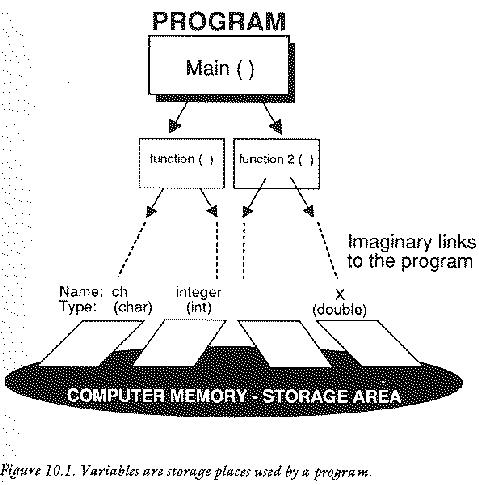
float x;
int i = 12;

x = (float) i;
The general form of the cast operator is therefore:
(type) variable
It does not always make sense to convert types. This will be seen particularly with regard to structures and unions. Cast operators crop up in many areas of C. This is not the last time they will have to be explained.
/***************************************************/
/*                                                 */
/* Demo of Cast operator                           */
/*                                                 */
/***************************************************/

#include <stdio.h>

main ()               /* Use int float and char */

{ float x;
  int i;
  char ch;

x = 2.345;
i = (int) x;
ch = (char) x;
printf ("From float x =%f i =%d ch =%c\n",x,i,ch);

i = 45;
x = (float) i;
ch = (char) i;
printf ("From int i=%d x=%f ch=%c\n",i,x,ch);

ch = '*';
i = (int) ch;
x = (float) ch;
printf ("From char ch=%c i=%d x=%f\n",ch,i,x);
}
static and externSometimes C programs are written in more than one text file. If this is the case then, on occasion, it will be necessary to get at variables which were defined in another file. If the word extern is placed in front of a variable then it can be referenced across files:
     File 1                        File 2

                                 int i;

   main ()                       function ()

   {                            {
   extern int i;
   }                            }
In this example, the function main() in file 1 can use the
variable i from the function main in file 2.
Another class is called static. The name static is given to
variables which can hold their values between calls of a function:
they are allocated once and once only and their values are preserved
between any number of function calls. Space is allocated for static
variables in the program code itself and it is never disposed of
unless the whole program is. NOTE: Every global variable, defined
outside functions has the type static automatically. The opposite of
static is auto.
Functions do not always have to return values which are integers
despite the fact that this has been exclusively the case up to
now. Unless something special is done to force a function to return a
different kind of value C will always assume that the type of a
function is int.
If you want this to be different, then a function has to be declared to be a certain type, just as variables have to be. There are two places where this must be done:
     float function1 ()

     {
     return (1.229);
     }
A function which returns a character:
     char function2 ()

     {
     return ('*');
     }
main(), they would have to
declared in the variables section as:
     main ()

     { char ch, function2 ();
       float x, function1 ();

     x = function1 ();
     ch = function2 ();
     }
If a function whose type is not integer is not declared like
this, then compilation errors will result! Notice also that the
function must be declared inside every function which calls it, not
just main().
Ralph23
80shillings
mission_control
A%
A$
_off
i and j.
floa and double.
int and unsigned int?
long float, it must
be done in, at least, two places. Where are these?
Ways in and out of functions.
Not all functions will be as simple as the ones which have been given so
far. Functions are most useful if they can be given information to work
with and if they can reach variables and data which are defined outside
of them. Examples of this have already been seen in a limited way. For
instance the function CalculateBill accepted three values
a,b and c.
CalculateBill (a,b,c)

int a,b,c;

{ int total;

total = a + b + c;
return total;
}
When variable values are handed to a function, by writing them
inside a functions brackets like this, the function is said to accept
parameters. In mathematics a parameter is a variable which controls
the behaviour of something. In C it is a variable which carries some
special information. In CalculateBill the "behaviour" is the addition
process. In other words, the value of total depends upon the
starting values of a,b and c.
Parameters are about communication between different functions in a program. They are like messengers which pass information to and from different places. They provide a way of getting information into a function, but they can also be used to hand information back. Parameters are usually split into two categories: value parameters and variable parameters. Value parameters are one-way communication carrying information into a function from somewhere outside. Variable parameters are two-way.
A function was defined by code which looks like this:
identifier (parameters...)

types of parameters

{

}
Parameters, like variables and functions, also have types which must be declared. For instance:
function1 (i,j,x,y)

int i,j;
float x,y;

{

}
or
char function2 (x,ch)

double x;
char ch;

{ char ch2 = '*';

return (ch2);
}
Notice that they are declared outside the block braces.
A value parameter is the most common kind of parameter. All of
the examples up to know have been examples of value parameters.
When a value parameter is passes information to a function its
value is copied to a new place which is completely isolated from the
place that the information came from. An example helps to show
this. Consider a function which is called from main() whose purpose is
to add together two numbers and to print out the result.
#include <stdio.h>

main ()

{
add (1,4);
}

  /*******************************************/

add (a,b)

int a,b;

{
printf ("%d", a+b);
}
When this program is run, two new variables are automatically created by
the language, called a and b. The value 1 is copied into a
and the value 4 is copied into b. Obviously if a and b were given
new values in the function add() then this could not change the
values 1 and 4 in main(), because 1 is always 1 and 4 is always
4. They are constants. However if instead the program had been:
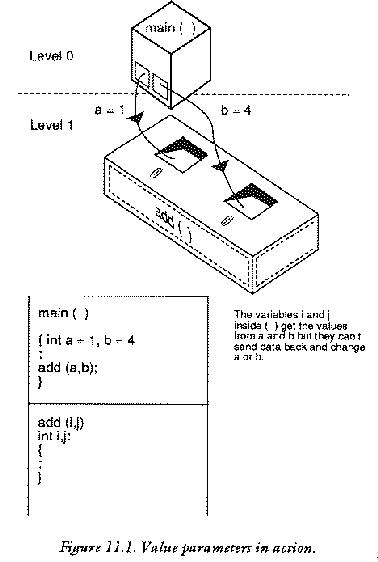
main ()

{ int a = 1, b = 4;

add (a,b);
}

  /**************************************/


add (a,b)

int a,b;

{
printf ("%d", a+b);
}
then it is less clear what will happen. In fact exactly the same thing happens:
add() is called from main() two new variables a and
b are created by the language (which have nothing to do
with the variables a and b in main() and are
completely isolated from them).
a in main() is copied into the value of a in
add().
b in main() is copied into the value of b in
add().
Now, any reference to a and b within the function
add() refers only to the two parameters of add and not to
the variables with the same names which appeared in main(). This means that if
a and b are altered in add() they will not affect
a and b in main(). More advanced computing texts
have names for the old and they new a and b:
Here are some points about value parameters.
#include <stdio.h>

main ()

{ int a = 1, b = 4;

add (a,b);
}

  /*******************************************/

add (i,j)

int i,j;

{
printf ("%d", i+j);
}
In this case the value of a in main() would be copied to
the value of i in add() and the value of b in main()
would be copied to the value of j in add().
main ()

{
function ('*',1.0);
}

  /********************************/

function (ch,i)

char ch;
int i;

{
}
is probably wrong because 1.0 is a floating point value, not an integer.
sin(3.41415);
cos(a+b*2.0);
strlen("The length of this string");
The value returned by a function can be used directly as a value parameter. It does not have to be assigned to a variable first. For instance:
main ()

{
PrintOut (SomeValue());
}

  /*********************************************/

PrintOut (a)           /* Print the value */

int a;

{
printf ("%d",a);
}

  /**********************************************/

SomeValue ()     /* Return an arbitrary no */

{
return (42);
}
This often gives a concise way of passing a value to a function.
/**************************************************/
/*                                                */
/* Value Parameters                               */
/*                                                */
/**************************************************/

   /* Toying with value parameters */

#include <stdio.h>

/**************************************************/
/* Level 0                                        */
/**************************************************/

main ()         /* Example of value parameters */

{ int i,j;
  double x,x_plus_one();
  char ch;

i = 0;
x = 0;

printf (" %f", x_plus_one(x));
printf (" %f", x);

j = resultof (i);

printf (" %d",j);
}

/***************************************************/
/* level 1                                         */
/***************************************************/

double x_plus_one(x)          /* Add one to x ! */

double x;

{
x = x + 1;
return (x);
}

/****************************************************/

resultof (j)             /* Work out some result */

int j;

{
return (2*j + 3);        /* why not... */
}
/******************************************************/
/*                                                    */
/* Program : More Value Parameters                    */
/*                                                    */
/******************************************************/

     /* Print out mock exam results etc */

#include <stdio.h>

/******************************************************/

main ()                  /* Print out exam results */

{ int pupil1,pupil2,pupil3;
  int ppr1,ppr2,ppr3;
  float pen1,pen2,pen3;

pupil1 = 87;
pupil2 = 45;
pupil3 = 12;

ppr1 = 200;
ppr2 = 230;
ppr3 = 10;

pen1 = 1;
pen2 = 2;
pen3 = 20;

analyse (pupil1,pupil2,pupil3,ppr1,ppr2,
                    ppr3,pen1,pen2,pen3);

}

/*******************************************************/

analyse (p1,p2,p3,w1,w2,w3,b1,b2,b3)

int p1,p2,p3,w1,w2,w3;
float b1,b2,b3;

{
printf ("Pupil 1 scored %d percent\n",p1);
printf ("Pupil 2 scored %d percent\n",p2);
printf ("Pupil 3 scored %d percent\n",p3);

printf ("However: \n");

printf ("Pupil1 wrote %d sides of paper\n",w1);
printf ("Pupil2 wrote %d sides\n",w2);
printf ("Pupil3 wrote %d sides\n",w3);

if (w2 > w1)
   {
   printf ("Which just shows that quantity");
   printf (" does not imply quality\n");
   }

printf ("Pupil1 used %f biros\n",b1);
printf ("Pupil2 used %f \n",b2);
printf ("Pupil3 used %f \n",b3);

printf ("Total paper used = %d", total(w1,w2,w3));
}

/*****************************************************/

total (a,b,c)                     /* add up total */

int a,b,c;

{
return (a + b + c);
}
(As a first time reader you may wish to omit this section until you have read about Pointers and Operators.)
One way to hand information back is to use the return statement.
This function is slightly limited however in
that it can only hand the value of one variable back at a time. There
is another way of handing back values which is less restrictive, but
more awkward than this. This is by using a special kind of parameter,
often called a variable parameter. It is most easily explained with
the aid of an example:
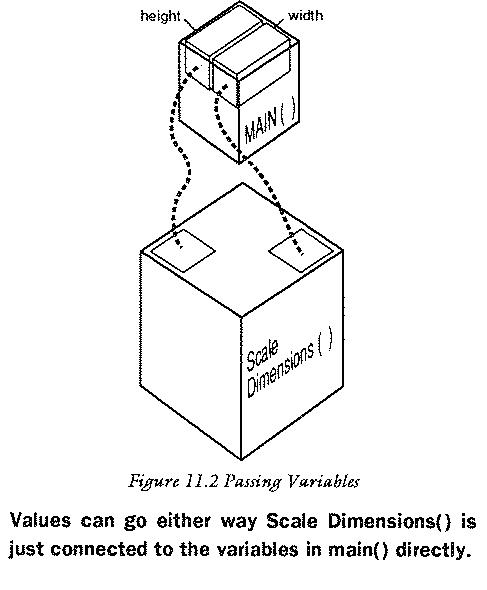
#include <stdio.h>

main ()

{ int i,j;

GetValues (&i,&j);
printf ("i = %d and j = %d",i,j)
}

   /************************************/

GetValues (p,q)

int *p,*q;

{
*p = 10;
*q = 20;
}
To understand fully what is going on in this program requires a knowledge of pointers and operators, which are covered in later sections, but a brief explanation can be given here, so that the method can be used.
There are two new things to notice about this program: the
symbols & and *.
The ampersand & symbol should be read as "the address of..".
The star * symbol should be read as "the contents of the
address...". This is easily confused with the multiplication symbol
(which is identical). The difference is only in the context in which
the symbol is used. Fortunately this is not ambiguous since
multiplication always takes place between two numbers or variables,
whereas the "contents of a pointer" applies only to a single variable
and the star precedes the variable name.
So, in the program above, it is not the variables themselves which are
being passed to the procedure but the addresses of the the variables. In
other words, information about where the variables are stored in the
memory is passed to the function GetValues(). These addresses are
copied into two new variables p and q, which are said to
be pointers to i and j. So, with variable parameters, the
function does not receive a copy of the variables themselves, but
information about how to get at the original variable which was
passed. This information can be used to alter the "actual parameters"
directly and this is done with the * operator.
*p = 10;
means: Make the contents of the address held in p equal to
10. Recall that the address held in p is the address of the
variable i, so this actually reads: make i equal to
10. Similarly:
*q = 20;
means make the contents of the address held in q equal to 20. Other
operations are also possible (and these are detailed in the section on
pointers) such as finding out the value of i and putting it into a new
variable, say, a:
int a;

a = *p;   /* is equivalent to a = i */
Notice that the * symbol is required in the declaration of these parameters.
/**************************************************/
/*                                                */
/* Program : Variable Parameters                  */
/*                                                */
/**************************************************/

   /* Scale some measurements on a drawing, say */

#include <stdio.h>

/**************************************************/

   main ()                   /* Scale measurements*/

   { int height,width;

   height = 4;
   width = 5;

   ScaleDimensions (&height,&width);

   printf ("Scaled height = %d\n",height);
   printf ("Scaled width = %d\n",width);
   }

/****************************************************/

   ScaleDimensions (h,w)    /* return scaled values */

   int *h, *w;

   { int hscale = 3;        /* scale factors */
int wscale = 1;

   *h = *h * hscale;
   *w = *w * wscale;
   }
Where a program's fingers can't reach.
From the computer's point of view, a C program is nothing more than a collection of functions and declarations. Functions can be thought of as sealed capsules of program code which float on a background of white space, and are connected together by means of function calls. White space is the name given to the white of an imaginary piece of paper upon which a program is written, in other words the spaces and new line characters which are invisible to the eye. The global white space is only the gaps between functions, not the gaps inside functions. Thinking of functions as sealed capsules is a useful way of understanding the difference between local and global objects and the whole idea of scope in a program.
Another analogy is to think of what goes on in a function as being like watching a reality on television. You cannot go in and change the TV reality, only observe the output, but the television show draws its information from the world around it. You can send a parameter (e.g. switch channels) to make some choices. A function called by a function, is like seeing someone watching a televsion, in a television show.
Global variables are declared in the white space between functions. If every function is a ship floating in this sea of white space, then global variables (data storage areas which also float in this sea) can enter any ship and also enter anything inside any ship (See the diagram). Global variables are available everywhere;. they are created when a program is started and are not destroyed until a program is stopped. They can be used anywhere in a program: there is no restriction about where they can be used, in principle.
Local variables are more interesting. They can not enter just any region of the program because they are trapped inside blocks. To use the ship analogy: if it is imagined that on board every ship (which means inside every function) there is a large swimming pool with many toy ships floating inside, then local variables will work anywhere in the swimming pool (inside any of the toys ships, but can not get out of the large ship into the wide beyond. The swimming pool is just like a smaller sea, but one which is restricted to being inside a particular function. Every function has its own swimming pool! The idea can be taken further too. What about swimming pools onboard the toy ships? (Meaning functions or blocks inside the functions!
    /* Global white space "sea" */

function ()

{
/* On board ship */

     {
     /* On board a toy ship */
     }
}
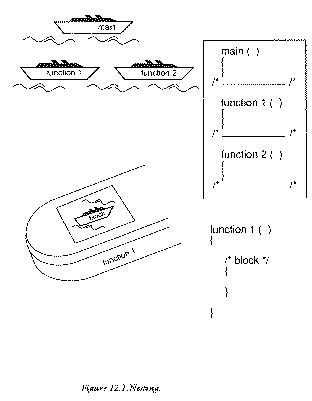
The same rules apply for the toy ships. Variables can reach anywhere inside them but they cannot get out. They cannot escape their block braces {}. Whenever a pair of block braces is written into a program it is possible to make variable declarations inside the opening brace. Like this:
{ int locali;
  char localch;

/* statements */

}
These variables do not exist outside the braces. They are only created when the opening brace is encountered and they are destroyed when the closing brace is executed, or when control jumps out of the block. Because they only work in this local area of a program, they are called local variables. It is a matter of style and efficiency to use local variables when it does not matter whether variables are preserved outside of a particular block, because the system automatically allocates and disposes of them. The programmer does not have to think about this.
Where a variable is and is not defined is called the scope of that variable. It tells a programmer what a variables horizons are!
If functions were sealed capsules and no local variables could ever communicate with other parts of the program, then functions would not be very useful. This is why parameters are allowed. Parameters are a way of handing local variables to other functions without letting them out! Value parameters (see last section) make copies of local variables without actually using them. The copied parameter is then a local variable in another function. In other words, it can't get out of the function to which is it passed ... unless it is passed on as another parameter.
Notice about the example that if there are two variables of the
same name, which are both allowed to be in the same place (c in the
example below) then the more local one wins. That is, the last
variable to be defined takes priority. (Technically adept readers will
realize that this is because it was the last one onto the variable
stack.)
/***************************************************************/
/*                                                             */
/* SCOPE : THE CLLLED CAPSULES                                 */
/*                                                             */
/***************************************************************/

#include <stdio.h>

/***************************************************************/

main ()

{ int a = 1, b = 2, c = 3;

if (a == 1)
   { int c;

   c = a + b;
   printf ("%d",c);
   }

handdown (a,b);
printf ("%d",c);
}

/**************************************************************/

handdown (a,b)                          /* Some function */

int a,b;

{
...
}
Some programmers complain about the use of global variables in a program. One complaint is that it is difficult to see what information is being passed to a function unless all that information is passed as parameters. Sometimes global variables are very useful however, and this problem need not be crippling. A way to make this clear is to write global variables in capital letters only, while writing the rest of the variables in mainly small letters..
int GLOBALINTEGER;

....

{ int local integer;

}
This allows global variables to be spotted easily. Another reason for restricting the use of global variables is that it is easier to debug a program if only local variables are used. The reason is that once a function capsule is tested and sealed it can be guaranteed to work in all cases, provided it is not affected by any other functions from outside. Global variables punch holes in the sealed function capsules because they allow bugs from other functions to creep into tried and tested ones. An alert and careful programmer can usually control this without difficulty.
The following guidelines may help the reader to decide whether to use local or global data:
All the programs in this book, which are longer than a couple of lines, are written in an unusual way: with a levelled structure There are several good reasons for this. One is that the sealed capsules are shown to be sealed, by using a comment bar between each function.
/**************************************/
Another good reason is that any function hands parameters down by only
one level at a time and that any return() statement hands values up a
single level. The global variables are kept to a single place at the
head of each program so that they can be seen to reach into
everything.
The diagram shows how the splitting of levels implies something about the scope of variables and the handing of parameters.
{} )
a "sealed capsule"?
number_of_hats,counter which are GLOBAL and two float variables
called x_coord,y_coord which are LOCAL inside the function
main(). Then add another function called another() and pass
x_coord,y_coord to this function. How many different storage spaces
are used when this program runs? (Hint: are x_coord,y_coord and their
copies the same?)
Making programming versatile.
C is unusual in that it has a pre-processor. This comes from its
Unix origins. As its name might suggest, the preprocessor is a phase
which occurs prior to compilation of a program. The preprocessor has two
main uses: it allows external files, such as header files, to be
included and it allows macros to be defined. This useful feature
traditionally allowed constant values to be defined in Kernighan and
Ritchie C, which had no constants in the language.
Pre-processor commands are distinguished by the hash (number) symbol
#. One example of this has already been encountered for the
standard header file stdio.h.
#include <stdio.h>
is a command which tells the preprocessor
to treat the file stdio.h as if it were the actually part of the
program text, in other words to include it as part of the program to
be compiled.
Macros are words which can be defined to stand in place of something complicated: they are a way of reducing the amount of typing in a program and a way of making long ungainly pieces of code into short words. For example, the simplest use of macros is to give constant values meaningful names: e.g.
#define TELEPHNUM 720663
This allows us to use the word TELEPHNUM in the program
to mean the number 720663. In this particular case, the word is
clearly not any shorter than the number it will replace, but it is
more meaningful and would make a program read more naturally than if
the raw number were used. For instance, a program which deals with
several different fixed numbers like a telephone number, a postcode
and a street number could write:
printf("%d %d %d",TELEPHNUM,postcode,streetnum);
instead of
printf("%d %d %d",720663,345,14);
Using the macros instead makes the actions much clearer and allows the programmer to forget about what the numbers actually are. It also means that a program is easy to alter because to change a telephone number, or whatever, it is only necessary to change the definition, not to retype the number in every single instance.
The important feature of macros is that they are not merely numerical constants which are referenced at compile time, but are strings which are physically replaced before compilation by the preprocessor! This means that almost anything can be defined:
#define SUM 1 + 2 + 3 + 4
would allow SUM to be used instead of 1+2+3+4. Or
#define STRING "Mary had a little lamb..."
would allow a commonly used string to be called by the identifier "string" instead of typing it out afresh each time. The idea of a define statement then is:
#define macroname definition on rest of lineMacros cannot define more than a single line to be substituted into a program but they can be used anywhere, except inside strings. (Anything enclosed in string quotes is assumed to be complete and untouchable by the compiler.) Some macros are defined already in the file
stdio.h such as:
EOF
NULL
A more advanced use of macros is also permitted by the
preprocessor. This involves macros which accept parameters and hand
back values. This works by defining a macro with some dummy parameter,
say x. For example: a macro which is usually defined in one of the
standard libraries is abs() which means the absolute or unsigned value
of a number. It is defined below:
#define ABS(x) ((x) < 0) ? -(x) : (x)
The result of this is to give the positive (or unsigned) part of any
number or variable. This would be no problem for a function which could
accept parameters, and it is, in fact, no problem for macros. Macros can
also be made to take parameters. Consider the ABS() example. If a
programmer were to write ABS(4) then the preprocessor would
substitute 4 for x. If a program read ABS(i) then the
preprocessor would substitute i for x and so on. (There is
no reason why macros can't take more than one parameter too. The
programmer just includes two dummy parameters with different names. See
the example listing below.) Notice that this definition uses a curious
operator which belongs to C:
<test> ? <true result> : <false result>
This is like a compact way of writing an if..then..else
statement, ideal for macros. But it is also slightly different: it is
an expression which returns a value, where as an if..then..else
is a statement with no value.
Firstly the test is made. If the test is
true then the first statement is carried out, otherwise the second is
carried out. As a memory aid, it could be read as:
if <test> then <true result> else <false result>
(Do not be confused by the above statement which is meant to show what a programmer might think. It is not a valid C statement.) C can usually produce much more efficient code for this construction than for a corresponding if-else statement.
It is tempting to forget about the distinction between macros and functions, thinking that it can be ignored. To some extent this is true for absolute beginners, but it is not a good idea to hold on to. It should always be remembered that macros are substituted whole at every place where they are used in a program: this is potentially a very large amount of repetition of code. The advantage of a macro, however, is speed. No time is taken up in passing control over to a new function, because control never leaves the home function when a macro is used: it just makes the function a bit longer. There is a limitation with macros though. Function calls cannot be used as their parameters, such as:
ABS(function())
has no meaning. Only variables or number constants will be substituted. Macros are also severely restricted in complexity by the limitations of the preprocessor. It is simply not viable to copy complicated sequences of code all over programs.
Choosing between functions and macros is a matter of personal judgement. No simple rules can be given. In the end (as with all programming choices) it is experience which counts towards the final ends. Functions are easier to debug than macros, since they allow us to single step through the code. Errors in macros are very hard to find, and can be very confusing.
/************************************************************/
/*                                                          */
/* MACRO DEMONSTRATION                                      */
/*                                                          */
/************************************************************/

#include <stdio.h>

#define STRING1        "A macro definition\n"
#define STRING2        "must be all on one line!!\n"
#define EXPRESSION     1 + 2 + 3 + 4
#define EXPR2          EXPRESSION + 10
#define ABS(x)         ((x) < 0) ? -(x) : (x)
#define MAX(a,b)       (a < b) ? (b) : (a)
#define BIGGEST(a,b,c) (MAX(a,b) < c) ? (c) : (MAX(a,b))

/************************************************************/

   main ()             /* No #definitions inside functions! */

   {
   printf (STRING1);
   printf (STRING2);
   printf ("%d\n",EXPRESSION);
   printf ("%d\n",EXPR2);
   printf ("%d\n",ABS(-5));
   printf ("Biggest of 1 2 and 3 is %d",BIGGEST(1,2,3));
   }
#includeWhen an include statement is written into a program, it is a sign
that a compiler should merge another file of C programming with the
current one. However, the #include statement is itself valid C, so
this means that a file which is included may contain #includes
itself. The includes are then said to be "nested". This often makes
includes simpler.
This section lies somewhat outside the main development of the book. You might
wish to omit it on a first reading.
There are a handful more preprocessor commands which can largely
be ignored by the beginner. They are commonly used in "include" files
to make sure that things are not defined twice.
NOTE : true has any non zero value in C. false is zero.
#undef
#if
#if and #endif if the value following
#if is true, else leave out that code altogether. This is
different from not executing code--the code will not even be
compiled.
#ifdef
#ifndef
#else
#if, #ifdef, #ifndef
preprocessor statement.
#endif
#line
#line constant filename
#error
/***********************************************************/
/* To compile or not to compile                            */
/***********************************************************/

#define SOMEDEFINITION 6546
#define CHOICE  1     /* Choose this before compiling */

/***********************************************************/

#if (CHOICE == 1)

#define OPTIONSTRING "The programmer selected this"
#define DITTO        "instead of ....             "

#else

#define OPTIONSTRING "The alternative"
#define DITTO        "i.e. This! "


#endif

/***********************************************************/

#ifdef SOMEDEFINITION

#define WHATEVER "Something was defined!"

#else

#define WHATEVER "Nothing was defined"

#endif

/************************************************************/

main ()

{
printf (OPTIONSTRING);
printf (DITTO);
}
math.h.
Making maps of data.
You have a map (a plan) of the computer's memory. You need to find that essential piece of information which is stored at some unknown location. How will you find it? You need a pointer!
A pointers is a special type of variable which holds the address or
location of another variable. Pointers point to these locations by
keeping a record of the spot at which they were stored. Pointers to
variables are found by recording the address at which a variable is
stored. It is always possible to find the address of a
piece of storage in C using the special & operator. For instance:
if location were a float type variable, it would be easy to find
a pointer to it called location_ptr.
float location;
float *location_ptr,*address;

location_ptr = &(location);
or
address = &(location);
The declarations of pointers look a little strange at first. The
star * symbol which stands in front of the variable name is C's way of
declaring that variable to be a pointer. The four lines above make two
identical pointers to a floating point variable called location, one
of them is called location_ptr and the other is called address. The
point is that a pointer is just a place to keep a record of the
address of a variable, so they are really the same thing.
A pointer is a bundle of information that has two parts. One part is the address of the beginning of the segment of memory that holds whatever is pointed to. The other part is the type of value that the pointer points to the beginning of. This tells the computer how much of the memory after the beginning to read and how to interpret it. Thus, if the pointer is of a type int, the segment of memory returned will be four bytes long (32 bits) and be interpreted as an integer. In the case of a function, the type is the type of value that the function will return, although the address is the address of the beginning of the function executable.
If, like some modern day programmers, you believe in sanctity of high level languages, it is probably a source of wonder why anyone Would ever want to know the address of these variables. Having gone to the trouble to design a high level language, like C, in which variables can be given elegant and meaningful names: it seems like a step in the backward direction to want to be able to find out the exact number of the memory location at which it is stored! The whole point of variables, after all, is that it is not necessary to know exactly where information is really stored. This is not quite fair though. It is certainly rare indeed when we should want to know the actual number of the memory location at which something is stored. That would really make the idea of a high level language a bit pointless. The idea behind pointers is that a high level programmer can now find out the exact location of a variable without ever having to know the actual number involved. Remember:
A pointer is a variable which holds the address of the storage location for another given variable.
C provides two operators & and * which allow pointers to
be used in many versatile ways.
& and *The & and * operators have already been used once to hand
back values to variable parameters, See Value parameters. They can be
read in a program to have the following meanings:
&
*
Another way of saying the second of these is:
*
This reinforces the idea that pointers reach out an imaginary hand and
point to some location in the memory and it is more usual to speak of
pointers in this way. The two operators * and & are always written in
front of a variable, clinging on, so that they refer, without doubt,
to that one variable. For instance:
&x
x is stored.
*ptr
ptr.
The following example might help to clarify the way in which they are used:
int somevar;                       /* 1 */
int *ptr_to_somevar;               /* 2 */

somevar = 42;                      /* 3 */

ptr_to_somevar = &(somevar);       /* 4 */

printf ("%d",*ptr_to_somevar);     /* 5 */

*ptr_to_somevar = 56;              /* 6 */
The key to these statements is as follows:
int type variable called somevar.
ptr_to_somevar.
The * which stands in front of ptr_to_somevar is the
way C declares ptr_to_somevar as a pointer to an
integer, rather than an integer.
somevar take the value 42.
ptr_to_somevar. The value is the
address of the variable somevar. Notice that only
at this stage does is become a pointer to the particular
variable somevar. Before this, its fate is quite open.
The declaration (2) merely makes it a pointer which can
point to any integer variable which is around.
ptr_to_somevar" in other words somevar itself. So this
will be just 42.
ptr_to_somevar be 56. This is the same as the more
direct statement:
somevar = 56;
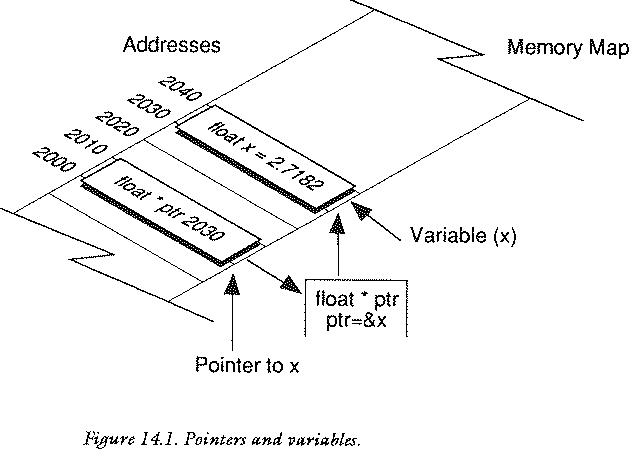
It is possible to have pointers which point to any type of data
whatsoever. They are always declared with the * symbol. Some examples
are given below.
 int i,*ip;

 char ch,*chp;

 short s,*sp;

 float x,*xp;

 double y,*yp;
Pointers are extremely important objects in C. They are far more
important in C than in, say, Pascal or BASIC (PEEK,POKE
are like pointers). In particular they are vital when using data
structures like strings or arrays or linked lists.
We shall meet these objects in later chapters.
One example of the use of pointers is the C input function, which
is called scanf(). It is looked at in detail in the next
section. scanf() is for getting information from the keyboard. It is a
bit like the reverse of printf(), except that it uses pointers to
variables, not variables themselves. For example: to read an integer:
 int i;
 scanf ("%d",&i);
or
 int *i;
 scanf ("%d",i);
The & sign or the * sign is vital. If it is
forgotten, scanf will probably corrupt a program. This is one reason
why this important function has been ignored up to now.
Assembly language programmers might argue that there are
occasions on which it would be nice to know the actual address of a
variable as a number. One reason why one might want to know this would
be for debugging. It is not often a useful thing to do, but it is not
inconceivable that in developing some program a programmer would want
to know the actual address. The & operator is flexible enough to allow
this to be found. It could be printed out as an integer:
 type *ptr:

 printf ("Address = %d",(int) ptr);
Something to be wary of with pointer variables is the way that they are initialized. It is incorrect, logically, to initialize pointers in a declaration. A compiler will probably not prevent this however because there is nothing incorrect about it as far as syntax is concerned.
Think about what happens when the following statement is written. This statement is really talking about two different storage places in the memory:
int *a = 2;
First of all, what is declared is a pointer, so space for a `pointer
to int' is allocated by the program and to start off with that space
will contain garbage (random numbers), because no statement like
a = &someint;
has yet been encountered which would give it a value. It will then
attempt to fill the contents of some variable, pointed to by a, with
the value 2. This is doomed to faliure. a only contains garbage so the
2 could be stored anywhere. There may not even be a variable at the
place in the memory which a points to. Nothing has been said about
that yet. This kind of initialization cannot possibly work and will
most likely crash the program or corrupt some other data.
/**********************************************/
/*                                            */
/* Swapping Pointers                          */
/*                                            */
/**********************************************/

   /* Program swaps the variables which a,b */
   /* point to. Not pointless really !      */

#include <stdio.h>


main ()

{ int *a,*b,*c;               /* Declr ptrs */
  int  A,B;               /* Declare storage */

A = 12;               /* Initialize storage */
B = 9;

a = &A;              /* Initialize pointers */
b = &B;

printf ("%d %d\n",*a,*b);

c = a;                     /* swap pointers */
a = b;
b = c;

printf ("%d %d\n",*a,*b);

}
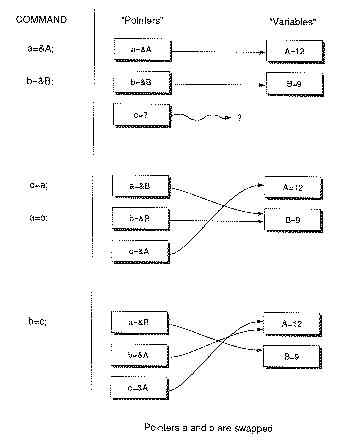
It is tempting but incorrect to think that a pointer to an integer is the same kind of object as a pointer to a floating point object or any other type for that matter. This is not necessarily the case. Compilers distinguish between pointers to different kinds of objects. There are occasions however when it is actually necessary to convert one kind of pointer into another. This might happen with a type of variable called "unions" or even functions which allocate storage for special uses. These objects are met later on in this book. When this situation comes about, the cast operator has to be used to make sure that pointers have compatible types when they are assigned to one another. The cast operator for variables, See The Cast Operator, is written in front of a variable to force it to be a particular type:
(type) variableFor pointers it is:
(type *) pointer
Look at the following statement:
 char *ch;
 int  *i;

 i = (int *) ch;
This copies the value of the pointer ch to the pointer
i. The cast operator makes sure that the pointers are in step and
not talking at cross purposes. The reason that pointers have to be
`cast' into shape is a bit subtle and depends upon particular
computers. In practice it may not actually do anything, but it is a
necessary part of the syntax of C.
Pointer casting is discussed in greater detail in the chapter on Structures and Unions.
This section is somewhat outside of the main development of the book. You might want
to omit it on first reading.
Let's now consider pointers to functions as opposed to variables. This is an advanced feature which should be used with more than a little care. The idea behind pointers to functions is that you can pass a function as a parameter to another function! This seems like a bizarre notion at first but in fact it makes perfect sense.
Pointers to functions enable you to tell any function which sub-ordinate function it should use to do its job. That means that you can plug in a new function in place of an old one just by passing a different parameter value to the function. You do not have to rewrite any code. In machine code circles this is sometimes called indirection or vectoring.
When we come to look at arrays, we'll find that
a pointer to the start of an array can be found by
using the name of the array itself without the square brackets
[]. For functions, the name of the function without the
round brackets works as a pointer to the start of the function,
as long as the compiler understands that the name represents the
function and not a variable with the same name. So--to pass a function
as a parameter to another function you would write
function1(function2);
If you try this as it stands, a stream of compilation errors
will be the result. The reason is that you must declare function2()
explicitly like this:
int function2();
If the function returns a different type then clearly the declaration
will be different but the form will be the same. The declaration can be
placed together with other declarations. It is not important whether
the variable is declared locally or globally, since a function is a
global object regardless. What is important is that we declare
specifically a pointer to a function which returns a type (even
if it is void). The function which accepts a function pointer
as an argument looks like this:
 function1 (a)

 int (*a)();

 { int i;

 i = (*a)(parameters);
 }
This declares the formal parameter a to be a pointer to a
function returning a value of type int. Similarly if you want to
declare a pointer to a function to a general type typename with
the name fnptr, you would do it like this:
typename (*fnptr)();
Given a pointer to a function how do we call the function? The syntax is this:
variable = (*fnptr)(parameters);
An example let us look at a function which takes an integer and returns a character.
 int i;
 char ch, function();
Normally this function is called using the statement:
ch = function(i);
but we can also do the same thing with a pointer to the function. First define
 char function();
 char (*fnptr)();

 fnptr = function;
then call the function with
ch = (*fnptr)(i);A pointer to a function can be used to provide a kind of plug-in interface to a logical device, i.e. a way of choosing the right function for the job.
void printer(),textscreen(),windows();

switch (choice)
   {
   case 1: fnptr = printer;
           break;
   case 2: fnptr = textscreen;
        break;
   case 3: fnptr = windows;
   }

 Output(data,fnptr);
This is the basis of `polymorphism' found in object oriented languages: a choice of a logical (virtual) function based on some abstract label (the choice). The C++ language provides an abstract form of this with a more advanced syntax, but this is the essence of virtual function methods in object oriented languages.
BEWARE! A pointer to a function is an automatic local variable. Local variables are never initialized by the compiler in C. If you inadvertently forget to initialize the pointer to a function, you will come quickly to grief. Make sure that your pointers are assigned before you use them!
double type. (This is not as pointless as it
seems. It is useful in dealing with unions and memory
allocation functions.)
float *number = 2.65; ?
Talking to the user.
Getting information in and out of a computer is the most important thing that a program can do. Without input and output computers would be quite useless.
C treats all its output as though it were reading or writing to
different files. A file is really just an abtraction: a place
where information comes from or can be sent to. Some files can only be
read, some can only be written to, others can be both read from and
written to. In other situations files are called I/O streams.
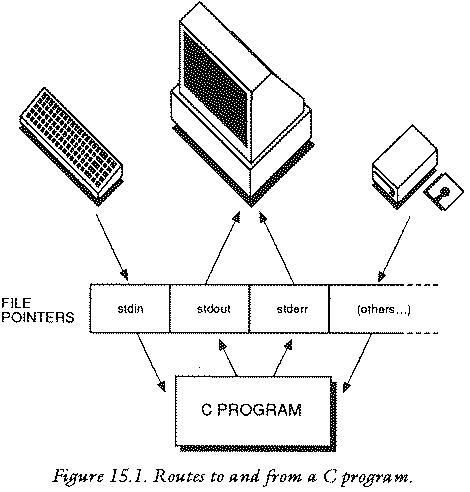
C has three files (also called streams) which are always open and ready for use. They are called stdin, stdout and stderr, meaning standard input and standard output and standard error file. Stdin is the input which usually arrives from the keyboard of a computer. stdout is usually the screen. stderr is the route by which all error messages pass: usually the screen. This is only `usually' because the situation can be altered. In fact what happens is that these files are just handed over to the local operating system to deal with and it chooses what to do with them. Usually this means the keyboard and the screen, but it can also be redirected to a printer or to a disk file or to a modem etc.. depending upon how the user ran the program.
The keyboard and screen are referred to as the standard input/output
files because this is what most people use, most of the time. Also the
programmer never has to open or close these, because C does it
automatically. The C library functions covered by stdio.h
provides some methods for working with stdin and
stdout. They are simplified versions of the functions that can be
used on any kind of file, See Files and Devices. In order of
importance, they are:
 printf ()
 scanf  ()
 getchar()
 putchar()
 gets   ()
 puts   ()
printfThe printf function has been used widely up to now for output
because it provides a neat and easy way of printing text and numbers
to stdout (the screen). Its name is meant to signify formatted printing
because it gives the user control over how text and numerical data are
to be laid out on the screen.
Making text look good on screen is important in programming. C
makes this easy by allowing you to decide how the text will
be printed in the available space. The printf function has general
form:
printf ("string...",variables,numbers)
It contains a string (which is not optional) and it contains any number of parameters to follow: one for each blank field in the string.
The blank fields are control sequences which one can put
into the string to be filled in with numbers or the contents
of variables before the final result is printed out. These fields
are introduced by using a % character, followed by some coded
information, which says something about the size of the blank space
and the type of number or string which will be filled into that
space. Often the string is called the control string because it
contains these control characters.
The simplest use of printf is to just print out a string with no
blank fields to be filled:
 printf ("A pretty ordinary string..");
 printf ("Testing 1,2,3...");
The next simplest case that has been used before now is to print out a single integer number:
 int number = 42;

 printf ("%d",number);
The two can be combined:
 int number = 42;

 printf ("Some number = %d",number);
The result of this last example is to print out the following on the screen:
Some number = 42
The text cursor is left pointing to the character just after the
2. Notice the way that %d is swapped for the number 42. %d
defines a field which is filled in with the value of the variable.
There are other kinds of data than integers though. Any kind of variable
can be printed out with printf. %d is called a conversion
character for integers because it tells the compiler to treat the
variable to be filled into it as an integer. So it better had be an
integer or things will go wrong! Other characters are used for other
kinds of data. Here is a list if the different letters for
printf.
d
u
x
o
s
c
f
e
g
f or e, whichever is shorter
The best way to learn these is to experiment with different conversion characters. The example program and its output below give some impression of how they work:
/*******************************************************/
/*                                                     */
/* printf Conversion Characters and Types              */
/*                                                     */
/*******************************************************/

#include <stdio.h>

main ()

{ int i = -10;
  unsigned int ui = 10;
  float x = 3.56;
  double y = 3.52;
  char ch = 'z';
  char *string_ptr = "any old string";

printf ("signed integer %d\n", i);
printf ("unsigned integer %u\n",ui);

printf ("This is wrong! %u",i);
printf ("See what happens when you get the ");
printf ("character wrong!");

printf ("Hexadecimal %x %x\n",i,ui);
printf ("Octal %o %o\n",i,ui);

printf ("Float and double %f %f\n",x,y);
printf ("      ditto      %e %e\n",x,y);
printf ("      ditto      %g %g\n",x,y);

printf ("single character %c\n",ch);
printf ("whole string -> %s",string_ptr);
}
signed integer -10
unsigned integer 10
This is wrong! 10See what happens when you get the character wrong!Hexadecimal FFFFFFF6 A
Octal 37777777766 12
Float and double 3.560000 3.520000
 ditto      3.560000E+00 3.520000E+00
 ditto      3.560000 3.520000
single character z
whole string -> any old string
printfThe example program above does not produce a very neat layout on the
screen. The conversion specifiers in the printf string can be extended
to give more information. The % and the character type act like
brackets around the extra information. e.g.
%-10.3f
is an extended version of %f, which carries some more
information. That extra information takes the form:
% [-] [fwidth] [.p] X
where the each bracket is used to denote that the item is optional and the symbols inside them stand for the following.
[fwidth]
[-]
[fwidth]. Normally all
numbers are right justified, or aligned with the
right hand margin of the field "box".
[.p]
float or double)
p specifies the number of decimal places after the point which are
to be printed. For a string it specifies how many characters are to be
printed.
Some valid format specifiers are written below here.
%10d %2.2f %25.21s %2.6f
The table below helps to show the effect of changing these format
controls. The width of a field is draw in by using the | bars.
Object to                Control Spec.       Actual Output
be printed

42                       %6d             |   42|
42                       %-6d            |42   |
324                      %10d            |       324|
-1                       %-10d           |-1        |
-1                       %1d             |-1|(overspill)

'z'                      %3c             |  z|
'z'                      %-3c            |z  |

2.71828                  %10f            |   2.71828|
2.71828                  %10.2f          |      2.71|
2.71828                  %-10.2f         |2.71      |
2.71828                  %2.4f           |2.7182|(overspill)
2.718                    %.4f            |2.7180|
2.718                    %10.5f          |   2.71800|

2.71828                  %10e            |2.71828e+00|
2.71828                  %10.2e          |  2.17e+00|
2.71828                  %10.2g          |      2.71|

"printf"                 %s              |printf|
"printf"                 %10s            |    printf|
"printf"                 %2s             |printf|(overspill)
"printf"                 %5.3s           |  pri|
"printf"                 %-5.3s          |pri  |
"printf"                 %.3s            |pri|
/***********************************************/
/*                                             */
/* Multiplication Table                        */
/*                                             */
/***********************************************/

#include <stdio.h>


main ()               /* Printing in columns */

{ int i,j;

for (i = 1; i <= 10; i++)
   {
   for (j = 1; j <= 10; j++)
      {
      printf ("%5d",i * j);
      }
   printf ("\n");
   }
}
    1    2    3    4    5    6    7    8    9   10
    2    4    6    8   10   12   14   16   18   20
    3    6    9   12   15   18   21   24   27   30
    4    8   12   16   20   24   28   32   36   40
    5   10   15   20   25   30   35   40   45   50
    6   12   18   24   30   36   42   48   54   60
    7   14   21   28   35   42   49   56   63   70
    8   16   24   32   40   48   56   64   72   80
    9   18   27   36   45   54   63   72   81   90
   10   20   30   40   50   60   70   80   90  100
Control characters are invisible on the screen. They have special
purposes usually to do with cursor movement. They are written into an
ordinary string by typing a backslash character \ followed by some
other character. These characters are listed below.
\b
\f
\n
\r
\t
\v
\"
\'
\\
\
\ddd
\xddd
6.23e+00
%f or a
floating point number with %c. This is bound to go wrong - but how
will it go wrong?
printf (x);
printf ("%d");
printf ();
printf ("Number = %d");
scanfscanf is the input function which gets formatted input from the
file stdin (the keyboard). This is a very versatile function but it is
also very easy to go wrong with. In fact it is probably the most
difficult to understand of all the C standard library functions.
Remember that C treats its keyboard input as a file. This makes
quite a difference to the way that scanf works. The actual mechanics
of scanf are very similar to those of printf in reverse
scanf ("string...",pointers);
with one important exception: namely that it is not variables which
are listed after the control string, but pointers to variables. Here
are some valid uses of scanf:
int i;
char ch;
float x;

scanf ("%d %c %f", &i, &ch, &x);
Notice the & characters which make the arguments pointers. Also notice
the conversion specifiers which tell scanf what types of data it is
going to read. The other possibility is that a program might already
have pointers to a particular set of variables in that case the & is
not needed. For instance:
function (i,ch,x)

int *i;
char *ch;
float *x;

{
scanf ("%d %c %f", i, ch, x);
}
In this case it would actually be wrong to
write the ampersand & symbol.
The conversion characters for scanf are not identical to those
for printf and it is much more important to be precise and totally
correct with these than it is with printf.
d
ld
x
o
h
f
lf
e
le
c
s
The difference between short integer and long integer can make or break a program. If it is found that a program's input seems to be behaving strangely, check these carefully. (See the section on Errors and Debugging for more about this.)
When scanf is called in a program it checks to see what is
in the input file, that is, it checks to see what the user has typed
in at the keyboard. Keyboard input is usually buffered. This means
that the characters are held in a kind of waiting bay in the memory
until they are read. The buffer can be thought of as a part of the
input file stdin, holding some characters which can be scanned
though. If the buffer has some characters in it, scanf will start to
look through these; if not, it will wait for some characters to be put
into the buffer.
There is an important point here: although scanf will start
scanning through characters as soon as they are in the buffer, the
operating system often sees to it that scanf doesn't get to know
about any of the characters until the user has pressed the RETURN
or ENTER key on the computer or terminal. If the buffer is empty
scanf will wait for some characters to be put into it.
To understand how scanf works, it is useful to think of the input
as coming in `lines'. A line is a bunch of characters ending in a
newline character \n. This can be represented by a box like the one
below:
 --------------------------------------
| some...chars.738/.              |'\n'|
 --------------------------------------
As far as scanf is concerned, the input is entirely made out of
a stream of characters. If the programmer says that an integer is to be expected
by using the %d conversion specifier then scanf will try to make
sense of the characters as an integer. In other words, it will look
for some characters which make up a valid integer, such as a group of
numbers all between 0 and 9. If the user says that floating point type
is expected then it will look for a number which may or may not have a
decimal point in it. If the user just wants a character then any
character will do!
Consider the example which was give above.
int i;
char ch;
float x;

scanf ("%d %c %f", &i, &ch, &x);
Here is a simplified, ideal view of what happens.
scanf looks at the control string and finds that the first
conversion specifier is %d which means an integer. It then tries to
find some characters which fit the description of an integer in the
input file. It skips over any white space characters (spaces,
newlines) which do not constitute a valid integer until it matches
one. Once it has matched the integer and placed its value in the
variable i it carries on and looks at the next conversion specifier
%c which means a character. It takes the next character and places
it in ch. Finally it looks at the last conversion specifier %f
which means a floating point number and finds some characters which
fit the description of a floating point number. It passes the value
onto the variable x and then quits.
This brief account of scanf does not tell the whole story by a
long way. It assumes that all the characters were successfully found
and that everything went smoothly: something which seldom happens in
practice!
What happens if scanf doesn't find an integer or a float type?
The answer is that it will quit at the first item it fails to match,
leaving that character and the rest of the input line still to be read
in the file. At the first character it meets which does not fit in
with the conversion string's interpretation scanf aborts and control
passes to the next C statement. This is why scanf is a `dangerous'
function: because it can quit in the middle of a task and leave a lot
of surplus data around in the input file. These surplus data simply
wait in the input file until the next scanf is brought into operation,
where they can also cause it to quit. It is not safe, therefore, to
use scanf by itself: without some check that it is working
successfully.
scanf is also dangerous for the opposite reason: what
happens if scanf doesn't use up all the characters in the input
line before it satisfies its needs? Again the answer is that it quits
and leaves the extra characters in the input file stdin for the
next scanf to read, exactly where it left off. So if the
program was meant to read data from the input and couldn't, it leaves
a mess for something else to trip over.
scanf can get out of step with its input if the user types
something even slightly out of line. It should be used with
caution...
scanf may be dangerous for sloppy programs which do not check
their input carefully, but it is easily tamed by using it as just a
part of a more sophisticated input routine and sometimes even more
simply with the aid of a very short function which can be incorporated
into any program:
skipgarb()        /* skip garbage corrupting scanf */

{
while (getchar() != '\n')
   {
   }
}
The action of this function is simply to skip to the end of the
input line so that there are no characters left in the input. It
cannot stop scanf from getting out of step before the end of a line
because no function can stop the user from typing in nonsense! So to
get a single integer, for instance, a program could try:
int i;

scanf("%d",&i);
skipgarb();
The programmer must police user-garbage personally by using a loop to the effect of:
while (inputisnonsense)

{
printf ("Get your act together out there!!\n");
scanf (..)
skipgarb();
}
It is usually as well to use skipgarb() every time.
Here are some example programs with example runs to show how
scanf either works or fails.
/****************************************/
/* Example 1                            */
/****************************************/


#include <stdio.h>

main ()

{ int i = 0;
  char ch = '*';
  float x = 0;


scanf ("%d %c %f",&i,&ch,&x);

printf ("%d %c %f\n",i,ch,x);
}
This program just waits for a line from the user and prints out
what it makes of that line. Things to notice about these examples are
the way in which scanf `misunderstands' what the user has typed in and
also the values which the variables had before the scanf function.
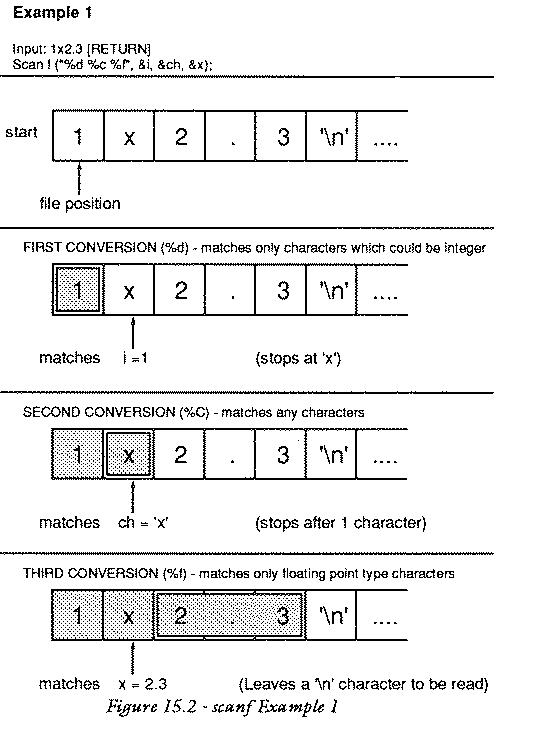
Input : 1x2.3
Output: 1 x 2.300000
The input gets broken up in the following way:
                 ------------------
                | 1 |'x'| 2.3 |'\n'|
                 ------------------
In this example everything works properly. There are no spaces to
confuse matters. it is simple for scanf to see what the first number
is because the next character is x which is not a valid number.
Input : 1 x 2.3
Output: 1   0.000000

                 ------         ------
                |1|' '| <break> |x 2.3|
                 ------         ------
In this example the integer is correctly matched as 1. The character is
now a space and the x is left in the stream. The x does
not match the description of a float value so scanf terminates,
leaving x 2.3 still in the input stream.
Input : .
Output: 0 * 0.000000

                          ---
                         |'.'| <break>
                          ---
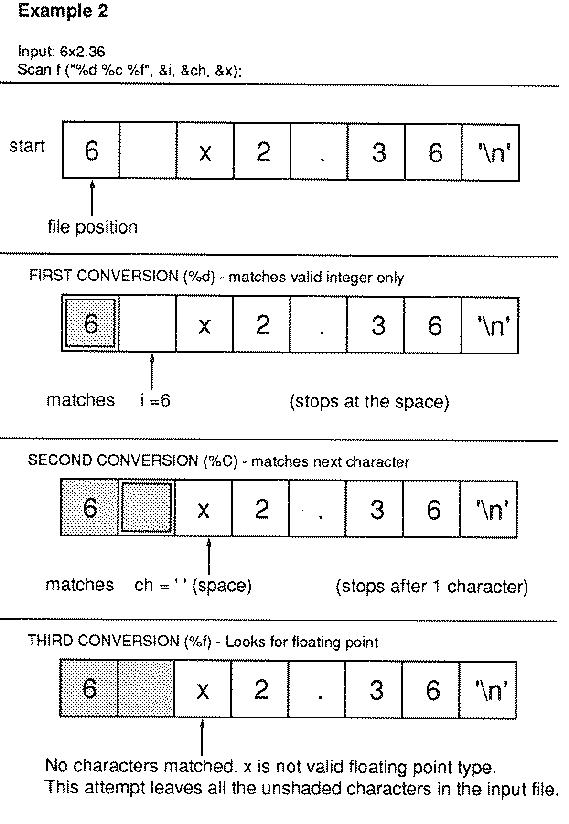
A single full-stop (period). scanf quits straight away because it
looks for an integer. It leaves the whole input line (which is just
the period .) in the input stream.
/****************************************/
/* Example 2                            */
/****************************************/

#include <stdio.h>

main ()

{ int i = 0;
  char ch = '*',ch2,ch3;
  float x = 0;

scanf ("%d %c %f", &i,&ch,&x);
scanf ("%c %c", &ch2,&ch3);
printf ("%d %c %f\n %c %c");
}
The input for this program is:
6 x2.36

and the output is:

6   0.000000
x 2
 ---------           -------------
| 6 | ' ' | <break> |'x'|'2'| .36 |
 ---------           -------------
Here the integer is successfully matched
with 6. The character is matched with a space but the float character
finds an x in the way, so the first scanf aborts leaving
the value of x unchanged and the rest of the characters still
in the file. The second scanf function then picks these up. It can be
seen that the first two characters are the x which caused the previous
scanf to fail and the first 2 of the intended floating point number.
/****************************************/
/* Example 3                            */
/****************************************/

#include <stdio.h>

   main()

   { char ch1,ch2,ch3;

   scanf ("%c %c %c",&ch1,&ch2,&ch3);
   printf ("%c %c %c",ch1,ch2,ch3);
   }
Trials:
input : abc
output: a b c


input : a [return]
   b [return]
   c [return]

output: a b c


input : 2.3
output: 2 . 3
scanf allows input types to be matched but then discarded without
being assigned to any variable. It also allows whole sequences of
characters to be matched and skipped. For example:
scanf ("%*c");
would skip a single character. The * character means do not make an
assignment. Note carefully that the following is wrong:
scanf ("%*c", &ch);
A pointer should not be given for a dummy conversion character. In this
simple case above it probably does not matter, but in a string with
several things to be matched, it would make the conversion characters
out of step with the variables, since scanf does not return a
value from a dummy conversion character. It might seem as though there
would be no sense in writing:
scanf ("%*s %f %c",&x,&ch);
because the whole input file is one long string after all, but this is
not true because, as far as scanf is concerned a string is
terminated by any white space character, so the float type x and the
character ch would receive values provided there were a space or
newline character after any string.
If any non-conversion characters are typed into the string scanf will match and skip over them in the input. For example:
scanf (" Number = %d",&i);
If the input were: Number = 256, scanf would skip over the
Number = . As usual, if the string cannot be matched, scanf
will abort, leaving the remaining characters in the input stream.
/****************************************/
/* Example 4                            */
/****************************************/

#include <stdio.h>

main()

{ float x = 0;
  int i = 0;
  char ch = '*';

scanf("Skipthis! %*f %d %*c",&i);

printf("%f %d %c",x,i,ch);

}
Input : Skipthis! 23
Output: 0.000000 23 *

Input : 26
Output: 0.000000 0 *
In this last case scanf aborted before matching anything.
The general form of the scanf function is:
n = scanf ("string...", pointers);
The value n returned is the number of items matched or the end of
file character EOF, or NULL if the first item did not match. This value
is often discarded. The control string contains a number of conversion
specifiers with the following general form:
%[*][n]X
[*]
[n]
X
Any white space characters in the scanf string are ignored. Any other
characters are matched. The pointers must be pointers to variables of
the correct type and they must match the conversion specifiers in the
order in which they are written.
There are two variations on the conversion specifiers for strings, though it is very likely that many compilers will not support this. Both of the following imply strings:
%[set of characters]
%[^set of characters]
For example, to read the rest of a line of text, up to but not including the end of line, into a string array one would write:
scanf("%[^\n]",stringarray);
stdin.
%c. Only a %c type can contain a
white space character.
scanf always takes pointer arguments. True or false?
getchar and putcharscanf() and printf() are relatively high level functions:
this means that they are versatile and do a lot of hidden work for the
user. C also provides some functions for dealing with input and output
at a lower level: character by character. These functions are called
getchar() and putchar() but, in fact, they might not be
functions: they could be macros instead, See Preprocessor.
                           |
high level:     printf()   |   scanf()
                           |
                /          |         \
                           |
low level: putchar()       |         getchar()
                           |
getchar gets a single character from the input file stdin;
putchar writes a single character to the output file
stdout. getchar returns a character type: the next character on the
input file. For example:
char ch;

ch = getchar();
This places the next character, what ever it might be, into the
variable ch. Notice that no conversion to different data types can be
performed by getchar() because it deals with single characters
only. It is a low level function and does not `know' anything about
data types other than characters.
getchar was used in the function skipgarb()
to tame the scanf()
function. This function was written in a very compact way. Another way
of writing it would be as below:
skipgarb ()    /* skip garbage corrupting scanf */

{ char ch;

ch = getchar();

while (ch != '\n')
   {
   ch = getchar();
   }
}
The != symbol means "is not equal to" and the while statement is a
loop. This function keeps on getchar-ing until it finds the newline
character and then it quits. This function has many uses. One of these
is to copy immediate keypress statements of languages like BASIC,
where a program responds to keys as they are pressed without having to
wait for return to be pressed. Without special library functions to
give this kind of input (which are not universal) it is only possible
to do this with the return key itself. For example:
printf("Press RETURN to continue\n");

skipgarb();
skipgarb() does not receive any
input until the user presses RETURN, and then it simply skips
over it in one go! The effect is that it waits for RETURN to be
pressed.
putchar() writes a character type and also returns a character
type. For example:
char ch = '*';

putchar (ch);
ch = putchar (ch);
These two alternatives have the same effect. The value returned by
putchar() is the character which was written to the output. In other
words it just hands the same value back again. This can simply be
discarded, as in the first line. putchar() is not much use without
loops to repeat it over and over again.
An important point to remember is that putchar() and
getchar() could well be implemented as macros, rather than
functions. This means that it might not be possible to use functions
as parameters inside them:
putchar( function() );
This depends entirely upon the compiler, but it is something to watch out for.
gets and putsTwo functions which are similar to putchar() and getchar()
are puts() and gets() which mean putstring and getstring
respectively. Their purpose is either to read a whole string from the
input file stdin or write a whole string to the output stdout. Strings
are groups or arrays of characters. For instance:
char *string[length];

string = gets(string);
puts(string);
More information about these is given later, See Strings.
putchar(getchar());
What might this do? (Hint: re-read the chapter about the pre-processor.)
putchar() and getchar() are macros.
Thinking in C. Working things out.
An operator is something which takes one or more values and does
something useful with those values to produce a result. It operates on
them. The terminology of operators is the following:
There are lots of operators in C. Some of them may already be familiar:
+ - * / = & ==
Most operators can be thought of as belonging to one of three groups, divided up arbitrarily according to what they do with their operands. These rough groupings are thought of as follows:
+, the
addition operator takes two numbers or two variables
or a number and a variable and adds them together to
give a new number.
The majority of operators fall into the first group. In fact
the second group is a subset of the first, in which the result
of the operation is a boolean value of either true of false.
C has no less than thirty nine different operators. This is more than, say, Pascal and BASIC put together! The operators serve a variety of purposes and they can be used very freely. The object of this chapter is to explain the basics of operators in C. The more abstruse operators are looked at in another chapter.
++ --:
The most common operators in any language are basic arithmetic operators. In C these are the following:
+
-
+
-
*
/
/
%
These operators would not be useful without a partner operator which could attach the values which they produce to variables. Perhaps the most important operator then is the assignment operator:
= assignment operatorThis has been used extensively up to now. For example:
double x,y;

x = 2.356;
y = x;

x = x + 2 + 3/5;
The assignment operator takes the value of whatever is on the right
hand side of the = symbol and puts it into the variable on the left
hand side. As usual there is some standard jargon for this, which is
useful to know because compilers tend to use this when handing out
error messages. The assignment operator can be summarized in the
following way:
lvalue = expression;
This statement says no more than what has been said about assignments
already: namely that it takes something on the right hand side and
attaches it to whatever is on the left hand side of the = symbol. An
expression is simply the name for any string of operators, variables
and numbers. All of the following could be called expressions:
1 + 2 + 3

a + somefunction()

32 * x/3

i % 4

x

1

(22 + 4*(function() + 2))

function ()  /* provided it returns a sensible value */
Lvalues on the other hand are simply names for memory locations: in other words variable names, or identifiers. The name comes from `left values' meaning anything which can legally be written on the left hand side of an assignment.
/**************************************/
/*                                    */
/* Operators Demo # 1                 */
/*                                    */
/**************************************/

#include <stdio.h>

/**************************************/

   main ()

   { int i;

   printf ("Arithmetic Operators\n\n");

   i = 6;
   printf ("i = 6, -i is : %d\n", -i);

   printf ("int 1 + 2 = %d\n", 1 + 2);
   printf ("int 5 - 1 = %d\n", 5 - 1);
   printf ("int 5 * 2 = %d\n", 5 * 2);

   printf ("\n9 div 4 = 2 remainder 1:\n");
   printf ("int 9 / 4 = %d\n", 9 / 4);
   printf ("int 9 % 4 = %d\n", 9 % 4);

   printf ("double 9 / 4 = %f\n", 9.0 / 4.0);
   }
Arithmetic Operators

i = 6, -i is : -6
int 1 + 2 = 3
int 5 - 1 = 4
int 5 * 2 = 10

9 div 4 = 2 remainder 1:
int 9 / 4 = 2
int 9  4 = 1
double 9 / 4 = 2.250000
Parentheses are classed as operators by the compiler, although their position is a bit unclear. They have a value in the sense that they assume the value of whatever expression is inside them. Parentheses are used for forcing a priority over operators. If an expression is written out in an ambiguous way, such as:
a + b / 4 * 2
it is not clear what is meant by this. It could be interpreted in several ways:
((a + b) / 4) * 2
or
(a + b)/ (4 * 2)
or
a + (b/4) * 2
and so on. By using parentheses, any doubt about what the expression means is removed. Parentheses are said to have a higher priority than + * or / because they are evaluated as "sealed capsules" before other operators can act on them. Putting parentheses in may remove the ambiguity of expressions, but it does not alter than fact that
a + b / 4 * 2
is ambiguous. What will happen in this case? The answer is that the C compiler has a convention about the way in which expressions are evaluated: it is called operator precedence. The convention is that some operators are stronger than others and that the stronger ones will always be evaluated first. Otherwise, expressions like the one above are evaluated from left to right: so an expression will be dealt with from left to right unless a strong operator overrides this rule. Use parentheses to be sure. A table of all operators and their priorities is given in the reference section.
++ --,
Previous:Parentheses and Priority,
Up:Assignments Expressions and Operators
Unary operators are operators which have only a single operand: that is, they operate on only one object. For instance:
++ -- + - &
The precedence of unary operators is from right to left so an expression like:
*ptr++;
would do ++ before *.
++ --,
Next:More Special Assignments,
Previous:Unary Operator Precedence,
Up:Assignments Expressions and Operators
++ and --C has some special operators which cut down on the amount of typing involved in a program. This is a subject in which it becomes important to think in C and not in other languages. The simplest of these perhaps are the increment and decrement operators:
++
--
These attach to any variable of integer or floating point type. (character types too, with care.) They are used to simply add or subtract 1 from a variable. Normally, in other languages, this is accomplished by writing:
variable = variable + 1;
In C this would also be quite valid, but there is a much better way of doing this:
variable++; or
++variable;
would do the same thing more neatly. Similarly:
variable = variable - 1;
is equivalent to:
variable--;
or
--variable;
Notice particularly that these two operators can be placed in front or after the name of the variable. In some cases the two are identical, but in the more advanced uses of C operators, which appear later in this book, there is a subtle difference between the two.
++ --,
Up:Assignments Expressions and Operators
Here are some of the nicest operators in C. Like ++ and
-- these are short ways of writing longer expressions. Consider
the statement:
variable = variable + 23;
In C this would be a long winded way of adding 23 to variable. It
could be done more simply using the general increment operator: +=
variable += 23;
This performs exactly the same operation. Similarly one could write:
variable1 = variable1 + variable2;as
variable1 += variable2;
and so on. There is a handful of these
<operation>=
operators: one for each of the major operations which can be performed. There is, naturally, one for subtraction too:
variable = variable - 42;
can be written:
variable -= 42;
More surprisingly, perhaps, the multiplicative assignment:
variable = variable * 2;
may be written:
variable *= 2;
and so on. The main arithmetic operators all follow this pattern:
+=
-=
*=
/=
%=
>>=
<<=
^=
|=
&=
/**************************************/
/*                                    */
/* Operators Demo # 2                 */
/*                                    */
/**************************************/

#include <stdio.h>

/**************************************/

   main ()

   { int i;

   printf ("Assignment Operators\n\n");

   i = 10;                           /* Assignment */
   printf("i = 10 : %d\n",i);

   i++;                              /* i = i + 1 */
   printf ("i++ : %d\n",i);

   i += 5;                           /* i = i + 5 */
   printf ("i += 5 : %d\n",i);

   i--;                              /* i = i = 1 */
   printf ("i-- : %d\n",i);

   i -= 2;                           /* i = i - 2 */
   printf ("i -= 2 : %d\n",i);

   i *= 5;                           /* i = i * 5 */
   printf ("i *= 5 :%d\n",i);

   i /= 2;                           /* i = i / 2 */
   printf ("i /= 2 : %d\n",i);

   i %= 3;                           /* i = i % 3 */
   printf ("i %%= 3 : %d\n",i);
   }
Assignment Operators

i = 10 : 10
i++ : 11
i += 5 : 16
i-- : 15
i -= 2 : 13
i *= 5 :65
i /= 2 : 32
i %= 3 : 2
The cast operator is an operator which forces a particular type mould or type cast onto a value, hence the name. For instance a character type variable could be forced to fit into an integer type box by the statement:
     char ch;
     int i;

     i = (int) ch;
This operator was introduced earlier, See Variables. It will always
produce some value, whatever the conversion: however remotely improbable
it might seem. For instance it is quite possible to convert a character
into a floating point number: the result will be a floating point
representation of its ASCII code!
There is a rule in C that all arithmetic and mathematical
operations must be carried out with long variables: that is, the
types
double
long float

int
long int
If the programmer tries to use other types
like short or float in a mathematical expression they
will be cast into long types automatically by the compiler. This can
cause confusion because the compiler will spot an error in the
following statement:
short i, j = 2;

i = j * 2 + 1;
A compiler will claim that there is a type mismatch between i and the
expression on the right hand side of the assignment. The compiler is
perfectly correct of course, even though it appears to be wrong. The
subtlety is that arithmetic cannot be done in short type variables, so
that the expression is automatically converted into long type or int
type. So the right hand side is int type and the left hand side is
short type: hence there is indeed a type mismatch. The programmer
can get around this by using the cast operator to write:
short i, j = 2;

i = (short) j * 2 + 1;
A similar thing would happen with float:
float x, y = 2.3;

x = y * 2.5;
would also be incorrect for the same reasons as above.
Comparisons and Logic
Six operators in C are for making logical comparisons. The relevance of these operators will quickly become clear in the next chapter, which is about decisions and comparisons. The six operators which compare values are:
==
!=
>
<
>=
<=
These operators belong to the second group according to the scheme above but they do actually result in values so that they could be thought of as being a part of the first group of operators too. The values which they produce are called true and false. As words, "true" and "false" are not defined normally in C, but it is easy to define them as macros and they may well be defined in a library file:
#define TRUE  1
#define FALSE 0
Falsity is assumed to have the value zero in C and truth is represented by any non-zero value. These comparison operators are used for making decisions, but they are themselves operators and expressions can be built up with them.
1 == 1
has the value "true" (which could be anything except zero). The statement:
int i;

i = (1 == 2);
would be false, so i would be false. In other words, i would be zero.
Comparisons are often made in pairs or even in groups and linked together with words like OR and AND. For instance, some test might want to find out whether:
(A is greater than B) AND (A is greater than C)
C does not have words for these operations but gives symbols instead. The logical operators, as they are called, are as follows:
&&
||
!
The statement which was written in words above could be translated as:
(A > B) && (A > C)
The statement:
(A is greater than B) AND (A is not greater than C)
translates to:
(A > B) && !(A > C)
Shakespeare might have been disappointed to learn that, whatever the
value of a variable tobe the result of
thequestion = tobe || !tobe
must always be true. The NOT operator always creates the logical
opposite: !true is false and !false is true. On or the
other of these must be true. thequestion is therefore always
true. Fortunately this is not a matter of life or death!
The highest priority operators are listed first.
 Operator       Operation                       Evaluated.

  ()            parentheses                   left to right
  []            square brackets               left to right

  ++            increment                     right to left
  --            decrement                     right to left
(type)          cast operator                 right to left
  *             the contents of               right to left
  &             the address of                right to left
  -             unary minus                   right to left
  ~             one's complement              right to left
  !             logical NOT                   right to left

  *             multiply                      left to right
  /             divide                        left to right
  %             remainder (MOD)               left to right

  +             add                           left to right
  -             subtract                      left to right

  >>            shift right                   left to right
  <<            shift left                    left to right

  >             is greater than               left to right
  >=            greater than or equal to      left to right
  <=            less than or equal to         left to right
  <             less than                     left to right

  ==            is equal to                   left to right
  !=            is not equal to               left to right

  &             bitwise AND                   left to right
  ^             bitwise exclusive OR          left to right
  |             bitwise inclusive OR          left to right
  &&            logical AND                   left to right
  ||            logical OR                    left to right

  =             assign                        right to left
  +=            add assign                    right to left
  -=            subtract assign               right to left
  *=            multiply assign               right to left
  /=            divide assign                 right to left
  %=            remainder assign              right to left
  >>=           right shift assign            right to left
  <<=           left shift assign             right to left
  &=            AND assign                    right to left
  ^=            exclusive OR assign           right to left
  |=            inclusive OR assign           right to left
Testing and Branching. Making conditions.
Suppose that a fictional traveller, some character in a book like this one, came to the end of a straight, unfinished road and waited there for the author to decide where the road would lead. The author might decide a number of things about this road and its traveller:
We are often faced with this dilemma: a situation in which a decision has to be made. Up to now the simple example programs in this book have not had any choice about the way in which they progressed. They have all followed narrow paths without any choice about which way they were going. This is a very limited way of expressing ideas though: the ability to make decisions and to choose different options is very useful in programming. For instance, one might want to implement the following ideas in different programs:
These choices are actually just the same choices that the traveller had to make on his undecided path, thinly disguised. In the first case there is a simple choice: a do of don't choice. The second case gives two choices: do thing 1 or thing 2. The final choice has several possibilities.
C offers four ways of making decisions like the ones above. They are listed here below. The method which is numbered 2b was encountered in connection with the C preprocessor; its purpose is very similar to 2a.
1:    if (something_is_true)
         {
         /* do something */
         }

2a:   if (something_is_true)
         {
         /* do one thing */
         }
      else
         {
         /* do something else */
         }

2b:   ? (something_is_true) :

         /* do one thing */
      :

         /* do something else */


3:    switch (choice)

         {
         case first_possibility : /* do something */
         case second_possibility : /* do something */

         ....
         }
ifThe first form of the if statement is an all or nothing
choice. if some condition is satisfied, do what is in the braces,
otherwise just skip what is in the braces. Formally, this is written:
if (condition) statement;
or
if (condition)
   {
   compound statement
   }
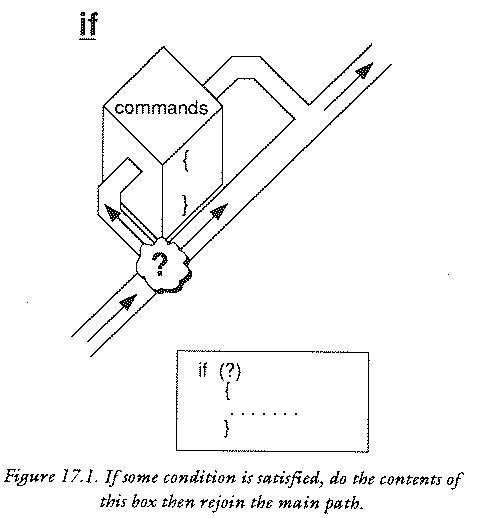
Notice that, as well as a single statement, a whole block of statements can be written under the if statement. In fact, there is an unwritten rule of thumb in C that wherever a single statement will do, a compound statement will do instead. A compound statement is a block of single statements enclosed by curly braces.
A condition is usually some kind of comparison, like the ones discussed
in the previous chapter. It must have a value which is either true or
false (1 or 0) and it must be enclosed by the parentheses ( and
). If the condition has the value `true' then the statement or
compound statement following the condition will be carried out,
otherwise it will be ignored. Some of the following examples help to
show this:
int i;

printf ("Type in an integer");

scanf ("%ld",&i);

if (i == 0)
   {
   printf ("The number was zero");
   }

if (i > 0)
   {
   printf ("The number was positive");
   }

if (i < 0)
   {
   printf ("The number was negative");
   }
The same code could be written more briefly, but perhaps less consistently in the following way:
int i;

printf ("Type in an integer");

scanf ("%ld",&i);

if (i == 0) printf ("The number was zero");
if (i > 0) printf ("The number was positive");
if (i < 0) printf ("The number was negative");
The preference in this book is to include the block braces,
even when they are not strictly required. This does no harm. It is no
more or less efficient, but very often you will find that
some extra statements have to go into those braces, so it is as well
to include them from the start. It also has the appeal that it makes
if statements look the same as all other block statements and it
makes them stand out clearly in the program text. This rule of thumb
is only dropped in very simple examples like:
if (i == 0) i++;
The if statement alone allows only a very limited kind of
decision: it makes do or don't decisions; it could not decide for the
traveller whether to take the left fork or the right fork of his road,
for instance, it could only tell him whether to get up and go at
all. To do much more for programs it needs to be extended. This is the
purpose of the else statement, described after some example
listings..
/*****************************************/
/*                                       */
/* If... #1                              */
/*                                       */
/*****************************************/

#include <stdio.h>

#define TRUE    1
#define FALSE   0

/******************************************/

main ()

{ int i;

if (TRUE)
   {
   printf ("This is always printed");
   }

if (FALSE)
   {
   printf ("This is never printed");
   }
}
/*******************************************/
/*                                         */
/* If demo #2                              */
/*                                         */
/*******************************************/

  /* On board car computer. Works out the */
  /* number of kilometers to the litre    */
  /* that the car is doing at present     */


#include <stdio.h>

/*******************************************/
/* Level 0                                 */
/*******************************************/

main ()

{ double fuel,distance;

FindValues (&fuel,&distance);
Report (fuel,distance);
}

/********************************************/
/* Level 1                                  */
/********************************************/

FindValues (fuel,distance)   /* from car */

   /* These values would be changing in */
   /* a real car, independently of the  */
   /* program.                          */

double *fuel,*distance;

{
/* how much fuel used since last check on values */

printf ("Enter fuel used");
scanf ("%lf",fuel);

/* distance travelled since last check on values */

printf ("Enter distance travelled");
scanf ("%lf",distance);
}

/**********************************************/

Report (fuel,distance)     /* on dashboard */

double fuel,distance;

{ double kpl;

kpl = distance/fuel;

printf ("fuel consumption: %2.1lf",kpl);
printf (" kilometers per litre\n");

if (kpl <= 1)
   {
   printf ("Predict fuel leak or car");
   printf (" needs a service\n");
   }

if (distance > 500)
   {
   printf ("Remember to check tyres\n");
   }

if (fuel > 30)        /* Tank holds 40 l */
   {
   printf ("Fuel getting low: %s left\n",40-fuel);
   }
}
if ... elseThe if .. else statement has the form:
if (condition) statement1; else statement2;
This is most often written in the compound statement form:
if (condition)
   {
   statements
   }
else
   {
   statements
   }
The if..else statement is a two way
branch: it means do one thing or the other. When it is executed, the
condition is evaluated and if it has the value `true' (i.e. not zero)
then statement1 is executed. If the condition is `false' (or
zero) then statement2 is executed. The if..else
construction often saves an unnecessary test from having to be
made. For instance:
int i;

scanf ("%ld",i);

if (i > 0)
   {
   printf ("That number was positive!");
   }
else
   {
   printf ("That number was negative or zero!");
   }
It is not necessary to test whether i was negative in the second
block because it was implied by the if..else structure. That is,
that block would not have been executed unless i were NOT greater
than zero. The weary traveller above might make a decision such as:
if (rightleg > leftleg)
   {
   take_left_branch();
   }
else
   {
   take_right_branch();
   }
ifs and logicConsider the following statements which decide upon the value of
some variable i. Their purposes are exactly the same.
if ((i > 2) && (i < 4))
   {
   printf ("i is three");
   }
or:
if (i > 2)
   {
   if (i < 4)
      {
      printf ("i is three");
      }
   }
Both of these test i for the same information, but they do it in
different ways. The first method might been born out of the following
sequence of thought:
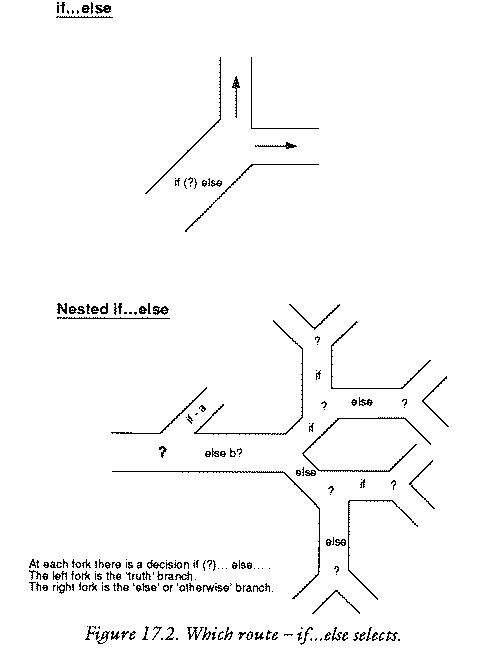
i is greater than 2 and i is less than four, both at
the same time, then i has to be 3.
The second method is more complicated. Think carefully. It says:
i is greater than 2, do what is in the curly braces.
Inside these curly braces i is always greater than 2
because otherwise the program would never have arrived
inside them. Now, if i is also less than 4, then do what is
inside the new curly braces. Inside these curly braces i
is always less than 4. But wait! The whole of the second
test is held inside the "i is greater than 2" braces, which
is a sealed capsule: nothing else can get in, so,
if the program gets into the "i is less than 4" braces
as well, then both facts must be true at the same time.
There is only one integer which is bigger than 2 and less
than 4 at the same time: it is 3. So i is 3.
The aim of this demonstration is to show that there are two ways
of making multiple decisions in C. Using the logical comparison
operators &&, || (AND,OR) and so on.. several multiple
tests can be made. In many cases though it is too difficult to think
in terms of these operators and the sealed capsule idea begins to look
attractive. This is another advantage of using the curly braces: it
helps the programmer to see that if statements and if..else statements
are made up of sealed capsule parts. Once inside a sealed capsule
if (i > 2)
   {
   /* i is greater than 2 in here! */
   }
else
   {
   /* i is not greater than 2 here! */
   }
the programmer can rest assured that nothing illegal can get in. The block braces are like regions of grace: they cannot be penetrated by anything which does not satisfy the right conditions. This is an enourmous weight off the mind! The programmer can sit back and think: I have accepted that i is greater than 2 inside these braces, so I can stop worrying about that now. This is how programmers learn to think in a structured way. They learn to be satisfied that certain things have already been proven and thus save themselves from the onset of madness as the ideas become too complex to think of all in one go.
/***********************************************/
/*                                             */
/* If demo #3                                  */
/*                                             */
/***********************************************/

#include <stdio.h>

/***********************************************/

main ()

{ int persnum,usernum,balance;

persnum = 7462;
balance = -12;

printf ("The Plastic Bank Corporation\n");
printf ("Please enter your personal number :");

usernum = getnumber();

if (usernum == 7462)
   {
   printf ("\nThe current state of your account\n");
   printf ("is %d\n",balance);

   if (balance < 0)
      {
      printf ("The account is overdrawn!\n");
      }
   }
else
   {
   printf ("This is not your account\n");
   }

printf ("Have a splendid day! Thank you.\n");
}

/**************************************************/

getnumber ()     /* get a number from the user */

{ int num = 0;

scanf ("%d",&num);

if ((num > 9999) || (num <= 0))
   {
   printf ("That is not a valid number\n");
   }

return (num);
}
What is the difference between the following programs? They both interpret some imaginary exam result in the same way. They both look identical when compiled and run. Why then are they different?
/**************************************************/
/* Program 1                                      */
/**************************************************/

#include <stdio.h>

main ()

{ int result;

printf("Type in exam result");
scanf ("%d",&result);

if (result < 10)
   {
   printf ("That is poor");
   }

if (result > 20)
   {
   printf ("You have passed.");
   }

if (result > 70)
   {
   printf ("You got an A!");
   }
}

               /* end */
/**************************************************/
/* Program 2                                      */
/**************************************************/

#include <stdio.h>

main ()

{ int result;

printf("Type in exam result");
scanf ("%d",&result);

if (result < 10)
   {
   printf ("That is poor");
   }

else

   {
   if (result > 20)
      {
      printf ("You have passed.");
      }

   else

      {
      if (result > 70)
         {
         printf ("You got an A!");
         }
      }
   }
}
The answer is that the second of these programs can be more efficient.
This because it uses the else form of the if statement
which in turn means that few things have to be calculated. Program one
makes every single test, because the program meets every if statement,
one after the other. The second program does not necessarily do this
however. The nested if statements make sure that the second two
tests are only made if the first one failed. Similarly the third test is
only performed if the first two failed. So the second program could end
up doing a third of the work of the first program, in the best possible
case. Nesting decisions like this can be an efficient way of controlling
long lists of decisions like those above. Nested loops make a program
branch into lots of possible paths, but choosing one path would preclude
others.
switch: integers and charactersThe switch construction is another way of making a program path
branch into lots of different limbs. It can be used as a different way
of writing a string of if .. else statements, but it is more versatile
than that and it only works for integers and character type values. It
works like a kind of multi-way switch. (See the diagram.) The switch
statement has the following form:
switch (int or char expression)
   {
   case constant : statement;
                   break;          /* optional */
   ...
   }
It has an expression which is evaluated
and a number of constant `cases' which are to be chosen from, each of
which is followed by a statement or compound statement. An extra
statement called break can also be incorporated into the block
at any point. break is a reserved word.
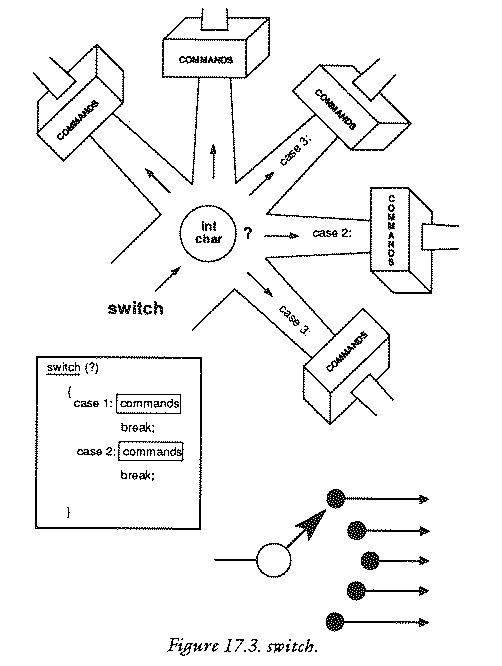
The switch statement can be written more specifically for integers:
switch (integer value)

   {
   case 1:  statement1;
            break;                /* optional line */

   case 2:  statement2;
            break;                /* optional line */

   ....

   default: default statement
            break;                 /* optional line */
   }
When a switch statement is encountered, the expression in the parentheses
is evaluated and the program checks to see whether the result of that
expression matches any of the constants labelled with case. If a
match is made (for instance, if the expression is evaluated to 23 and
there is a statement beginning "case 23 : ...") execution will start
just after that case statement and will carry on until either the
closing brace } is encountered or a break statement is
found. break is a handy way of jumping straight out of the switch
block. One of the cases is called default. Statements which
follow the default case are executed for all cases which are not
specifically listed. switch is a way of choosing some action
from a number of known instances. Look at the following example.
/************************************************/
/*                                              */
/* switch  .. case                              */
/*                                              */
/************************************************/

   /* Morse code program. Enter a number and */
   /* find out what it is in Morse code      */

#include <stdio.h>

#define CODE 0

/*************************************************/

main ()

{ short digit;

printf ("Enter any digit in the range 0..9");

scanf ("%h",&digit);

if ((digit < 0) || (digit > 9))
   {
   printf ("Number was not in range 0..9");
   return (CODE);
   }

printf ("The Morse code of that digit is ");
Morse (digit);
}

/************************************************/

Morse (digit)        /* print out Morse code */

short digit;

{
switch (digit)
   {
   case 0 : printf ("-----");
            break;
   case 1 : printf (".----");
            break;
   case 2 : printf ("..---");
            break;
   case 3 : printf ("...--");
            break;
   case 4 : printf ("....-");
            break;
   case 5 : printf (".....");
            break;
   case 6 : printf ("-....");
            break;
   case 7 : printf ("--...");
            break;
   case 8 : printf ("---..");
            break;
   case 9 : printf ("----.");
   }
}
The program selects one of the printf statements using a switch
construction. At every case in the switch, a break
statement is used. This causes control to jump straight out of the
switch statement to its closing brace }. If break were not
included it would go right on executing the statements to the end,
testing the cases in turn. break this gives a way of jumping out of a
switch quickly.
There might be cases where it is not necessary or not desirable to jump
out of the switch immediately. Think of a function yes() which
gets a character from the user and tests whether it was 'y' or 'Y'.
yes ()         /* A sloppy but simple function */

{
switch (getchar())
   {
   case 'y' :
   case 'Y' : return TRUE
   default  : return FALSE
   }
}
If the character is either 'y' or 'Y' then the function meets the
statement return TRUE. If there had been a break statement after
case 'y' then control would not have been able to reach case 'Y' as
well. The return statement does more than break out of switch, it
breaks out of the whole function, so in this case break was not
required. The default option ensures that whatever else the character
is, the function returns false.
if
(yes()) {...}
.
Controlling repetitive processes. Nesting loops
Decisions can also be used to make up loops. Loops free a program from the straitjacket of doing things only once. They allow the programmer to build a sequence of instructions which can be executed again and again, with some condition deciding when they will stop. There are three kinds of loop in C. They are called:
while
do ... while
for
These three loops offer a great amount of flexibility to programmers and can be used in some surprising ways!
whileThe simplest of the three loops is the while loop. In common language
while has a fairly obvious meaning: the while-loop has a
condition:
while (condition)
   {
   statements;
   }
and the statements in the curly braces are executed while the
condition has the value "true" ( 1 ). There are dialects of English,
however, in which "while" does not have its commonplace meaning, so it
is worthwhile explaining the steps which take place in a while loop.
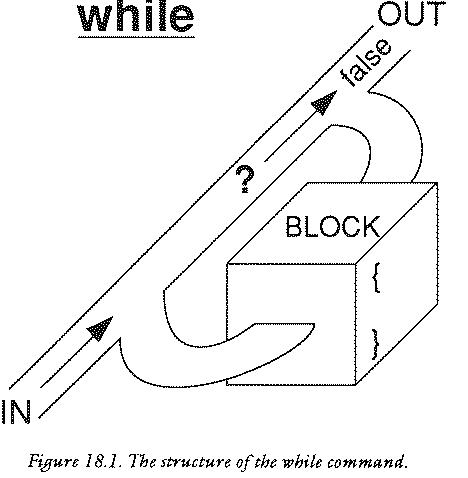
The first important thing about this loop is that has a
conditional expression (something like (a > b) etc...) which is
evaluated every time the loop is executed by the computer. If the
value of the expression is true, then it will carry on with the
instructions in the curly braces. If the expression evaluates to
false (or 0) then the instructions in the braces are ignored and the
entire while loop ends. The computer then moves onto the next
statement in the program.
The second thing to notice about this loop is that the conditional expression comes at the start of the loop: this means that the condition is tested at the start of every `pass', not at the end. The reason that this is important is this: if the condition has the value false before the loop has been executed even once, the statements inside the braces will not get executed at all - not even once.
The best way to illustrate a loop is to give an example of its use. One
example was sneaked into an earlier chapter before its time, in order to
write the skipgarb() function which complemented
scanf(). That was:
skipgarb ()             /* skip garbage corrupting scanf */

{
while (getchar() != '\n')
   {
   }
}
This is a slightly odd use of the while loop which is pure C, through
and through. It is one instance in which the programmer has to start
thinking C and not any other language. Something which is immediately
obvious from listing is that the while loop in skipgarb() is empty: it
contains no statements. This is quite valid: the loop will merely do
nothing a certain number of times... at least it would do nothing if
it were not for the assignment in the conditional expression! It could
also be written:
skipgarb ()             /* skip garbage corrupting scanf */

{
while (getchar() != '\n')
   {
   }
}
The assignment inside the conditional expression makes this loop
special. What happens is the following. When the loop is encountered,
the computer attempts to evaluate the expression inside the
parentheses. There, inside the parentheses, it finds a function call to
getchar(), so it calls getchar() which fetches the next
character from the input. getchar() then takes on the value of
the character which it fetched from the input file. Next the computer
finds the != "is not equal to" symbol and the newline character
\n. This means that there is a comparison to be made. The
computer compares the character fetched by getchar() with the
newline character and if they are `not equal' the expression is true. If
they are equal the expression is false. Now, if the expression is true,
the while statement will loop and start again - and it will evaluate
the expression on every pass of the loop to check whether or not it is
true. When the expression eventually becomes false the loop will
quit. The net result of this subtlety is that skipgarb() skips all
the input characters up to and including the next newline \n
character and that usually means the rest of the input.
Another use of while is to write a better function called
yes(). The idea of this function was introduced in the previous
section. It uses a while loop which is always true to repeat the
process of getting a response from the user. When the response is
either yes or no it quits using the return function to jump right
out of the loop.
/***********************************************/
/*                                             */
/* Give me your answer!                        */
/*                                             */
/***********************************************/

#include <stdio.h>

#define TRUE    1
#define FALSE   0

/*************************************************/
/* Level 0                                       */
/*************************************************/

main ()

{
printf ("Yes or no? (Y/N)\n");

if (yes())
   {
   printf ("YES!");
   }
else
   {
   printf ("NO!");
   }
}

/*************************************************/
/* Level 1                                       */
/*************************************************/


yes ()             /* get response Y/N query */

{ char getkey();

while (true)
   {
   switch (getkey())
      {
      case 'y' : case 'Y' : return (TRUE);
      case 'n' : case 'N' : return (FALSE);
      }
   }
}

/*************************************************/
/* Toolkit                                       */
/*************************************************/

char getkey ()    /* get a character + RETURN */

{ char ch;

ch = getchar();
skipgarb();
}

/**************************************************/

skipgarb ()

{
while (getchar() != '\n')
   {
   }
}

               /* end */
This example listing prompts the user to type in a line of text and it counts all the spaces in that line. It quits when there is no more input left and printf out the number of spaces.
/***********************************************/
/*                                             */
/* while loop                                  */
/*                                             */
/***********************************************/

 /* count all the spaces in an line of input */


#include <stdio.h>

main ()

{ char ch;
   short count = 0;

printf ("Type in a line of text\n");

while ((ch = getchar()) != '\n')
   {
   if (ch == ' ')
      {
      count++;
      }
   }

printf ("Number of space = %d\n",count);
}
do..whileThe do..while
loop resembles most closely the repeat..until loops
of Pascal and BASIC except that it is the `logical opposite'. The
do loop has the form:
do
   {
   statements;
   }

while (condition)
Notice that the condition is at the end of this loop. This means that a
do..while loop will always be executed at least once, before the
test is made to determine whether it should continue. This is the only
difference between while and do..while.
A do..while loop is like the "repeat .. until" of other languages
in the following sense: if the condition is NOTed using the !
operator, then the two are identical.
repeat                   do

                   ==

until(condition)            while (!condition)
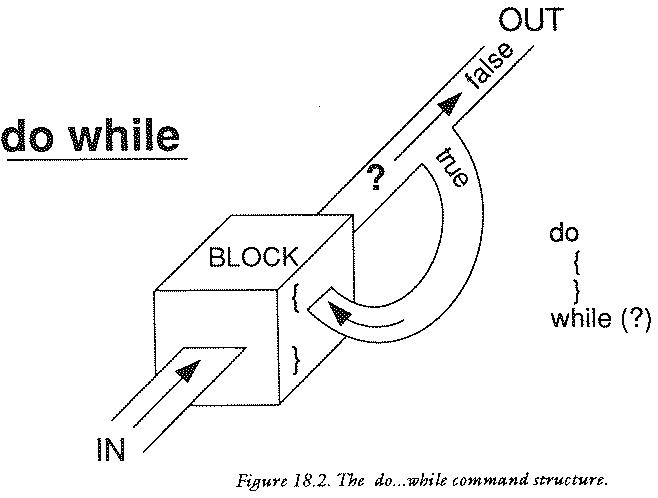
This fact might be useful for programmers who have not yet learned to think in C!
Here is an example of the use of a do..while loop. This program
gets a line of input from the user and checks whether it contains a
string marked out with "" quote marks. If a string is found, the
program prints out the contents of the string only. A typical input line
might be:
Onceupon a time "Here we go round the..."what a terrible..
The output would then be:
Here we go round the...
If the string has only one quote mark then the error message `string was not closed before end of line' will be printed.
/**********************************************/
/*                                            */
/* do .. while demo                           */
/*                                            */
/**********************************************/

   /* print a string enclosed by quotes " " */
   /* gets input from stdin i.e. keyboard   */
   /* skips anything outside the quotes     */


#include <stdio.h>

/*************************************************/
/* Level 0                                       */
/*************************************************/

main ()

{ char ch,skipstring();

do
   {
   if ((ch = getchar()) == '"')
      {
      printf ("The string was:\n");
      ch = skipstring();
      }
   }

while (ch != '\n')
   {
   }
}

/*************************************************/
/* Level 1                                       */
/*************************************************/

char skipstring () /* skip a string "..." */

{ char ch;

do
   {
   ch = getchar();
   putchar(ch);

   if (ch == '\n')
      {
      printf ("\nString was not closed ");
      printf ("before end of line\n");
      break;
      }
   }

while (ch != '"')
   {
   }

return (ch);
}
forThe most interesting and also the most difficult of all the loops
is the for loop. The name for is a hangover from earlier days and
other languages. It is not altogether appropriate for C's version of
for. The name comes from the typical description of a classic for
loop:
value3, repeat the
following sequence of commands....
In BASIC this looks like:
FOR variable = value1 TO value2 STEP value3

NEXT variable
The C for loop is much more versatile than its BASIC counterpart;
it is actually based upon the while construction. A for loop
normally has the characteristic feature of controlling one particular
variable, called the control variable. That variable is somehow
associated with the loop. For example it might be a variable which is
used to count "for values from 0 to 10" or whatever.
The form of the for loop is:
for (statement1; condition; statement2)
   {
   }
For normal usage, these expressions have the following significance.
i = 0;
i < 20;
i++ or i *= 20 or i /= 2.3 ...
Compare a C for loop to the BASIC for loop. Here is an example in which the loop counts from 0 to 10 in steps of 0.5:
FOR X = 0 TO 10 STEP 0.5

NEXT X


for (x = 0; x <= 10; x += 0.5)
   {
   }
The C translation looks peculiar in comparison because it works
on a subtly different principle. It does not contain information about
when it will stop, as the BASIC one does, instead it contains
information about when it should be looping. The result is that a C
for loop often has the <= symbol in it.
The for loop has plenty of uses. It could be used to find the sum
of the first n natural numbers very simply:
sum = 0;

for (i = 0; i <= n; i++)
   {
   sum += i;
   }
It generally finds itself useful in applications where a single
variable has to be controlled in a well determined way.
g4
This example program prints out all the primes numbers between 1
and the macro value maxint. Prime numbers are numbers which cannot
be divided by any number except 1 without leaving a remainder.
/************************************************/
/*                                              */
/* Prime Number Generator #1                    */
/*                                              */
/************************************************/

   /* Check for prime number by raw number */
   /* crunching. Try dividing all numbers  */
   /* up to half the size of a given i, if */
   /* remainder == 0 then not prime!       */

#include <stdio.h>

#define MAXINT  500
#define TRUE      1
#define FALSE     0

/*************************************************/
/* Level 0                                       */
/*************************************************/

main ()

{ int i;

for (i = 2; i <= MAXINT; i++)
   {
   if (prime(i))
      {
      printf ("%5d",i);
      }
   }
}

/*************************************************/
/* Level 1                                       */
/*************************************************/

prime (i)         /* check for a prime number */

int i;

{ int j;

for (j = 2; j <= i/2; j++)
   {
   if (i % j == 0)
      {
      return FALSE;
      }
   }

return TRUE;
}
The word `statement' was chosen carefully, above, to describe what goes into a for loop. Look at the loop again:
for (statement1; condition; statement2)
   {
   }
Statement really means what it says. C will accept any statement in the place of those above, including the empty statement. The while loop could be written as a for loop!
for (; condition; )    /* while ?? */
   {
   }
Here there are two empty statements, which are just wasted. This flexibility can be put to better uses though. Consider the following loop:
for (x = 2; x <= 1000; x = x * x)
   {
     ....
   }
This loop begins from 2 and each time the statements in the braces are
executed x squares itself! Another odd looking loop is the following
one:
for (ch = '*'; ch != '\n'; ch = getchar())
   {
   }
This could be used to make yet another different kind of skipgarb()
function. The loop starts off by initializing ch with a star
character. It checks that ch != '\n' (which it isn't, first time
around) and proceeds with the loop. On each new pass, ch is reassigned
by calling the function getchar().
It is also possible to combine several incremental commands in a loop:
for (i = 0, j=10; i < j; i++, j--)
   {
   printf("i = %d, j= %d\n",i,j);
   }
Statement2 can be any statement at all which the programmer would like to be executed on every pass of the loop. Why not put that statement in the curly braces? In most cases that would be the best thing to do, but in special instances it might keep a program tidier or more readable to put it in a for loop instead. There is no good rule for when to do this, except to say: make you code as clear as possible.
It is not only the statements which are flexible. An unnerving feature of the for construction (according to some programmers) is that even the conditional expression in the for loop can be altered by the program from within the loop itself if is written as a variable.
int i, number = 20;

for (i = 0; i <= number; i++)
   {
   if (i == 9)
      {
      number = 30;
      }
   }
This is so nerve shattering that many languages forbid it outright. To be sure, is not often a very good idea to use this facility, but in the right hands, it is a powerful one to have around.
C provides a simple way of
jumping out of any of the three loops above at any stage, whether it
has finished or not. The statement which performs this action is the
same statement which was used to jump out of switch statements in
last section.
break;
If this statement is encountered a loop will quit where it stands. For
instance, an expensive way of assigning i to be 12 would be:
for (i = 1; i <= 20; i++)
   {
   if (i == 12)
      {
      break;
      }
   }
Still another way of making skipgarb() would be to perform the
following loop:
while (TRUE)
   {
   ch = getchar();
   if (ch == '\n')
      {
      break;
      }
   }
Of course, another way to do this would be to use the return()
statement, which jumps right out of a whole function. break only
jumps out of the loop, so it is less drastic.
As well as wanting to quit a loop, a programmer might want to hurry a loop on to the next pass: perhaps to avoid executing a lot of irrelevant statements, for instance. C gives a statement for this too, called:
continue;
When a continue statement is encountered, a loop will stop whatever it
is doing and will go straight to the start of the next loop pass. This
might be useful to avoid dividing by zero in a program:
for (i = -10; i <= 10; i++)
   {
   if (i == 0)
      {
      continue;
      }
   printf ("%d", 20/i);
   }
Like decisions, loops will also nest: that is, loops can be
placed inside other loops. Although this feature will work with any
loop at all, it is most commonly used with the for loop, because this
is easiest to control. The idea of nested loops is important for
multi-dimensional arrays which are examined in the next section. A
for loop controls the number of times that a particular set of
statements will be carried out. Another outer loop could be used
to control the number of times that a whole loop is carried out. To
see the benefit of nesting loops, the example below shows how a square
could be printed out using two printf statements and two loops.
/*****************************************/
/*                                       */
/* A "Square"                            */
/*                                       */
/*****************************************/

#include <stdio.h>

#define SIZE  10

/*****************************************/

main ()

{ int i,j;

for (i = 1; i <= SIZE; i++)
   {
   for (j = 1; j <= SIZE; j++)
      {
      printf("*");
      }
   printf ("\n");
   }
}
The output of this program is a "kind of" square:
**********
**********
**********
**********
**********
**********
**********
**********
**********
**********
Rows and tables of storage.
Arrays are a convenient way of grouping a lot of variables under
a single variable name. Arrays are like pigeon holes or chessboards,
with each compartment or square acting as a storage place; they can be
one dimensional, two dimensional or more dimensional!
An array is defined using square brackets []. For example: an
array of three integers called "triplet" would be declared like this:
int triplet[3];
Notice that there is no space between the square bracket [ and the
name of the array. This statement would cause space for three integers
type variables to be created in memory next to each other as in the
diagram below.
                 ------------------------------------
int triplet:    |           |           |            |
                 ------------------------------------
The number in the square brackets of the declaration is referred to as the `index' (plural: indicies) or `subscript' of the array and it must be an integer number between 0 and (in this case) 2. The three integers are called elements of the array and they are referred to in a program by writing:
triplet[0]
triplet[1]
triplet[2]
Note that the indicies start at zero and run up to one less than the number which is placed in the declaration (which is called the dimension of the array.) The reason for this will become clear later. Also notice that every element in an array is of the same type as every other. It is not (at this stage) possible to have arrays which contain many different data types. When arrays are declared inside a function, storage is allocated for them, but that storage space is not initialized: that is, the memory space contains garbage (random values). It is usually necessary, therefore, to initialize the array before the program truly begins, to prepare it for use. This usually means that all the elements in the array will be set to zero.
Arrays are most useful when they have a large number of elements: that is, in cases where it would be completely impractical to have a different name for every storage space in the memory. It is then highly beneficial to move over to arrays for storing information for two reasons:
The first of these reasons is probably the most important one, as far as C is concerned, since information can be stored in other ways with equally simple initialization facilities in C. One example of the use of an array might be in taking a census of the types of car passing on a road. By defining macros for the names of the different cars, they could easily be linked to the elements in an array.
Type      Array Element

car            0
auto           1
bil            2
The array could then be used to store the number of cars of a given type which had driven past. e.g.
/***********************************************/
/*                                             */
/* Census                                      */
/*                                             */
/***********************************************/

#include <stdio.h>

#define NOTFINISHED 1
#define CAR         0
#define AUTO        1
#define BIL         2

/************************************************/

main ()

{ int type[3];
   int index;

for (index = 0; index < 3; index++)
   {
   type[index] = 0;
   }

while (NOTFINISHED)
   {
   printf ("Enter type number 0,1, or 2");
   scanf ("%d", &index);
   skipgarb();

   type[index] += 1;       /* See text below */
   }
}
This program, first of all, initializes the elements of the array to be zero. It then enters a loop which repeatedly fetches a number from the user and increases the value stored in the array element, labelled by that number, by 1. The effect is to count the cars as they go past. This program is actually not a very good program for two reasons in particular:
C does not do much hand holding. It is invariably up to the programmer to make sure that programs are free from errors. This is especially true with arrays. C does not complain if you try to write to elements of an array which do not exist! For example:
char array[5];
is an array with 5 elements. If you wrote:
array[7] = '*';C would happily try to write the character
* at the location which
would have corresponded to the seventh element, had it been declared
that way. Unfortunately this would probably be memory taken up by some
other variable or perhaps even by the operating system. The result
would be either:
The second of these tends to be the result on operating systems with proper memory protection. Writing over the bounds of an array is a common source of error. Remember that the array limits run from zero to the size of the array minus one.
Arrays have a natural partner in programs: the for loop. The for loop
provides a simple way of counting through the numbers of an index in a
controlled way. Consider a one dimensional array called array. A for
loop can be used to initialize the array, so that all its elements
contain zero:
#define SIZE  10;

main ()

{ int i, array[SIZE];

for (i = 0; i < SIZE; i++)
   {
   array[i] = 0;
   }
}
It could equally well be used to fill the array with different values. Consider:
#define SIZE  10;

main ()

{ int i, array[size];

for (i = 0; i < size; i++)
   {
   array[i] = i;
   }
}
This fills each successive space with the number of its index:
index        0   1   2   3   4   5   6   7   8   9

            ---------------------------------------
element    | 0 | 1 | 2 | 3 | 4 | 5 | 6 | 7 | 8 | 9 |
contents    ---------------------------------------
The for loop can be used to work on an array sequentially at any time
during a program, not only when it is being initialized. The example
listing below shows an example of how this might work for a one
dimensional array, called an Eratosthenes sieve. This sieve is an
array which is used for weeding out prime numbers, that is: numbers
which cannot be divided by any number except 1 without leaving a
remainder or a fraction. It works by filling an array with numbers
from 0 to some maximum value in the same way that was shown above and
then by going through the numbers in turn and deleting (setting equal
to zero) every multiple of every number from the array. This
eliminates all the numbers which could be divided by something exactly
and leaves only the prime numbers at the end. Try to follow the
listing below.
/******************************************************/
/*                                                    */
/* Prime Number Sieve                                 */
/*                                                    */
/******************************************************/

#include <stdio.h>

#define SIZE     5000
#define DELETED     0

/*******************************************************/
/* Level 0                                             */
/*******************************************************/

main ()

{ short sieve[SIZE];

printf ("Eratosthenes Sieve \n\n");

FillSeive(sieve);
SortPrimes(sieve);
PrintPrimes(sieve);
}

/*********************************************************/
/* Level 1                                               */
/*********************************************************/

FillSeive (sieve)               /* Fill with integers */

short sieve[SIZE];

{ short i;

for (i = 2; i < SIZE; i++)
   {
   sieve[i] = i;
   }
}

/**********************************************************/

SortPrimes (sieve)                /* Delete non primes */

short sieve[SIZE];

{ short i;

for (i = 2; i < SIZE; i++)
   {
   if (sieve[i] == DELETED)
      {
      continue;
      }
   DeleteMultiplesOf(i,sieve);
   }
}

/***********************************************************/

PrintPrimes (sieve)                  /* Print out array */

short sieve[SIZE];

{ short i;

for (i = 2; i < SIZE; i++)
   {
   if (sieve[i] == DELETED)
      {
      continue;
      }
   else
      {
      printf ("%5d",sieve[i]);
      }
   }
}

/***********************************************************/
/* Level 2                                                 */
/***********************************************************/

DeleteMultiplesOf (i,sieve)   /* Delete.. of an integer */

short i,sieve[SIZE];

{ short j, mult = 2;

for (j = i*2; j < SIZE; j = i * (mult++))
   {
   sieve[j] = DELETED;
   }
}

                      /* end */
There is no limit, in principle, to the number of indicies which an array can have. (Though there is a limit to the amount of memory available for their storage.) An array of two dimensions could be declared as follows:
float numbers[SIZE][SIZE];
SIZE is some constant. (The sizes of the two dimensions do not
have to be the same.) This is called a two dimensional array because
it has two indicies, or two labels in square brackets. It has (SIZE *
SIZE) or size-squared elements in it, which form an imaginary grid,
like a chess board, in which every square is a variable or storage
area.
------------------------------------
| 0 | 1 | 2 | 3 | 4 | 5 | 6 | 7 | 8 | ... (up to SIZE)
------------------------------------
| 1 |   |   |   |   |   |   |   |   |
------------------------------------
| 2 |   |   |   |   |   |   |   |   |
------------------------------------
| 3 |   |   |   |   |   |   |   |   |
------------------------------------
| 4 |   |   |   |   |   |   |   |   |
------------------------------------
| 5 |   |   |   |   |   |   |   |   |
------------------------------------
| 6 |   |   |   |   |   |   |   |   |
------------------------------------
| 7 |   |   |   |   |   |   |   |   |
------------------------------------
  .
  .
(up to SIZE)
Every element in this grid needs two indicies to pin-point it. The elements are accessed by giving the coordinates of the element in the grid. For instance to set the element 2,3 to the value 12, one would write:
array[2][3] = 12;
The usual terminology for the two indicies is that the first gives the row number in the grid and that the second gives the column number in the grid. (Rows go along, columns hold up the ceiling.) An array cannot be stored in the memory as a grid: computer memory is a one dimensional thing. Arrays are therefore stored in rows. The following array:
------------
| 1 | 2 | 3 |
------------
| 4 | 5 | 6 |
------------
| 7 | 8 | 9 |
------------
would be stored:
------------------------------------
| 1 | 2 | 3 | 4 | 5 | 6 | 7 | 8 | 9 |
------------------------------------
*  ROW # 1  *  ROW # 2  *  ROW #3   *
Another way of saying that arrays are stored row-wise is to say that the second index varies fastest, because a two-dimensional array is always thought of as...
array[row][column]
so for every row stored, there will be lots of columns inside that
row. That means the column index goes from 0..SIZE inside every row,
so it is changing faster as the line of storage is followed.
A three dimensional array, like a cube or a cuboid, could also be defined in the same kind of way:
double cube[SIZE][SIZE][SIZE];
or with different limits on each dimension:
short notcubic[2][6][8];
Three dimensional arrays are stored according to the same pattern as two dimensional arrays. They are kept in computer memory as a linear sequence of variable stores and the last index is always the one which varies fastest.
Arrays of more than one dimension are usually handled by nested for loops. A two dimensional array might be initialized in the following way:
main ()

{ int i,j;
  float array[SIZE1][SIZE2];

for (i = 0; i < SIZE1; i++)
   {
   for (j = 0; j < SIZE2; j++)
      {
      array[i][j] = 0;
      }
   }
}
In three dimensions, three nested loops would be needed:
main ()

{ int i,j,k;
  float array[SIZE1][SIZE2][SIZE3];

for (i = 0; i < SIZE1; i++)
   {
   for (j = 0; j < SIZE2; j++)
      {
      for (k = 0; k < SIZE3; k++)
         {
         array[i][j][k] = 0;
         }
      }
   }
}
An example program helps to show how this happens in practice. The
example below demonstrates the so-called "Game of Life". The aim is to
mimic something like cell reproduction by applying some rigid rules to a
pattern of dots . and stars *. A dot is a place where
there is no life (as we know it!) and a star is a place in which there
is a living thing. The rules will be clear from the listing. Things to
notice are the way the program traverses the arrays and the way in which
it checks that it is not overstepping the boundaries of the arrays.
/*********************************************************/
/*                                                       */
/* Game of Life                                          */
/*                                                       */
/*********************************************************/

   /* Based upon an article from Scientific American */
   /* in 1970. Simulates the reproduction of cells   */
   /* which depend on one another. The rules are     */
   /* that cells will only survive if they have a    */
   /* certain number of neighbours to support them   */
   /* but not too many, or there won't be enough     */
   /* food!                                          */

#include <stdio.h>

#define SIZE          20
#define MAXNUM        15
#define INBOUNDS      (a>=0)&&(a<SIZE)&&(b>=0)&&(b<SIZE)
#define NORESPONSE     1

/*********************************************************/
/* Level 0                                               */
/*********************************************************/

main ()

{ int count[SIZE][SIZE];
  char array[SIZE][SIZE];
  int generation = 0;

printf ("Game of Life\n\n\n");
InitializeArray(array);

while (NORESPONSE)
   {
   CountNeighbours(array,count);
   BuildNextGeneration(array,count);
   UpdateDisplay(array,++generation);

   printf ("\n\nQ for quit. RETURN to continue.\n");
   if(quit()) break;
   }
}

/**********************************************************/
/* Level 1                                                */
/**********************************************************/

InitializeArray (array)     /* Get starting conditions */

char array[SIZE][SIZE];

{ int i,j;
  char ch;

printf ("\nEnter starting setup. Type '.' for empty");
printf ("\nand any other character for occupied.\n");
printf ("RETURN after each line.\n\n");
printf ("Array size guide:\n\n");

for (i=0; i++ < SIZE; printf("%c",'^'));
printf ("\n\n");

for (i = 0; i < SIZE; i++)
   {
   for (j = 0; j < SIZE; j++)
      {
      scanf ("%c",&ch);
      if (ch == '.')
         {
         array[i][j] = '.';
         }
      else
         {
         array[i][j] = '*';
         }
      }
   skipgarb();
   }

printf ("\n\nInput is complete. Press RETURN.");
skipgarb();
}

/********************************************************/

CountNeighbours (array,count) /* count all neighbours */

char array[SIZE][SIZE];
int count[SIZE][SIZE];

{ int i,j;

for (i = 0; i < SIZE; i++)
   {
   for (j = 0; j < SIZE; j++)
      {
      count[i][j] = numalive(array,i,j);
      }
   }
}

/*******************************************************/

BuildNextGeneration (array,count)

/* A cell will survive if it has two or three  */
/* neighbours. New life will be born to a dead */
/* cell if there are exactly three neighbours  */

char array[SIZE][SIZE];
int count[SIZE][SIZE];

{ int i,j;

for (i = 0; i < SIZE; i++)
   {
   for (j = 0; j < SIZE; j++)
      {
      if (array[i][j] == '*')
         {
         switch (count[i][j])
            {
            case 2 :
            case 3 : continue;

            default: array[i][j] = '.';
                     break;
            }
         }
      else
         {
         switch (count[i][j])
            {
            case 3 : array[i][j] = '*';
                     break;
            default: continue;
            }
         }
      }
   }
}

/*******************************************************/

UpdateDisplay (array,g)     /* print out life array */

char array[SIZE][SIZE];
int g;

{ int i,j;

printf ("\n\nGeneration %d\n\n",g);

for (i = 0; i < SIZE; i++)
   {
   for (j = 0; j < SIZE; j++)
      {
      printf("%c",array[i][j]);
      }
   printf("\n");
   }
}

/*******************************************************/
/* Level 2                                             */
/*******************************************************/

numalive (array,i,j)

/* Don't count array[i,j] : only its neighbours */
/* Also check that haven't reached the boundary */
/* of the array                                 */

char array[SIZE][SIZE];
int i,j;

{ int a,b,census;

census = 0;

for (a = (i-1); (a <= (i+1)); a++)
   {
   for (b = (j-1); (b <= (j+1)); b++)
      {
      if (INBOUNDS && (array[a][b] == '*'))
         {
         census++;
         }
      }
   }

if (array[i][j] == '*') census--;

return (census);
}

/********************************************************/
/* Toolkit input                                        */
/********************************************************/

quit()

{ char ch;

while (NORESPONSE)
   {
   scanf ("%c",&ch);
   if (ch != '\n') skipgarb();
   switch (ch)
      {
      case 'q' : case 'Q' : return (1);
      default  :            return (0);
      }
   }
}

/********************************************************/

skipgarb ()

{
while (getchar() != '\n')
   {
   }
}
 Game of Life


 Enter starting setup. Type '.' for empty
 and any other character for occupied.
 RETURN after each line.

 Array SIZE guide:

 ^^^^^^^^^^^^^^^^^^^^
 (user types in:             (It doesn't matter if the input
 ....................         spills over the SIZE guide,
 ....................         because "skipgarb()" discards it.)
 .....................
 .....................
 .....................
 ..........***........
 ...........*.........
 ......................
 .....................
 .....................
 .....................
 *********************
 .....................
 ......................
 ....................
 .....................
 ......................
 ......................
 ......................
 ...................... )


 Input is complete. Press RETURN.

 Generation 1

 ....................
 ....................
 ....................
 ....................
 ...........*........
 ..........***.......
 ..........***.......
 ....................
 ....................
 ....................
 .******************.
 .******************.
 .******************.
 ....................
 ....................
 ....................
 ....................
 ....................
 ....................
 ....................


 Q for quit. RETURN to continue.


 Generation 2

 ....................
 ....................
 ....................
 ....................
 ..........***.......
 ....................
 ..........*.*.......
 ...........*........
 ....................
 ..****************..
 .*................*.
 *..................*
 .*................*.
 ..****************..
 ....................
 ....................
 ....................
 ....................
 ....................
 ....................


 Q for quit. RETURN to continue.


 Generation 3

 ....................
 ....................
 ....................
 ...........*........
 ...........*........
 ..........*.*.......
 ...........*........
 ...........*........
 ...*******...****...
 ..****************..
 .******************.
 **................**
 .******************.
 ..****************..
 ...**************...
 ....................
 ....................
 ....................
 ....................
 ....................


 Q for quit. RETURN to continue.


 Generation 4

 ....................
 ....................
 ....................
 ....................
 ..........***.......
 ..........*.*.......
 ..........***.......
 ....*****.*.*.**....
 ..*..............*..
 .*................*.
 *..................*
 *..................*
 *..................*
 .*................*.
 ..*..............*..
 ....************....
 ....................
 ....................
 ....................
 ....................


 Q for quit. RETURN to continue.
etc... Try experimenting with different starting patterns.
Arrays can be initialized in two ways. The first way is by assigning every element to some value with a statement like:
array[2] = 42;
array[3] = 12;
or perhaps with the aid of one or more for loops. Because it is
tedious, to say the least, not to mention uneconomical, to initialize
the values of each element to as different value, C provides another
method, which employs a single assignment operator = and curly
braces { }.
This method only works for static variables and external variables.
Recall that arrays are stored row-wise or with the last index varying fastest. A 3 by 3 array could be initialized in the following way:
static int array[3][3] =

{
 {10,23,42},
 {1,654,0},
 {40652,22,0}
};
The internal braces are unnecessary, but help to distinguish the rows from the columns. The same thing could be written:
int array[3][3] =

{
10,23,42,
1,654,0
40652,22,0
};
Take care to include the semicolon at the end of the curly brace which closes the assignment.
Note that, if there are not enough elements in the curly braces to account for every single element in an array, the remaining elements will be filled out with zeros. Static variables are always guaranteed to be initialized to zero anyway, whereas auto or local variables are guaranteed to be garbage: this is because static storage is created by the compiler in the body of a program, whereas auto or local storage is created at run time.
The information about how arrays are stored was not included just
for interest. There is another way of looking at arrays which follows
the BCPL idea of an array as simply a block of memory. An array can be
accessed with pointers as well as with [] square brackets.
The name of an array variable, standing alone, is actually a pointer to the first element in the array.
For example: if an array is declared
float numbers[34];then
numbers is a pointer to the first floating point number in the
array; numbers is a pointer in its own right. (In this case it is
type `pointer to float'.) So the first element of the array could be
accessed by writing:
numbers[0] = 22.3;
or by writing
*numbers = 22.3;
For character arrays, which are dealt with in some depth in chapter 20, this gives an alternative way of getting at the elements in the array.
char arrayname[5];
char *ptr;

for (ptr = arrayname; ptr <= arrayname+4; ptr++)
   {
   *ptr = 0;
   }
The code above sets the array arrayname to zero. This method of
getting at array data is not recommended by this author except in very
simple computer environments. If a program is running on a normal
microcomputer, then there should be few problems with this alternative
method of handling arrays. On the hand, if the microcomputer is
multi-tasking, or the program is running on a larger system which has
a limited manager, then memory ceases to be something which can be
thought of as a sequence of boxes standing next to one another. A
multi-tasking system shares memory with other programs and it takes
what it can find, where it can find it. The upshot of this is that it
is not possible to guarantee that arrays will be stored in one simple
string of memory locations: it might be scattered around in different
places. So
ptr = arrayname + 5;
might not be a pointer to the fifth character in a character
array. This could be found instead using the & operator. A pointer to
the fifth element can be reliably found with:
ptr = &(arrayname[5]);
Be warned!
What happens if we want to pass an array as a parameter? Does the program copy the entire array into local storage? The answer is no because it would be a waste of time and memory. Arrays can be passed as parameters, but only as variable ones. This is a simple matter, because the name of the array is a pointer to the array. The Game of Life program above does this. Notice from that program how the declarations for the parameters are made.
main ()

{
char array[23];

function (array);

.....
}

function (arrayformal)

char arrayformal[23];

{
}
Any function which writes to the array, passed as a parameter, will affect the original copy. Array parameters are always variable parameters
Communication with arrays.
Strings are pieces of text which can be treated as values for variables. In C a string is represented as some characters enclosed by double quotes.
"This is a string"
A string may contain any character, including special control
characters, such as \n, \r, \7 etc...
"Beep! \7 Newline \n..."
There is an important distinction between a string and a single
character in C. The convention is that single characters are enclosed
by single quotes e.g. * and have the type char. Strings, on the
hand, are enclosed by double quotes e.g. "string..." and have the type
"pointer to char" (char *) or array of char. Here are some
declarations for strings which are given without immediate
explanations.
/**********************************************************/
/*                                                        */
/* String Declaration                                     */
/*                                                        */
/**********************************************************/

#define SIZE    10

char *global_string1;
char  global_string2[SIZE];


main ()

{ char *auto_string;
  char  arraystr[SIZE];
  static char *stat_strng;
  static char statarraystr[SIZE];

}
A string is really an array of characters. It is stored at some
place the memory and is given an end marker which standard library
functions can recognize as being the end of the string. The end marker
is called the zero (or NULL) byte because it is just a byte which
contains the value zero: \0. Programs rarely gets to see
this end marker as most functions which handle strings use it or add
it automatically.
Strings can be declared in two main ways; one of these is as an
array of characters, the other is as a pointer to some pre-assigned
array. Perhaps the simplest way of seeing how C stores arrays is to give
an extreme example which would probably never be used in
practice. Think of how a string called string might be used to to
store the message "Tedious!". The fact that a string is an array
of characters might lead you to write something like:
#define LENGTH 9;

main ()

{ char string[LENGTH];

string[0] = 'T';
string[1] = 'e';
string[2] = 'd';
string[3] = 'i';
string[4] = 'o';
string[5] = 'u';
string[6] = 's';
string[7] = '!';
string[8] = '\0';

printf ("%s", string);
}
This method of handling strings is perfectly acceptable, if there is time to waste, but it is so laborious that C provides a special initialization service for strings, which bypasses the need to assign every single character with a new assignment!. There are six ways of assigning constant strings to arrays. (A constant string is one which is actually typed into the program, not one which in typed in by the user.) They are written into a short compilable program below. The explanation follows.
/**********************************************************/
/*                                                        */
/* String Initialization                                  */
/*                                                        */
/**********************************************************/

char *global_string1 = "A string declared as a pointer";

char  global_string2[] = "Declared as an array";


main ()

{ char *auto_string = "initializer...";

  static char *stat_strng = "initializer...";

  static char statarraystr[] = "initializer....";


/* char arraystr[] = "initializer....";  IS ILLEGAL! */
/* This is because the array is an "auto" type       */
/* which cannot be preinitialized, but...            */

  char arraystr[20];

printf ("%s %s", global_string1, global_string2);
printf ("%s %s %s", auto_string, stat_strng, statarraystr);
}

               /* end */
The details of what goes on with strings can be difficult to get to grips with. It is a good idea to get revise pointers and arrays before reading the explanations below. Notice the diagrams too: they are probably more helpful than words.
The first of these assignments is a global, static variable.
More correctly, it is a pointer to a global, static array. Static
variables are assigned storage space in the body of a program when the
compiler creates the executable code. This means that they are saved
on disk along with the program code, so they can be initialized at
compile time. That is the reason for the rule which says that only
static arrays can be initialized with a constant expression in a
declaration. The first statement allocates space for a pointer to an
array. Notice that, because the string which is to be assigned to it,
is typed into the program, the compiler can also allocate space for
that in the executable file too. In fact the compiler stores the
string, adds a zero byte to the end of it and assigns a pointer to its
first character to the variable called global_string1.
The second statement works almost identically, with the exception that, this time the compiler sees the declaration of a static array, which is to be initialized. Notice that there is no size declaration in the square brackets. This is quite legal in fact: the compiler counts the number of characters in the initialization string and allocates just the right amount of space, filling the string into that space, along with its end marker as it goes. Remember also that the name of the array is a pointer to the first character, so, in fact, the two methods are identical.
The third expression is the same kind of thing, only this time,
the declaration is inside the function main() so the type is not
static but auto. The difference between this and the other two
declarations is that this pointer variable is created every time the
function main() is called. It is new each time and the same thing
holds for any other function which it might have been defined in: when
the function is called, the pointer is created and when it ends, it is
destroyed. The string which initializes it is stored in the executable
file of the program (because it is typed into the text). The compiler
returns a value which is a pointer to the string's first character and
uses that as a value to initialize the pointer with. This is a
slightly round about way of defining the string constant. The normal
thing to do would be to declare the string pointer as being static,
but this is just a matter of style. In fact this is what is done in
the fourth example.
The fifth example is again identical, in practice to other static types, but is written as an `open' array with an unspecified size.
The sixth example is forbidden! The reason for this might seem rather trivial, but it is made in the interests of efficiency. The array declared is of type auto: this means that the whole array is created when the function is called and destroyed afterwards. auto-arrays cannot be initialized with a string because they would have to be re-initialized every time the array were created: that is, each time the function were called. The final example could be used to overcome this, if the programmer were inclined to do so. Here an auto array of characters is declared (with a size this time, because there is nothing for the compiler to count the size of). There is no single assignment which will fill this array with a string though: the programmer would have to do it character by character so that the inefficiency is made as plain as possible!
In the previous chapter we progressed from one dimensional arrays to two dimensional arrays, or arrays of arrays! The same thing works well for strings which are declared static. Programs can take advantage of C's easy assignment facilities to let the compiler count the size of the string arrays and define arrays of messages. For example here is a program which prints out a menu for an application program:
/*********************************************************/
/*                                                       */
/* MENU : program which prints out a menu                */
/*                                                       */
/*********************************************************/

main ()

{ int str_number;

for (str_number = 0; str_number < 13; str_number++)
   {
   printf ("%s",menutext(str_number));
   }
}

/*********************************************************/

char *menutext(n)           /* return n-th string ptr */

int n;

{
  static char *t[] =
   {
   "  -------------------------------------- \n",
   " |            ++ MENU ++                |\n",
   " |           ~~~~~~~~~~~~               |\n",
   " |     (1) Edit Defaults                |\n",
   " |     (2) Print Charge Sheet           |\n",
   " |     (3) Print Log Sheet              |\n",
   " |     (4) Bill Calculator              |\n",
   " |     (q) Quit                         |\n",
   " |                                      |\n",
   " |                                      |\n",
   " |     Please Enter Choice              |\n",
   " |                                      |\n",
   "  -------------------------------------- \n"
   };
return (t[n]);
}
Notice the way in which the static declaration works. It is initialized once at compile time, so there is effectively only one statement in this function and that is the return statement. This function retains the pointer information from call to call. The Morse coder program could be rewritten more economically using static strings, See Example 15.
/************************************************/
/*                                              */
/* static string array                          */
/*                                              */
/************************************************/

   /* Morse code program. Enter a number and */
   /* find out what it is in Morse code      */

#include <stdio.h>

#define CODE 0

/*************************************************/

main ()

{ short digit;

printf ("Enter any digit in the range 0..9");

scanf ("%h",&digit);

if ((digit < 0) || (digit > 9))
   {
   printf ("Number was not in range 0..9");
   return (CODE);
   }

printf ("The Morse code of that digit is ");
Morse (digit);
}

/************************************************/

Morse (digit)        /* print out Morse code */

short digit;

{
  static char *code[] =
     {
     "dummy",             /* index starts at 0 */
     "-----",
     ".----",
     "..---",
     "...--",
     "....-",
     ".....",
     "-....",
     "--...",
     "---..",
     "----.",
     };

printf ("%s\n",code[digit]);
}
All the strings mentioned so far have been typed into a program by the programmer and stored in a program file, so it has not been necessary to worry about where they were stored. Often though we would like to fetch a string from the user and store it somewhere in the memory for later use. It might even be necessary to get a whole bunch of strings and store them all. But how will the program know in advance how much array space to allocate to these strings? The answer is that it won't, but that it doesn't matter at all!
One way of getting a simple, single string from the user is to define an array and to read the characters one by one. An example of this was the Game of Life program the the previous chapter:
Another way is to define a static string with an initializer as
in the following example. The function filename() asks the user to
type in a filename, for loading or saving by and return it to a
calling function.
char *filename()
{ static char *filenm = "........................";
do
{
printf ("Enter filename :");
scanf ("%24s",filenm);
skipgarb();
}
while (strlen(filenm) == 0);
return (filenm);
}
The string is made static and given an initializing expression and
this forces the compiler to make some space for the string. It makes
exactly 24 characters plus a zero byte in the program file, which can
be used by an application. Notice that the conversion string in scanf
prevents the characters from spilling over the bounds of the
string. The function strlen() is a standard library function which is
described below; it returns the length of a string. skipgarb() is
the function which was introduced in chapter 15.
Neither of the methods above is any good if a program is going to be fetching a lot of strings from a user. It just isn't practical to define lots of static strings and expect the user to type into the right size boxes! The next step in string handling is therefore to allocate memory for strings personally: in other words to be able to say how much storage is needed for a string while a program is running. C has special memory allocation functions which can do this, not only for strings but for any kind of object. Suppose then that a program is going to get ten strings from the user. Here is one way in which it could be done:
The function which allocates memory in C is called
malloc() and it works like this:
malloc() should be declared as returning the type
pointer to character, with the statement:
char *malloc();
malloc() takes one argument which should be an unsigned
integer value telling the function how many bytes of
storage to allocate. It returns a pointer to the
first memory location in that storage:
char *ptr; unsigned int size; ptr = malloc(size);
NULL if
there was no memory left to allocate. This should
always be checked.
The fact that malloc() always returns a pointer to a character does
not stop it from being used for other types of data too. The cast
operator can force malloc() to give a pointer to any data type. This
method is used for building data structures in C with "struct" types.
malloc() has a complementary function which does precisely
the opposite: de-allocates memory. This function is called
free(). free() returns an integer code, so it does not
have to be declared as being any special type.
free() takes one argument: a pointer to a block of
memory which has previously been allocated by malloc().
int returncode; returncode = free (ptr);
char *ptr;
An example of how strings can be created using malloc() and
free() is given below. First of all, some explanation of Standard
Library Functions is useful to simplify the program.
The C Standard Library commonly provides a number of very useful functions which handle strings. Here is a short list of some common ones which are immediately relevant (more are listed in the following chapter). Chances are, a good compiler will support a lot more than those listed below, but, again, it really depends upon the compiler.
strlen()
NULL byte end marker. An example is:
int len; char *string; len = strlen (string);
strcpy()
char *to,*from; to = strcpy (to,from);
Where to is a pointer to the place to which
the string is to be copied and from is the
place where the string is to be copied from.
strcmp()
int value; char *s1,*s2; value = strcmp(s1,s2);The value returned is 0 if the two strings were identical. If the strings were not the same, this function indicates the (ASCII) alphabetical order of the two.
s1 > s2,
alphabetically, then the value is > 0. If
s1 < s2 then the value is < 0. Note that
numbers come before letters in the ASCII
code sequence and also that upper case comes
before lower case.
strstr()
int n;
char *s1,*s2;
if (n = strstr(s1,s2))
{
printf("s2 is a substring of s1, starting at %d",n);
}
strncpy()
strcpy, but limits the copy to
no more than n characters.
strncmp()
strcmp, but limits the comparison to
no more than n characters.
More string functions are described in the next section along with a host of Standard Library Functions.
This program aims to get ten strings from the user. The strings may not contain any spaces or white space characters. It works as follows:
The user is prompted for a string which he/she types into a
buffer. The length of the string is tested with strlen() and a block
of memory is allocated for it using malloc(). (Notice that this block
of memory is one byte longer than the value returned by strlen(),
because strlen() does not count the end of string marker \0.)
malloc() returns a pointer to the space allocated, which is then
stored in the array called array. Finally the strings is copied from
the buffer to the new storage with the library function strcpy(). This
process is repeated for each of the 10 strings. Notice that the
program exits through a low level function called QuitSafely(). The
reason for doing this is to exit from the program neatly, while at the
same time remembering to perform all a programmer's duties, such as
de-allocating the memory which is no longer needed. QuitSafely() uses
the function exit() which should be provided as a standard library
function. exit() allows a program to end at any point.
/******************************************************/
/* */
/* String storage allocation */
/* */
/******************************************************/
#include <stdio.h>
/* #include another file for malloc() and */
/* strlen() ???. Check the compiler manual! */
#define NOOFSTR 10
#define BUFSIZE 255
#define CODE 0
/******************************************************/
/* Level 0 */
/******************************************************/
main ()
{ char *array[NOOFSTR], *malloc();
char buffer[BUFSIZE];
int i;
for (i = 0; i < NOOFSTR; i++)
{
printf ("Enter string %d :",i);
scanf ("%255s",buffer);
array[i] = malloc(strlen(buffer)+1);
if (array[i] == NULL)
{
printf ("Can't allocate memory\n");
QuitSafely (array);
}
strcpy (array[i],buffer);
}
for (i = 0; i < NOOFSTR; i++)
{
printf ("%s\n",array[i]);
}
QuitSafely(array);
}
/******************************************************/
/* Snakes & Ladders! */
/******************************************************/
QuitSafely (array) /* Quit & de-alloc memory */
char *array[NOOFSTR];
{ int i, len;
for (i = 0; i < NOOFSTR; i++)
{
len = strlen(array[i]) + 1;
if (free (array[i]) != 0)
{
printf ("Debug: free failed\n");
}
}
exit (CODE);
}
/* end */
Because strings are recognized to be special objects in C, some special library functions for reading and writing are provided for them. These make it easier to deal with strings, without the need for special user-routines. There are four of these functions:
gets() puts() sprintf() sscanf()
gets()This function fetches a string from the standard input file stdin and places it into some buffer which the programmer must provide.
#define SIZE 255 char *sptr, buffer[SIZE]; strptr = gets(buffer);If the routine is successful in getting a string, it returns the value
buffer to the string pointer strptr. Otherwise it returns
NULL (==0). The advantage of gets() over
scanf("%s"..) is that it will read spaces in strings, whereas
scanf() usually will not. gets() quits reading when it
finds a newline character: that is, when the user presses RETURN.
NOTE: there are valid concerns about using this function. Often
it is implemented as a macro with poor bounds checking and can
be exploited to produce memory corruption by system attackers.
In order to write more secure code, use fgets() instead.
puts()puts() sends a string to the output file stdout, until it
finds a NULL end of string marker. The NULL byte is not
written to stdout, instead a newline character is written.
char *string; int returncode; returncode = puts(string);
puts() returns an integer value, whose value is only guaranteed if
there is an error. returncode == EOF if an end of file was encountered
or there was an error.
sprintf()This is an interesting function which works in almost the same way as
printf(), the exception being that it prints to a string! In
other words it treats a string as though it were an output file. This is
useful for creating formatted strings in the memory. On most systems it
works in the following way:
int n; char *sp; n = sprintf (sp, "control string", parameters, values);
n is an integer which is the number of characters printed.
sp is a pointer to the destination string or the string which is
to be written to. Note carefully that this function does not perform
any check on the output string to make sure that it is long enough to
contain the formatted output. If the string is not large enough, then a
crash could be in store! This can also be considered a potential
security problem, since buffer overflows can be used to capture control
of important programs. Note that on system V Unix systems the
sprintf functionr returns a pointer to the start of the printed
string, breaking the pattern of the other printf functions. To make such
an implementation compatible with the usual form you would have to
write:
n = strlen(sprintf(parameters......));
sscanf()This function is the complement of sprintf(). It reads its input
from a string, as though it were an input file.
int n; char *sp; n = sscanf (sp,"control string", pointers...);
sp is a pointer to the string which is to be read from. The string
must be NULL terminated (it must have a zero-byte end marker
'\0'). sscanf() returns an integer value which holds the number of
items successfully matched or EOF if an end of file marker was read or
an error occurred. The conversion specifiers are identical to those
for scanf().
/************************************************/
/* */
/* Formatted strings */
/* */
/************************************************/
/* program rewrites s1 in reverse into s2 */
#include <stdio.h>
#define SIZE 20
#define CODE 0
/************************************************/
main ()
{ static char *s1 = "string 2.3 55x";
static char *s2 = "....................";
char ch, *string[SIZE];
int i,n;
float x;
sscanf (s1,"%s %f %d %c", string, &x, &i, &ch);
n = sprintf (s2,"%c %d %f %s", ch, i, x, string);
if (n > SIZE)
{
printf ("Error: string overflowed!\n");
exit (CODE);
}
puts (s2);
}
Putting it all together.
C was written in order to implement Unix in a portable form. Unix was designed with a command language which was built up of independent programs. These could be passed arguments on the command line. For instance:
ls -l /etc cc -o program prog.c
In these examples, the first word is the command itself, while the subsequent
words are options and arguments to the command. We need some way getting this
information into a C program. Unix solved this problem by passing C programs
an array of these arguments together with their number as parameters to the
function main(). Since then most other operating systems have adopted
the same model, since it has become a part of the C language.
main (argc,argv)
int argc;
char *argv[];
{
}
The traditional names for the parameters are the argument count
argc and the argument vector (array) argv. The operating system
call which starts the C program breaks up the command line into an array,
where the first element argv[0] is the name of the command itself
and the last argument argv[argc-1] is the last argument. For example,
in the case of
cc -o program prog.c
would result in the values
argv[0]
argv[1]
argv[2]
argv[3]
main (argc,argv)
int argc;
char *argv[];
{ int i;
printf ("This program is called %s\n",argv[0]);
if (argc > 1)
{
for (i = 1; i < argc; i++)
{
printf("argv[%d] = %s\n",i,argv[i]);
}
}
else
{
printf("Command has no arguments\n");
}
}
getopt
When we write a C program which reads command line arguments,
they are fed to us by the argument vector. Unix processes
also a set of text variable associations called environment
variables. Each child process inherits the environment of its
parent. The static environment variables are stored in a
special array which is also passed to main() and
can be read if desired.
main (argc,argv,envp)
int argc;
char *argv[], *envp[];
{
}
The array of strings envp[] is a list of values of the
environment variables of the system, formatted by
NAME=value
This gives C programmers access to the shell's global environment.
In addition to the envp vector, it is possible to access the
environment variables through the call getenv(). This is used as
follows; suppose we want to access the shell environment variable $HOME.
char *string;
string = getenv("HOME");
string is now a pointer to static but public data. You should not
use string as if it were you're own property because it will be
used again by the system. Copy it's contents to another string before
using the data.
char buffer[500]; strcpy (buffer,string);
Checking character types. Handling strings. Doing maths.
C provides a repertoire of standard library functions and macros for specialized purposes (and for the advanced user). These may be divided into various categories. For instance
ctype.h)
string.h)
math.h)
A program generally has to #include special header files in order
to use special functions in libraries. The names of the appropriate
files can be found in particular compiler manuals. In the examples
above the names of the header files are given in parentheses.
Some or all of the following functions/macros will be available for
identifying and classifying single characters. The programmer ought to
beware that it would be natural for many of these facilities to exist as
macros rather than functions, so the usual remarks about macro
parameters apply, See Preprocessor. An example of their use is
given above. Assume that `true' has any non-zero, integer value and
that `false' has the integer value zero. ch stands for some
character, or char type variable.
isalpha(ch)
ch is
alphabetic and false otherwise.
Alphabetic means a..z or
A..Z.
isupper(ch)
ch was not an
alphabetic character, this returns
false.
islower(ch)
ch was not an
alphabetic character, this returns
false.
isdigit(ch)
isxdigit(ch)
isspace(ch)
ispunct(ch)
ch is a punctuation
character.
isalnum(ch)
isprint(ch)
isgraph(ch)
iscntrl(ch)
isascii(ch)
iscsym(ch)
toupper(ch)
ch into
its upper case counterpart. This
does not affect characters which
are already upper case, or
characters which do not have a
particular case, such as digits.
tolower(ch)
toascii(ch)
/********************************************************/
/* */
/* Demonstration of character utility functions */
/* */
/********************************************************/
/* prints out all the ASCII characters which give */
/* the value "true" for the listed character fns */
#include <stdio.h>
#include <ctype.h> /* contains character utilities */
#define ALLCHARS ch = 0; isascii(ch); ch++
/********************************************************/
main () /* A criminally long main program! */
{ char ch;
printf ("VALID CHARACTERS FROM isalpha()\n\n");
for (ALLCHARS)
{
if (isalpha(ch))
{
printf ("%c ",ch);
}
}
printf ("\n\nVALID CHARACTERS FROM isupper()\n\n");
for (ALLCHARS)
{
if (isupper(ch))
{
printf ("%c ",ch);
}
}
printf ("\n\nVALID CHARACTERS FROM islower()\n\n");
for (ALLCHARS)
{
if (islower(ch))
{
printf ("%c ",ch);
}
}
printf ("\n\nVALID CHARACTERS FROM isdigit()\n\n");
for (ALLCHARS)
{
if (isdigit(ch))
{
printf ("%c ",ch);
}
}
printf ("\n\nVALID CHARACTERS FROM isxdigit()\n\n");
for (ALLCHARS)
{
if (isxdigit(ch))
{
printf ("%c ",ch);
}
}
printf ("\n\nVALID CHARACTERS FROM ispunct()\n\n");
for (ALLCHARS)
{
if (ispunct(ch))
{
printf ("%c ",ch);
}
}
printf ("\n\nVALID CHARACTERS FROM isalnum()\n\n");
for (ALLCHARS)
{
if (isalnum(ch))
{
printf ("%c ",ch);
}
}
printf ("\n\nVALID CHARACTERS FROM iscsym()\n\n");
for (ALLCHARS)
{
if (iscsym(ch))
{
printf ("%c ",ch);
}
}
}
VALID CHARACTERS FROM isalpha()
A B C D E F G H I J K L M N O P Q R S T U V W X Y Z a b c d e f g h i j
k l m n o p q r s t u v w x y z
VALID CHARACTERS FROM isupper()
A B C D E F G H I J K L M N O P Q R S T U V W X Y Z
VALID CHARACTERS FROM islower()
a b c d e f g h i j k l m n o p q r s t u v w x y z
VALID CHARACTERS FROM isdigit()
0 1 2 3 4 5 6 7 8 9
VALID CHARACTERS FROM isxdigit()
0 1 2 3 4 5 6 7 8 9 A B C D E F a b c d e f
VALID CHARACTERS FROM ispunct()
! " # $ % & ' ( ) * + , - . / : ; < = > ? @ [ \ ] ^ _ ` { | } ~
VALID CHARACTERS FROM isalnum()
0 1 2 3 4 5 6 7 8 9 A B C D E F G H I J K L M N O P Q R S T U V W
X Y Z a b c d e f g h i j k l m n o p q r s t u v w x y z
VALID CHARACTERS FROM iscsym()
0 1 2 3 4 5 6 7 8 9 A B C D E F G H I J K L M N O P Q R S T U V W
X Y Z _ a b c d e f g h i j k l m n o p q r s t u v w x y z
The following functions perform useful functions for string handling, See Strings.
strcat()
char *new,*this, onto[255]; new = strcat(onto,this);
is to join the string this onto the string
onto. new is a pointer to the complete
string; it is identical to onto. Memory is
assumed to have been allocated for the
starting strings. The string which is to be
copied to must be large enough to accept the
new string, tagged onto the end. If it is not
then unpredictable effects will result. (In
some programs the user might get away without
declaring enough space for the "onto" string,
but in general the results will be garbage,
or even a crashed machine.) To join two
static strings together, the following code
is required:
char *s1 = "string one";
char *s2 = "string two";
main ()
{ char buffer[255];
strcat(buffer,s1);
strcat(buffer,s2);
}
buffer would then contain "string onestring
two".
strlen()
NULL byte end marker. An example is:
int len; char *string; len = strlen (string);
strcpy()
char *to,*from; to = strcpy (to,from);
Where to is a pointer to the place to which
the string is to be copied and from is the
place where the string is to be copied from.
strcmp()
int value; char *s1,*s2; value = strcmp(s1,s2);The value returned is 0 if the two strings were identical. If the strings were not the same, this function indicates the (ASCII) alphabetical order of the two.
s1 > s2,
alphabetically, then the value is > 0. If
s1 < s2 then the value is < 0. Note that
numbers come before letters in the ASCII
code sequence and also that upper case comes
before lower case.
There are also variations on the theme of the functions above which
begin with strn instead of str. These enable the programmer to
perform the same actions with the first n characters of a string:
strncat()
n characters of this to
the end of the onto string.
char *onto,*new,*this; new = strncat(onto,this,n);
strncpy()
n characters
of a string from one place to another
char *to,*from; int n; to = strncpy (to,from,n);
strncmp()
n characters
of two strings
int value; char *s1,*s2; value = strcmp(s1,s2,n);
The following functions perform conversions between strings and
floating point/integer types, without needing to use sscanf(). They
take a pre-initialized string and work out the value represented by
that string.
atof()
double x; char *stringptr; x = atof(stringptr);
atoi()
int i; char *stringptr; i = atoi(stringptr);
atol()
long i; char *stringptr; i = atol(stringptr);
/********************************************************/
/* */
/* String comparison */
/* */
/********************************************************/
#include <stdio.h>
#define TRUE 1
#define MAXLEN 30
/********************************************************/
main ()
{ char string1[MAXLEN],string2[MAXLEN];
int result;
while (TRUE)
{
printf ("Type in string 1:\n\n");
scanf ("%30s",string1);
printf ("Type in string 2:\n\n");
scanf ("%30s",string2);
result = strcmp (string1,string2);
if (result == 0)
{
printf ("Those strings were the same!\n");
}
if (result > 0)
{
printf ("string1 > string2\n");
}
if (result < 0)
{
printf ("string1 < string 2\n");
}
}
}
C has a library of standard mathematical functions which can be
accessed by #including the appropriate header files (math.h
etc.). It should be noted that all of these functions work with
double or long float type variables. All of C's mathematical
capabilities are written for long variable types. Here is a list of
the functions which can be expected in the standard library file. The
variables used are all to be declared long
int i; /* long int */ double x,y,result; /* long float */
The functions themselves must be declared long float or double (which
might be done automatically in the mathematics library file, or in a
separate file) and any constants must be written in floating point
form: for instance, write 7.0 instead of just 7.
ABS()
fabs() for a function
version.
fabs()
result = fabs(x);
ceil()
i = ceil(x); /* ceil (2.2) is 3 */
floor()
i = floor(x); /* floor(2.2) is 2 */
exp()
result = exp(x); result = exp(2.7);
log()
result = log(x); result = log(2.71828);
log10()
result = log10(x); result = log10(10000);
pow()
result = pow(x,y); /*raise x to the power y */ result = pow(x,2); /*find x-squared */ result = pow(2.0,3.2); /* find 2 to the power 3.2 ...*/
sqrt()
result = sqrt(x); result = sqrt(2.0);
sin()
result = sin(x); result = sin(3.14);
cos()
result = cos(x); result = cos(3.14);
tan()
result = tan(x); result = tan(3.14);
asin()
result = asin(x); result = asin(1.0);
acos()
result = acos(x); result = acos(1.0);
atan()
result = atan(x); result = atan(200.0);
atan2()
atan().
result = atan2(x,y); result = atan2(x/3.14);
sinh()
result = sinh(x); result = sinh(5.0);
cosh()
result = cosh(x); result = cosh(5.0);
tanh()
result = tanh(x); result = tanh(5.0);
/******************************************************/
/* */
/* Maths functions demo #1 */
/* */
/******************************************************/
/* use sin(x) to work out an animated model */
#include <stdio.h>
#include <math.h>
#include <limits.h>
#define TRUE 1
#define AMPLITUDE 30
#define INC 0.02
double pi; /* this may already be defined */
/* in the math file */
/******************************************************/
/* Level 0 */
/******************************************************/
main () /* The simple pendulum program */
{ pi = asin(1.0)*2; /* if PI is not defined */
printf ("\nTHE SIMPLE PENDULUM:\n\n\n");
Pendulum();
}
/*****************************************************/
/* Level 1 */
/*****************************************************/
Pendulum ()
{ double x, twopi = pi * 2;
int i,position;
while (true)
{
for (x = 0; x < twopi; x += INC)
{
position = (int)(AMPLITUDE * sin(x));
for (i = -AMPLITUDE; i <= AMPLITUDE; i++)
{
if (i == position)
{
putchar('*');
}
else
{
putchar(' ');
}
}
startofline();
}
}
}
/*****************************************************/
/* Toolkit */
/*****************************************************/
startofline()
{
putchar('\r');
}
Mathematical functions can be delicate animals. There exist
mathematical functions which simply cannot produce sensible answers in
all possible cases. Mathematical functions are not "user friendly"!
One example of an unfriendly function is the inverse sine function
asin(x) which only works for values of x in the range +1.0 to
-1.0. The reason for this is a mathematical one: namely that the sine
function (of which asin() is the opposite) only has values in this
range. The statement
y = asin (25.3);
is nonsense and it cannot possibly produce a value for y, because none
exists. Similarly, there is no simple number which is the square root
of a negative value, so an expression such as:
x = sqrt(-2.0);
would also be nonsense. This doesn't stop the programmer from writing these statements though and it doesn't stop a faulty program from straying out of bounds. What happens then when an erroneous statement is executed? Some sort of error condition would certainly have to result.
In many languages, errors, like the ones above, are terminal: they cause a program to stop without any option to recover the damage. In C, as the reader might have come to expect, this is not the case. It is possible (in principle) to recover from any error, whilst still maintaining firm control of a program.
Errors like the ones above are called domain errors (the set of values which a function can accept is called the domain of the function). There are other errors which can occur too. For example, division by zero is illegal, because dividing by zero is "mathematical nonsense" - it can be done, but the answer can be all the numbers which exist at the same time! Obviously a program cannot work with any idea as vague as this. Finally, in addition to these "pathological" cases, mathematical operations can fail just because the numbers they deal with get too large for the computer to handle, or too small, as the case may be.
Errors are investigated by calling a function called
matherr(). The mathematical functions, listed above, call this
function automatically when an error is detected. The function
responds by returning a value which gives information about the
error. The exact details will depend upon a given compiler. For
instance a hypothetical example: if the error could be recovered from,
matherr() returns 0, otherwise it returns -1. matherr() uses a
"struct" type variable called an "exception" to diagnose faults in
mathematical functions, See Structures and Unions. This can be
examined by programs which trap their errors dutifully. Information
about this structure must be found in a given compiler manual.
Although it is not possible to generalize, the following remarks about the behaviour of mathematical functions may help to avoid any surprises about their behaviour in error conditions.
NaN. Not
a form of Indian unleavened bread, this stands for `Not a Number',
i.e. no sensible result could be calculated.
Here is an example for the mathematically minded. The program
below performs numerical integration by the simplest possible method
of adding up the area under small strips of a graph of the function
f(y) = 2*y. The integral is found between the limits 0 and 5 and the
exact answer is 25. (See diagram.) The particular compiler used for
this program returns the largest number which can be represented by
the computer when numbers overflow, although, in this simple case, it
is impossible for the numbers to overflow.
/**********************************************************/
/* */
/* Numerical Estimation of Integral */
/* */
/**********************************************************/
#include <stdio.h>
#include <math.h>
#include <limits.h>
#define LIMIT 5
double inc = 0.001; /* Increment width - arbitrary */
double twopi;
/***********************************************************/
/** LEVEL 0 */
/***********************************************************/
main ()
{ double y,integrand();
double integral = 0;
twopi = 4 * asin(1.0);
for ( y = inc/2; y < LIMIT; y += inc )
{
integral += integrand (y) * inc;
}
printf ("Integral value = %.10f \n",integral);
}
/***************************************************************/
/** LEVEL 1 **/
/***************************************************************/
double integrand (y)
double y;
{ double value;
value = 2*y;
if (value > 1e308)
{
printf ("Overflow error\n");
exit (0);
}
return (value);
}
strlen()?
strcat()?
Concise expressions
Many operators in C are more versatile than they appear to be, at first glance. Take, for example, the following operators
= ++ -- += -= etc...
the assignment, increment and decrement operators... These innocent looking operators can be used in some surprising ways which make C source code very neat and compact.
The first thing to notice is that ++ and -- are
unary operators: that is, they are applied to a single variable and
they affect that variable alone. They therefore produce one unique
value each time they are used. The assignment operator, on the other
hand, has the unusual position of being both unary, in the sense that
it works out only one expression, and also binary or dyadic because it
sits between two separate objects: an "lvalue" on the left hand side
and an expression on the right hand side. Both kinds of operator have
one thing in common however: both form statements which have values in
their own right. What does this mean? It means that certain kinds of
statement, in C, do not have to be thought of as being complete and
sealed off from the rest of a program. To paraphrase a famous author:
"In C, no statement is an island". A statement can be taken as a whole
(as a "black box") and can be treated as a single value, which can
be assigned and compared to things! The value of a statement is the
result of the operation which was carried out in the statement.
Increment/decrement operator statements, taken as a whole, have a value which is one greater / or one less than the value of the variable which they act upon. So:
c = 5; c++;
The second of these statement c++; has the value 6, and similarly:
c = 5; c--;
The second of these statements c--; has the value 4.
Entire assignment statements have values too. A statement such
as:
c = 5;
has the value which is the value of the assignment. So the example above has the value 5. This has some important implications.
++ --:
=The idea that assignment statement has a value, can be used to
make C programs neat and tidy for one simple reason: it means that a
whole assignment statement can be used in place of a value. For
instance, the value c = 0; could be assigned to a variable b:
b = (c = 0);
or simply:
b = c = 0;
These equivalent statements set b
and c to the value zero, provided b and c are of the same type!
It is equivalent to the more usual:
b = 0; c = 0;Indeed, any number of these assignments can be strung together:
a = (b = (c = (d = (e = 5))))
or simply:
a = b = c = d = e = 5;
This very neat syntax compresses five lines of code into one single line! There are other uses for the valued assignment statement, of course: it can be used anywhere where a value can be used. For instance:
The uses are manifold. Consider how an assignment statement might be
used as a parameter to a function. The function below gets a character
from the input stream stdin and passes it to a function called
ProcessCharacter():
ProcessCharacter (ch = getchar());
This is a perfectly valid statement in C, because the hidden assignment statement passes on the value which it assigns. The actual order of events is that the assignment is carried out first and then the function is called. It would not make sense the other way around, because, then there would be no value to pass on as a parameter. So, in fact, this is a more compact way of writing:
ch = getchar(); ProcessCharacter (ch);
The two methods are entirely equivalent. If there is any doubt, examine a little more of this imaginary character processing program:
ProcessCharacter(ch = getchar());
if (ch == '*')
{
printf ("Starry, Starry Night...");
}
The purpose in adding the second statement is to impress the fact that
ch has been assigned quite legitimately and it is still defined in the
next statement and the one after...until it is re-assigned by a new
assignment statement. The fact that the assignment was hidden inside
another statement does not make it any less valid. All the same
remarks apply about the specialized assignment operators +=,
*=, /=
etc..
++ --,
Previous:Extended and Hidden =,
Up:Hidden Operators
/************************************************/
/* */
/* Hidden Assignment #1 */
/* */
/************************************************/
main ()
{
do
{
switch (ch = getchar())
{
default : putchar(ch);
break;
case 'Q' : /* Quit */
}
}
while (ch != 'Q');
}
/* end */
/************************************************/
/* */
/* Hidden Assignment #2 */
/* */
/************************************************/
main ()
{ double x = 0;
while ((x += 0.2) < 20.0)
{
printf ("%lf",x);
}
}
/* end */
++ --,
Next:Arrays Strings and Hidden Operators,
Previous:Example 28,
Up:Hidden Operators
++ and --The increment and decrement operators also form statements which have intrinsic values and, like assignment expressions, they can be hidden away in inconspicuous places. These two operators are slightly more complicated than assignments because they exist in two forms: as a postfix and as a prefix:
Postfix Prefix
var++ ++var
var-- --var
and these two forms have subtly different meanings. Look at the following example:
int i = 3; PrintNumber (i++);
The increment operator is hidden in the parameter list of the function
PrintNumber(). This example is not as clear cut as the assignment
statement examples however, because the variable i has, both a value
before the ++ operator acts upon it, and a different value
afterwards. The question is then: which value is passed to the
function? Is i incremented before or after the function is called?
The answer is that this is where the two forms of the operator come
into play.
If the operator is used as a prefix, the operation is performed before the function call. If the operator is used as a postfix, the operation is performed after the function call.
In the example above, then, the value 3 is passed to the function and
when the function returns, the value of i is incremented to 4. The
alternative is to write:
int i = 3; PrintNumber (++i);
in which case the value 4 is passed to the function PrintNumber().
The same remarks apply to the decrement operator.
++ --,
Up:Hidden Operators
Arrays and strings are one area of programming in which the increment and decrement operators are used a lot. Hiding operators inside array subscripts or hiding assignments inside loops can often make light work of tasks such as initialization of arrays. Consider the following example of a one dimensional array of integers.
#define SIZE 20
int i, array[SIZE];
for (i = 0; i < SIZE; array[i++] = 0)
{
}
This is a neat way of initializing an array to zero. Notice that the
postfixed form of the increment operator is used. This prevents the
element array[0] from assigning zero to memory which is out of the
bounds of the array.
Strings too can benefit from hidden operators. If the standard
library function strlen() (which finds the length of a string) were
not available, then it would be a simple matter to write the function
strlen (string) /* count the characters in a string */
char *string;
{ char *ptr;
int count = 0;
for (ptr = string; *(ptr++) != '\0'; count++)
{
}
return (count);
}
This function increments
count while the end of string marker \0 is not found.
/*********************************************************/
/* */
/* Hidden Operator Demo */
/* */
/*********************************************************/
/* Any assignment or increment operator has a value */
/* which can be handed straight to printf() ... */
/* Also compare the prefix / postfix forms of ++/-- */
#include <stdio.h>
/*********************************************************/
main ()
{ int a,b,c,d,e;
a = (b = (c = (d = (e = 0))));
printf ("%d %d %d %d %d\n", a, b++, c--, d = 10, e += 3);
a = b = c = d = e = 0;
printf ("%d %d %d %d %d\n", a, ++b, --c, d = 10, e += 3);
}
/* end */
/*******************************************************/
/* */
/* Hidden Operator demo #2 */
/* */
/*******************************************************/
#include <stdio.h>
/*******************************************************/
main () /* prints out zero! */
{
printf ("%d",Value());
}
/*******************************************************/
Value() /* Check for zero .... */
{ int value;
if ((value = GetValue()) == 0)
{
printf ("Value was zero\n");
}
return (value);
}
/********************************************************/
GetValue() /* Some function to get a value */
{
return (0);
}
/* end */
Hiding operators away inside other statements can certainly make programs look very elegant and compact, but, as with all neat tricks, it can make programs harder to understand. Never forget that programming is communication to other programmers and be kind to the potential reader of a program. (It could be you in years or months to come!) Statements such as:
if ((i = (int)ch++) <= --comparison)
{
}
are not recommendable programming style and they are no more efficient than the more longwinded:
ch++;
i = (int)ch;
if (i <= comparison)
{
}
comparison--;
There is always a happy medium in which to settle on a readable version of the code. The statement above might perhaps be written as:
i = (int) ch++;
if (i <= --comparison)
{
}
/******************************************************/
/* */
/* Arrays and Hidden Operators */
/* */
/******************************************************/
#include <stdio.h>
#define SIZE 10
/******************************************************/
/* Level 0 */
/******************************************************/
main () /* Demo prefix and postfix ++ in arrays */
{ int i, array[SIZE];
Initialize(array);
i = 4;
array[i++] = 8;
Print (array);
Initialize(array);
i = 4;
array[++i] = 8;
Print(array);
}
/*******************************************************/
/* Level 1 */
/*******************************************************/
Initialize (array) /* set to zero */
int array[SIZE];
{ int i;
for (i = 0; i < SIZE; array[i++] = 0)
{
}
}
/******************************************************/
Print (array) /* to stdout */
int array[SIZE];
{ int i = 0;
while (i < SIZE)
{
printf ("%2d",array[i++]);
}
putchar ('\n');
}
/* end */
/****************************************************/
/* */
/* Hidden Operator */
/* */
/****************************************************/
#include <stdio.h>
#define MAXNO 20
/*****************************************************/
main () /* Print out 5 x table */
{ int i, ctr = 0;
for (i = 1; ++ctr <= MAXNO; i = ctr*5)
{
printf ("%3d",i);
}
}
return (++x);
Would there be any point in writing:
return (x++);
This section is about the remaining data types which C has to offer programmers. Since C allows you to define new data types we shall not be able to cover all of the possiblities, only the most important examples. The most important of these are
FILE
enum
void
volatile
const
struct
union
Constant expressions are often used without any thought, until a programmer needs to know how to do something special with them. It is worth making a brief remark about some special ways of writing integer constants, for the latter half of this book.
Up to now the distinction between long and short integer types
has largely been ignored. Constant values can be declared explicitly
as long values, in fact, by placing the letter L after the constant.
long int variable = 23L; variable = 236526598L;
Advanced programmers, writing systems software, often find it
convenient to work with hexadecimal or octal numbers since these
number bases have a special relationship to binary. A constant in one
of these types is declared by placing either 0 (zero) or 0x in
front of the appropriate value. If ddd is a value, then:
Octal number 0ddd Hexadecimal number 0xddd
For example:
oct_value = 077; /* 77 octal */ hex_value = 0xFFEF; /* FFEF hex */
This kind of notation has already been applied to strings and single character constants with the backslash notation, instead of the leading zero character:
ch = '\ddd'; ch = '\xdd';
The values of character constants, like these, cannot be any greater than 255.
FILEIn all previous sections, the files stdin, stdout and
stderr
alone have been used in programs. These special files are always
handled implicitly by functions like printf() and scanf(): the
programmer never gets to know that they are, in fact, files. Programs
do not have to use these functions however: standard input/output
files can be treated explicitly by general file handling functions
just as well. Files are distinguished by filenames and by file
pointers. File pointers are variables which pass the location of files
to file handling functions; being variables, they have to be declared
as being some data type. That type is called FILE and file pointers
have to be declared "pointer to FILE". For example:
FILE *fp;
FILE *fp = stdin;
FILE *fopen();
File handling functions which return file pointers must also be declared
as pointers to files. Notice that, in contrast to all the other reserved
words FILE is written in upper case: the reason for this is that
FILE is not a simple data type such as char or int,
but a structure which is only defined by the header file
stdio.h and so, strictly speaking, it is not a reserved word
itself. We shall return to look more closely at files soon.
enumAbstract data are usually the realm of exclusively high level
languages such as Pascal. enum is a way of incorporating limited
"high level" data facilities into C.
enum is short for enumerated data. The user defines a type of
data which is made up of a fixed set of words, instead of numbers or
characters. These words are given substitute integer numbers by the
compiler which are used to identify and compare enum type data. For
example:
enum countries
{
England,
Scotland,
Wales,
Eire,
Norge,
Sverige,
Danmark,
Deutschland
};
main ()
{ enum countries variable;
variable = England;
}
Why go to all this trouble? The point about enumerated data is that they allow the programmer to forget about any numbers which the computer might need in order to deal with a list of words, like the ones above, and simply concentrate on the logic of using them. Enumerated data are called abstract because the low level number form of the words is removed from the users attention. In fact, enumerated data are made up of integer constants, which the compiler generates itself. For this reason, they have a natural partner in programs: the switch statement. Here is an example, which uses the countries above to make a kind of airport "help computer" in age of electronic passports!
/**********************************************************/
/* */
/* Enumerated Data */
/* */
/**********************************************************/
#include <stdio.h>
enum countries
{
England,
Ireland,
Scotland,
Wales,
Danmark,
Island,
Norge,
Sverige
};
/**********************************************************/
main () /* Electronic Passport Program */
{ enum countries birthplace, getinfo();
printf ("Insert electronic passport\n");
birthplace = getinfo();
switch (birthplace)
{
case England : printf ("Welcome home!\n");
break;
case Danmark :
case Norge : printf ("Velkommen til England\n");
break;
}
}
/************************************************************/
enum countries getinfo() /* interrogate passport */
{
return (England);
}
/* end */
enum makes words into constant integer values for a
programmer. Data which are declared enum are not the kind of data
which it makes sense to do arithmetic with (even integer arithmetic),
so in most cases it should not be necessary to know or even care about
what numbers the compiler gives to the words in the list. However,
some compilers allow the programmer to force particular values on
words. The compiler then tries to give the values successive integer
numbers unless the programmer states otherwise. For instance:
enum planets
{
Mercury,
Venus,
Earth = 12,
Mars,
Jupiter,
Saturn,
Uranus,
Neptune,
Pluto
};
This would probably yield values Mercury = 0,
Venus = 1, Earth = 12,
Mars = 13, Jupiter = 14 ... etc.
If the user tries to force a value which the compiler has already
used then the compiler will complain.
The following example program listing shows two points:
enum types can be local or global.
/**********************************************************/
/* */
/* Enumerated Data */
/* */
/**********************************************************/
/* The smallest adventure game in the world */
#include <stdio.h>
#define TRUE 1
#define FALSE 0
enum treasures /* Adventure Treasures */
{
rubies,
sapphires,
gold,
silver,
mask,
scroll,
lamp
};
/***********************************************************/
/* Level 0 */
/***********************************************************/
main () /* Tiny Adventure! */
{ enum treasures object = gold;
if (getobject(object))
{
printf ("Congratulations you've found the gold!\n");
}
else
{
printf ("Too bad -- you just missed your big chance");
}
}
/***********************************************************/
/* Level 1 */
/***********************************************************/
getobject (ob) /* yes or no ? */
enum treasures ob;
{ enum answer
{
no = false,
yes = true
};
if (ob == gold)
{
printf ("Pick up object? Y/N\n");
switch (getchar())
{
case 'y' :
case 'Y' : return ((int) yes); /* true and false */
default : return ((int) no); /* are integers */
}
}
else
{
printf ("You grapple with the dirt\n");
return (false);
}
}
/* end */
Here are some suggested uses for enum.
enum numbers
{
zero,
one,
two,
three
};
enum animals
{
cat,
dog,
cow,
sheep,
};
enum plants
{
grass,
roses,
cabbages,
oaktree
};
enum diseases
{
heart,
skin,
malnutrition,
circulatory
};
enum quarks
{
up,
down,
charmed,
strange,
top,
bottom,
truth,
beauty
};
Other suggestions: colours, names of roads or types of train.
voidvoid is a peculiar data type which has some debatable uses. The
void datatypes was introduced in order to make C syntactically
consistent. The main idea of void is to be able to declare
functions which have no return value. The word `void' is intended in the
meaning `empty' rather than `invalid'. If you recall, the default is
for C functions to return a value of type int. The value returned
by a function did not have to be specified could always be
discarded, so this was not a problem in practice. It did make compiler
checks more difficult however: how do you warn someone about
inconsistent return values if it is legal to ignore return values?
The ANSI solution was to introduce a new data type which was called
void for functions with no value. The word void is perhaps an
unfortunate choice, since it has several implicit meanings none of
which really express what is intended. The words `novalue' or `notype'
would have been better choices.
A variable or function can be declared void in the following ways.
void function(); void variable; void *ptr; (void) returnvalue();The following are true of
void:
void is useless: it cannot
be used in an expression and it cannot be assigned to
a value. The data type was introduced with functions in
mind but the grammar of C allows us to define variables of this
type also, even though there is no point.
void has no return value
and returns simply with:
return;
(void) in order to explicitly
discard a return value (though this is done by the
compiler anyway). For instance, scanf() returns the
number of items it matches in the control string, but
this is usually discarded.
scanf ("%c",&ch);
or
(void) scanf("%c",&ch);
Few programmers would do this since it merely clutters up
programs with irrelevant verbiage.
void pointer can point to to any kind of object. This
means that any pointer can be assigned to a void
pointer, regardless of its type. This is also a highly
questionable feature of the ANSI draft. It replaces the meaning
of void from `no type or value' to `no particular type'.
It allows assignments between incompatible pointer types without
a cast operator. This is also rather dubious.
volatilevolatile is a type which has been proposed in the ANSI
standard. The idea behind this type is to allow memory mapped
input/output to be held in C variables. Variables which are declared
volatile will be able to have their values altered in ways which a
program does not explicitly define: that is, by external influences
such as clocks, external ports, hardware, interrupts etc...
The volatile datatype has found another use since the arrival of
multiprocessor, multithreaded operating systems. Independent processes
which share common memory could each change a variable independently.
In other words, in a multithreaded environment the value of a variable
set by one process in shared memory might be altered by another process
without its knowledge. The keyword volatile servers as a
warning to the compiler that any optimizing code it produces should
not rely on caching the value of the variable, it should always
reread its value.
constThe reserved word const is used to declare data which can only be
assigned once, either because they are in ROM (for example) or because
they are data whose values must not be corrupted. Types declared const
must be assigned when they are first initialized and they exist as
stored values only at compile time:
const double pi = 3.14; const int one = 1;
Since a constant array only exists at compile time, it can be initialized by the compiler.
const int array[] =
{
1,
2,
3,
4
};
array[0] then has the value 1,
array[1] has the value 2 ... and so on. Any attempt to assign
values to const types will result in compilation errors.
It is worth comparing the const declaration to enumerated data,
since they are connected in a very simple way. The following two sets
of of statements are the same:
enum numbers
{
zero,
one,
two,
three,
four
};
and
const zero = 0; const one = 1; const two = 2; const three = 3; const four = 4;
Constant types and enumerated data are therefore just different
aspects of the same thing. Enumerated data provide a convenient way of
classifying constants, however, while the compiler keeps track of the
values and types. With const you have to keep track of constant values
personally.
structStructures are called records in Pascal and many other languages. They are packages of variables which are all wrapped up under a single name. Structures are described in detail in chapter 25.
unionUnions are often grouped together with structures, but they are quite unlike them in almost all respects. They are like general purpose storage containers, which can hold a variety of different variable types, at different times. The compiler makes a container which is large enough to take any of these, See Structures and Unions.
typedefC allows us to define our own data types or to rename existing ones by
using a compiler directive called typedef. This statement is
used as follows:
typedef type newtypename;
So, for example, we could define a type called byte, which
was exactly one byte in size by redefining the word char:
typedef unsigned char byte;
The compiler type checking facilities then treat byte as a new type which can be used to declare variables:
byte variable, function();
The typedef statement may be written inside functions or in the global white space of a program.
/**************************************************/
/* Program */
/**************************************************/
typedef int newname1;
main ()
{
typedef char newname2;
}
This program will compile and run (though it will not do very much).
It is not very often that you want to rename existing types in the way shown above. The most important use for typedef is in conjunction with structures and unions. Structures and unions can, by their very definition, be all kinds of shape and size and their names can become long and tedious to declare. typedef makes dealing with these simple because it means that the user can define a structure or union with a simple typename.
FILE a reserved word? If so why is it in upper case?
void do anything which C cannot already do without this type?
const can be of any type. True or false?
Bits and Bytes. Flags/messages. Shifting.
Down in the depths of your computer, below even the operating system are bits of memory. These days we are used to working at such a high level that it is easy to forget them. Bits (or binary digits) are the lowest level software objects in a computer: there is nothing more primitive. For precisely this reason, it is rare for high level languages to even acknowledge the existence of bits, let alone manipulate them. Manipulating bit patterns is usually the preserve of assembly language programmers. C, however, is quite different from most other high level languages in that it allows a programmer full access to bits and even provides high level operators for manipulating them.
Since this book is an introductory text, we shall treat bit operations only superficially. Many of the facilities which are available for bit operations need not concern the majority of programs at all. This section concerns the main uses of bit operations for high level programs and it assumes a certain amount of knowledge about programming at the low level. You may wish to consult a book on assembly language programming to learn about low level memory operations, in more detail.
All computer data, of any type, are bit patterns. The only difference between a string and a floating point variable is the way in which we choose to interpret the patterns of bits in a computer's memory. For the most part, it is quite unnecessary to think of computer data as bit patterns; systems programmers, on the other hand, frequently find that they need to handle bits directly in order to make efficient use of memory when using flags. A flag is a message which is either one thing or the other: in system terms, the flag is said to be `on' or `off' or alternatively set or cleared. The usual place to find flags is in a status register of a CPU (central processor unit) or in a pseudo-register (this is a status register for an imaginary processor, which is held in memory). A status register is a group of bits (a byte perhaps) in which each bit signifies something special. In an ordinary byte of data, bits are grouped together and are interpreted to have a collective meaning; in a status register they are thought of as being independent. Programmers are interested to know about the contents of bits in these registers, perhaps to find out what happened in a program after some special operation is carried out. Other uses for bit patterns are listed below here:
Programmers who are interested in performing bit operations often work in hexadecimal because every hexadecimal digit conveniently handles four bits in one go (16 is 2 to the power 4).
A register is a place inside a computer processor chip, where data are worked upon in some way. A status register is a register which is used to return information to a programmer about the operations which took place in other registers. Status registers contain flags which give yes or no answers to questions concerning the other registers. In advanced programming, there may be call for "pseudo registers" in addition to "real" ones. A pseudo register is merely a register which is created by the programmer in computer memory (it does not exist inside a processor).
Messages are just like pseudo status registers: they are collections of flags which signal special information between different devices and/or different programs in a computer system. Messages do not necessarily have fixed locations: they may be passed a parameters. Messages are a very compact way of passing information to low level functions in a program. Flags, registers, pseudo-registers and messages are all treated as bit patterns. A program which makes use of them must therefore be able to assign these objects to C variables for use. A bit pattern would normally be declared as a character or some kind of integer type in C, perhaps with the aid of a typedef statement.
typedef char byte;
typedef int bitpattern;
bitpattern variable;
byte message;
The flags or bits in a register/message... have the values 1 or 0, depending upon whether they are on or off (set or cleared). A program can test for this by using combinations of the operators which C provides.
C provides the following operators for handling bit patterns:
<<
>>
|
^
&
~
&=
|=
^=
>>=
<<=
The meaning and the syntax of these operators is given below.
Bitwise operations are not to be confused with logical operations
(&&, ||...) A bit pattern is made up of 0s and 1s and
bitwise operators operate individually upon each bit in the
operand. Every 0 or 1 undergoes the operations individually.
Bitwise operators (AND, OR) can be used in place of logical
operators (&&,||), but they are less efficient, because logical
operators are designed to reduce the number of comparisons made, in an
expression, to the optimum: as soon as the truth or falsity of an
expression is known, a logical comparison operator quits. A bitwise
operator would continue operating to the last before the final result
were known.
Below is a brief summary of the operations which are performed by the above operators on the bits of their operands.
Imagine a bit pattern as being represented by the following group of boxes. Every box represents a bit; the numbers inside represent their values. The values written over the top are the common integer values which the whole group of bits would have, if they were interpreted collectively as an integer.
128 64 32 16 8 4 2 1
-------------------------------
| 0 | 0 | 0 | 0 | 0 | 0 | 0 | 1 | = 1
-------------------------------
Shift operators move whole bit patterns left or right by shunting them between boxes. The syntax of this operation is:
value << number of positions
value >> number of positions
So for example, using the boxed value (1) above:
1 << 1
would have the value 2, because the bit pattern would have been moved one place the the left:
128 64 32 16 8 4 2 1
-------------------------------
| 0 | 0 | 0 | 0 | 0 | 0 | 1 | 0 | = 2
-------------------------------
Similarly:
1 << 4
has the value 16 because the original bit pattern is moved by four places:
128 64 32 16 8 4 2 1
-------------------------------
| 0 | 0 | 0 | 1 | 0 | 0 | 0 | 0 | = 16
-------------------------------
And:
6 << 2 == 12
128 64 32 16 8 4 2 1
-------------------------------
| 0 | 0 | 0 | 0 | 0 | 1 | 1 | 0 | = 6
-------------------------------
Shift left 2 places:
128 64 32 16 8 4 2 1
-------------------------------
| 0 | 0 | 0 | 0 | 1 | 1 | 0 | 0 | = 12
-------------------------------
Notice that every shift left multiplies by 2 and that every shift right would divide by two, integerwise. If a bit reaches the edge of the group of boxes then it falls out and is lost forever. So:
1 >> 1 == 0
2 >> 1 == 1
2 >> 2 == 0
n >> n == 0
A common use of shifting is to scan through the bits of a bitpattern one by one in a loop: this is done by using masks.
The operations AND, OR (inclusive OR) and XOR/EOR (exclusive OR) perform comparisons or "masking" operations between two bits. They are binary or dyadic operators. Another operation called COMPLEMENT is a unary operator. The operations performed by these bitwise operators are best summarized by truth tables. Truth tables indicate what the results of all possible operations are between two single bits. The same operation is then carried out for all the bits in the variables which are operated upon.
~The complement of a number is the logical opposite of the number. C provides a "one's complement" operator which simply changes all 1s into 0s and all 0s into 1s.
~1 has the value 0 (for each bit) ~0 has the value 1
As a truth table this would be summarized as follows:
~value == result 0 1 1 0
&This works between two values. e.g. (1 & 0)
value 1 & value 2 == result 0 0 0 0 1 0 1 0 0 1 1 1
Both value 1 AND value 2 have to be 1 in order for the result or be 1.
|This works between two values. e.g. (1 | 0)
value 1 | value 2 == result 0 0 0 0 1 1 1 0 1 1 1 1The result is 1 if one OR the other OR both of the values is 1.
^Operates on two values. e.g. (1 ^ 0)
value 1 ^ value 2 == result 0 0 0 0 1 1 1 0 1 1 1 0
The result is 1 if one OR the other (but not both) of the values is 1.
Bit patterns and logic operators are often used to make masks. A mask is as a thing which fits over a bit pattern and modifies the result in order perhaps to single out particular bits, usually to cover up part of a bit pattern. This is particularly pertinent for handling flags, where a programmer wishes to know if one particular flag is set or not set and does not care about the values of the others. This is done by deliberately inventing a value which only allows the particular flag of interest to have a non-zero value and then ANDing that value with the flag register. For example: in symbolic language:
MASK = 00000001 VALUE1 = 10011011 VALUE2 = 10011100 MASK & VALUE1 == 00000001 MASK & VALUE2 == 00000000
The zeros in the mask masks off the first seven bits and leave only the last one to reveal its true value. Alternatively, masks can be built up by specifying several flags:
FLAG1 = 00000001 FLAG2 = 00000010 FLAG3 = 00000100 MESSAGE = FLAG1 | FLAG2 | FLAG3 MESSAGE == 00000111
It should be emphasized that these expressions are only written in symbolic language: it is not possible to use binary values in C. The programmer must convert to hexadecimal, octal or denary first. (See the appendices for conversion tables).
A simple example helps to show how logical masks and shift operations can be combined. The first program gets a denary number from the user and converts it into binary. The second program gets a value from the user in binary and converts it into hexadecimal.
/***************************************************/
/* */
/* Bit Manipulation #1 */
/* */
/***************************************************/
/* Convert denary numbers into binary */
/* Keep shifting i by one to the left */
/* and test the highest bit. This does*/
/* NOT preserve the value of i */
#include <stdio.h>
#define NUMBEROFBITS 8
/****************************************************/
main ()
{ short i,j,bit,;
short MASK = 0x80;
printf ("Enter any number less than 128: ");
scanf ("%h", &i);
if (i > 128)
{
printf ("Too big\n");
return (0);
}
printf ("Binary value = ");
for (j = 0; j < NUMBEROFBITS; j++)
{
bit = i & MASK;
printf ("%1d",bit/MASK);
i <<= 1;
}
printf ("\n");
}
/* end */
Enter any number less than 128: 56 Binary value = 00111000 Enter any value less than 128: 3 Binary value = 00000011
/***************************************************/
/* */
/* Bit Manipulation #2 */
/* */
/***************************************************/
/* Convert binary numbers into hex */
#include <stdio.h>
#define NUMBEROFBITS 8
/****************************************************/
main ()
{ short j,hex = 0;
short MASK;
char binary[NUMBEROFBITS];
printf ("Enter an 8-bit binary number: ");
for (j = 0; j < NUMBEROFBITS; j++)
{
binary[j] = getchar();
}
for (j = 0; j < NUMBEROFBITS; j++)
{
hex <<= 1;
switch (binary[j])
{
case '1' : MASK = 1;
break;
case '0' : MASK = 0;
break;
default : printf("Not binary\n");
return(0);
}
hex |= MASK;
}
printf ("Hex value = %1x\n",hex);
}
/* end */
Enter any number less than 128: 56 Binary value = 00111000 Enter any value less than 128: 3 Binary value = 00000011
OpenWindow (BORDER | GADGETS | MOUSECONTROL | SIZING);
7 & 2
1 & 1
15 & 3
15 & 7
15 & 7 & 3
Try to explain the results. (Hint: draw out the numbers as binary patterns, using the program listed.)
1 | 2
1 | 2 | 3
1 & (~1)
23 & (~23)
2012 & (~2012)
short type
variables for all the numbers).
Files are places for reading data from or writing data to. This includes
disk files and it includes devices such as the printer or the monitor of
a computer. C treats all information which enters or leaves a program as
though it were a stream of bytes: a file. The most commonly used file
streams are stdin (the keyboard) and stdout (the screen),
but more sophisticated programs need to be able to read or write to
files which are found on a disk or to the printer etc.
An operating system allows a program to see files in the outside world by providing a number of channels or `portals' (`inlets' and `outlets') to work through. In order to examine the contents of a file or to write information to a file, a program has to open one of these portals. The reason for this slightly indirect method of working is that channels/portals hide operating system dependent details of filing from the programmer. Think of it as a protocol. A program which writes information does no more than pass that information to one of these portals and the operating system's filing subsystem does the rest. A program which reads data simply reads values from its file portal and does not have to worry about how they got there. This is extremely simple to work in practice. To use a file then, a program has to go through the following routine:
A program opens a file by calling a standard library function and is returned a file pointer, by the operating system, which allows a program to address that particular file and to distinguish it from all others.
C provides two levels of file handling; these can be called high level
and low level. High level files are all treated as text files. In fact,
the data which go into the files are exactly what would be seen on the
screen, character by character, except that they are stored in a file
instead. This is true whether a file is meant to store characters,
integers, floating point types. Any file, which is written to by high
level file handling functions, ends up as a text file which could be
edited by a text editor.
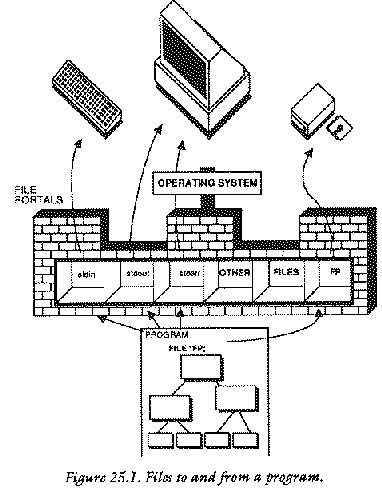
High level text files are also read back as character files, in the same way that input is acquired from the keyboard. This all means that high level file functions are identical in concept to keyboard/screen input/output.
The alternative to these high level functions, is obviously low level functions. These are more efficient, in principle, at filing data as they can store data in large lumps, in raw memory format, without converting to text files first. Low level input/output functions have the disadvantage that they are less `programmer friendly' than the high level ones, but they are likely to work faster.
When data are read from a file, the operating system keeps track of the current position of a program within that file so that it only needs to make a standard library call to `read the next part of the file' and the operating system obliges by reading some more and advancing its position within the file, until it reaches the end. Each single character which is read causes the position in a file to be advanced by one.
Although the operating system does a great deal of hand holding
regarding file positions, a program can control the way in which that
position changes with functions such as ungetc() if need be. In most
cases it is not necessary and it should be avoided, since complex
movements within a file can cause complex movements of a disk drive
mechanism which in turn can lead to wear on disks and the occurrence
of errors.
Most of the high level input/output functions which deal with files are easily recognizable in that they start with the letter `f'. Some of these functions will appear strikingly familiar. For instance:
fprintf() fscanf() fgets() fputs()
These are all generalized file handling versions of the
standard input/output library. They work with generalized files, as
opposed to the specific files stdin and stdout which printf()
and scanf() use. The file versions differ only in that they
need an extra piece of information: the file pointer to a particular
portal. This is passed as an extra parameter to the functions. they
process data in an identical way to their standard I/O counterparts.
Other filing functions will not look so familiar. For example:
fopen() fclose() getc() ungetc(); putc() fgetc() fputc() feof()
Before any work can be done with high level files, these functions need to be explained in some detail.
A file is opened by a call to the library function fopen(): this
is available automatically when the library file <stdio.h> is
included. There are two stages to opening a file: firstly a file
portal must be found so that a program can access information from a
file at all. Secondly the file must be physically located on a disk or
as a device or whatever. The fopen() function performs both of these
services and, if, in fact, the file it attempts to open does not
exist, that file is created anew. The syntax of the fopen() function
is:
FILE *returnpointer;
returnpointer = fopen("filename","mode");
or
FILE returnpointer;
char *fname, *mode;
returnpointer = fopen(fname,mode);
The filename is a string which provides the name of the file to be opened. Filenames are system dependent so the details of this must be sought from the local operating system manual. The operation mode is also a string, chosen from one of the following:
r
w
a
rw
This mode string specifies the way in which the file will be
used. Finally, returnpointer is a pointer to a FILE structure which is
the whole object of calling this function. If the file (which was
named) opened successfully when fopen() was called, returnpointer is a
pointer to the file portal. If the file could not be opened, this
pointer is set to the value NULL. This should be tested for, because
it would not make sense to attempt to write to a file which could not
be opened or created, for whatever reason.
A read only file is opened, for example, with some program code such as:
FILE *fp;
if ((fp = fopen ("filename","r")) == NULL)
{
printf ("File could not be opened\n");
error_handler();
}
A question which springs to mind is: what happens if the user has
to type in the name of a file while the program is running? The
solution to this problem is quite simple. Recall the function
filename() which was written in chapter 20.
char *filename() /* return filename */
{ static char *filenm = "........................";
do
{
printf ("Enter filename :");
scanf ("%24s",filenm);
skipgarb();
}
while (strlen(filenm) == 0);
return (filenm);
}
This function makes file opening simple. The programmer would now write something like:
FILE *fp;
char *filename();
if ((fp = fopen (filename(),"r")) == NULL)
{
printf ("File could not be opened\n");
error_handler();
}
and then the user of the program would automatically be prompted for a
filename. Once a file has been opened, it can be read from or written
to using the other library functions (such as fprintf() and
fscanf()) and then finally the file has to be closed again.
A file is closed by calling the function
fclose(). fclose() has the syntax:
int returncode; FILE *fp; returncode = fclose (fp);
fp is a pointer to the file which is to be closed and returncode is an
integer value which is 0 if the file was closed successfully. fclose()
prompts the file manager to finish off its dealings with the named
file and to close the portal which the operating system reserved for
it. When closing a file, a program needs to do something like the
following:
if (fclose(fp) != 0)
{
printf ("File did not exist.\n");
error_handler();
}
fprintf()This is the highest level function which writes to files. Its
name is meant to signify "file-print-formatted" and it is almost
identical to its stdout counterpart printf(). The form of the
fprintf() statement is as follows:
fprintf (fp,"string",variables);
where fp is a file pointer, string is a control string which is to be
formatted and the variables are those which are to be substituted into
the blank fields of the format string. For example, assume that there
is an open file, pointed to by fp:
int i = 12; float x = 2.356; char ch = 's'; fprintf (fp, "%d %f %c", i, x, ch);
The conversion specifiers are identical to
those for printf(). In fact fprintf() is related to
printf() in a very simple way: the following two statements are
identical.
printf ("Hello world %d", 1);
fprintf (stdout,"Hello world %d", 1);
fscanf()The analogue of scanf() is fscanf() and, as with
fprintf(), this
function differs from its standard I/O counterpart only in one extra
parameter: a file pointer. The form of an fscanf() statement is:
FILE *fp; int n; n = fscanf (fp,"string",pointers);
where n is the number of items matched in the control string
and fp is a pointer to the file which is to be read from. For
example, assuming that fp is a pointer to an open file:
int i = 10; float x = -2.356; char ch = 'x'; fscanf (fp, "%d %f %c", &i, &x, &ch);
The remarks which were made about scanf() also apply to this function:
fscanf() is a `dangerous' function in that it can easily get out of
step with the input data unless the input is properly formatted.
Do programs need a function such as skipgarb() to deal with
instances of badly formatted input data?
A programmer can assume a bit more about files which are read
into a program from disk file than it can assume about the user's
typed input. A disk file will presumably have been produced by the
same program which generated it, or will be in a format which the
program expects. Is a function like skipgarb() necessary then? The
answer is: probably not. This does not mean to say that a program does
not need to check for "bad files", or files which do not contain the
data they are alleged to contain. On the other hand, a programmer is
at liberty to assume that any file which does not contain correctly
formatted data is just nonsense: he/she does not have to try to make
sense of it with a function like skipgarb(), the program could simply
return an error message like "BAD FILE" or whatever and recover in a
sensible way. It would probably not make sense to use a function like
skipgarb() for files.
For comparison alone, skipfilegarb() is written below.
skipfilegarb(fp)
FILE *fp;
{
while (getc(fp) != '\n')
{
}
}
There are commonly four functions/macros which perform single character input/output to or from files. They are analogous to the functions/macros
getchar() putchar()
for the standard I/O files and they are called:
getc()
ungetc();
putc()
fgetc()
fputc()
getc() and fgetc()The difference between getc() and fgetc() will depend
upon a particular system. It might be that getc() is implemented as a
macro, whereas fgetc() is implemented as a function or vice
versa. One of these alternatives may not be present at all in a
library. Check the manual, to be sure! Both getc() and
fgetc() fetch a single character from a file:
FILE *fp; char ch; /* open file */ ch = getc (fp); ch = fgetc (fp);
These functions return a character from the specified file if they
operated successfully, otherwise they return EOF to indicate the end
of a file or some other error. Apart from this, these functions/macros
are quite unremarkable.
ungetc()ungetc() is a function which `un-gets' a character from a
file. That is, it reverses the effect of the last get
operation. This is not like writing to a file, but it is like stepping
back one position within the file. The purpose of this function is to
leave the input in the correct place for other functions in a program
when other functions go too far in a file. An example of this would
be a program which looks for a word in a text file and processes that
word in some way.
while (getc(fp) != ' ')
{
}
The program would skip over spaces until it found a character and then
it would know that this was the start of a word. However, having used
getc() to read the first character of that word, the position in the
file would be the second character in the word! This means that, if
another function wanted to read that word from the beginning, the
position in the file would not be correct, because the first character
would already have been read. The solution is to use ungetc() to move
the file position back a character:
int returncode; returncode = ungetc(fp);The returncode is EOF if the operation was unsuccessful.
putc() and fputc()These two functions write a single character to the output file, pointed
to by fp. As with getc(), one of these may be a macro. The
form of these statements is:
FILE *fp; char ch; int returncode; returncode = fputc (ch,fp); returncode = putc (ch,fp);
The returncode is the ascii code of the character sent, if the operation was successful, otherwise it is EOF.
fgets() and fputs()Just as gets() and puts() fetched and sent strings to
standard input/output files stdin and stdout, so fgets() and
fputs() send strings to generalized files. The form of an
fgets() statement is as follows:
char *strbuff,*returnval; int n; FILE *fp; returnval = fgets (strbuff,n,fp);
strbuff is a pointer to an input buffer for the string; fp is a
pointer to an open file. returnval is a pointer to a string: if there
was an error in fgets() this pointer is set to the value NULL,
otherwise it is set to the value of "strbuff". No more than (n-1)
characters are read by fgets() so the programmer has to be sure to set
n equal to the size of the string buffer. (One byte is reserved for
the NULL terminator.)
The form of an fputs() statement is as follows:
char *str; int returnval; FILE *fp; returnval = fputs (str,fp);
Where str is the NULL terminated string which is to be
sent to the file pointed to by fp. returnval is set to
EOF if there was an error in writing to the file.
This function returns a true or false result. It tests whether or not the end of a file has been reached and if it has it returns `true' (which has any value except zero); otherwise the function returns `false' (which has the value zero). The form of a statement using this function is:
FILE *fp; int outcome; outcome = feof(fp);
Most often feof() will be used inside loops or conditional
statements. For example: consider a loop which reads characters from
an open file, pointed to by fp. A call to feof() is required in order
to check for the end of the file.
while (!feof(fp))
{
ch = getc(fp);
}
Translated into pidgin English, this code reads: `while NOT end of
file, ch equals get character from file'. In better(?) English the
loop continues to fetch characters as long as the end of the file has
not been reached. Notice the logical NOT operator ! which stands
before feof().
Any serious application program will have to be in full control of the output of a program. For instance, it may need to redirect output to the printer so that data can be made into hard copies. To do this, one of three things must be undertaken:
stdout must be redirected so that it sends data to
the printer device.
The first method is not generally satisfactory for applications
programs, because the standard files stdin and stdout
can only easily be redirected from the operating system command line
interpreter (when a program is run by typing its name). Examples of
this are:
type file > PRN
which send a text file to the printer device. The second method is reserved for only a few implementations of C in which another `standard file' is opened by the local operating system and is available for sending data to the printer stream. This file might be called "stdprn" or "standard printer file" and data could be written to the printer by switching writing to the file like this:
fprintf (stdprn,"string %d...", integer);The final method of writing to the printer is to open a file to the printer, personally. To do this, a program has to give the "filename" of the printer device. This could be something like "PRT:" or "PRN" or "LPRT" or whatever. The filename (actually called a pseudo device name) is used to open a file in precisely the same way as any other file is opened: by using a call to
fopen().
fopen() then returns
a pointer to file (which is effectively "stdprn") and this is used to
write data to a computer's printer driver. The program code to do this
should look something like the following:
FILE *stdprn;
if ((stdprn = fopen("PRT:","w")) == NULL)
{
printf ("Printer busy or disconnected\n");
error_handler;
}
Here is an example program which reads a source file (for a program, written in C, Pascal or whatever...) and lists it, along with its line numbers. This kind of program is useful for debugging programs. The program provides the user with the option of sending the output to the printer. The printer device is assumed to have the filename "PRT:". Details of how to convert the program for other systems is given at the end.
/***************************************************************/
/* */
/* LIST : program file utility */
/* */
/***************************************************************/
/* List a source file with line numbers attached. Like */
/* TYPE only with lines numbers too. */
#include <stdio.h>
#define CODE 0
#define SIZE 255
#define ON 1
#define OFF 0
#define TRUE 1
#define FALSE 0
FILE *fin;
FILE *fout = stdout; /* where output goes to */
/***************************************************************/
/* Level 0 */
/***************************************************************/
main ()
{ char strbuff[size],*filename();
int Pon = false;
int line = 1;
printf ("Source Program Lister V1.0\n\n");
if ((fin = fopen(filename(),"r")) == NULL)
{
printf ("\nFile not found\n");
exit (CODE);
}
printf ("Output to printer? Y/N");
if (yes())
{
Pon = Printer(ON);
}
while (!feof(fin))
{
if (fgets(strbuff,size,fin) != strbuff)
{
if (!feof(fin))
{
printf ("Source file corrupted\n");
exit (CODE);
}
}
fprintf (fout,"%4d %s",line++,strbuff);
}
CloseFiles(Pon);
}
/*************************************************************/
/* Level 1 */
/*************************************************************/
CloseFiles(Pon) /* close & tidy */
int Pon;
{
if (Pon)
{
Printer(OFF);
}
if (fclose(fin) != 0)
{
printf ("Error closing input file\n");
}
}
/***********************************************************/
Printer (status) /* switch printer file */
int status;
{
switch (status)
{
case on: while ((fout = fopen("PRT:","w")) == NULL)
{
printf ("Printer busy or disconnected\n");
printf ("\n\nRetry? Y/N\n");
if (!yes())
{
exit(CODE);
}
}
break;
case off: while (fclose(fout) != 0)
{
printf ("Waiting to close printer stream\r");
}
}
}
/***********************************************************/
/* Toolkit */
/***********************************************************/
char *filename() /* return filename */
{ static char *filenm = "........................";
do
{
printf ("Enter filename :");
scanf ("%24s",filenm);
skipgarb();
}
while (strlen(filenm) == 0);
return (filenm);
}
/*************************************************************/
yes () /* Get a yes/no response from the user */
{ char ch;
while (TRUE)
{
ch = getchar();
skipgarb();
switch (ch)
{
case 'y' : case 'Y' : return (TRUE);
case 'n' : case 'N' : return (FALSE);
}
}
}
/*************************************************************/
skipgarb() /* skip garbage corrupting input */
{
while (getchar() != '\n')
{
}
}
/* end */
Here is a sample portion of the output of this program as applied to one of the example programs in section 30.
1 /********************************************************/ 2 /* */ 3 /* C programming utility : variable referencer */ 4 /* */ 5 /********************************************************/ 6 7 /* See section 30 */ 8 9 #include <stdio.h> 10 #include <ctype.h> 11 12 #define TRUE 1 13 #define FALSE 0 14 #define DUMMY 0 15 #define MAXSTR 512 16 #define MAXIDSIZE 32 ... and more of the same.
The example program could be altered to work with a standard printer file "stdprn" by changing the following function.
Printer (status) /* switch printer file */
int status;
{
switch (status)
{
case on: fout = stdprn;
break;
case off: fout = stdout;
}
}
The standard library provides an error function/macro which
returns a true/false result according to whether or not the last
filing function call returned an error condition. This is called
ferror(). To check for an error in an open file, pointed to by
fp:
FILE *fp;
if (ferror(fp))
{
error_handler();
}
This function/macro does not shed any light upon the cause of
errors, only whether errors have occurred at all. A detailed diagnosis
of what went wrong is only generally possible by means of a deeper
level call to the disk operating system (DOS).
Files which have been opened by fopen() can also be handled with
the following additional functions:
fread() fwrite() ftell() fseek() rewind() fflush()
These functions provide facilities to read and write whole blocks of characters in one operation as well as further facilities to locate and alter the current focus of attention within a file. They offer, essentially, low level filing operations for files which have been opened for high level use!
fread() and fwrite()These functions read and write whole blocks of characters at a
time. The form of fread() is as follows:
FILE *fp; int noread,n,size; char *ptr; noread = fread (ptr,size,n,fp);
The parameters in parentheses provide information about where the data will
be stored once they have been read from a file. fp is a pointer
to an open file; ptr is a pointer to the start of a block of
memory which is to store the data when it is read; size is the size of a
block of data in characters; n is the number of blocks of data to
be read. Finally noread is a return value which indicates the
number of blocks which was actually read during the operation. It is
important to check that the number of blocks expected is the same as the
number received because something could have gone wrong with the reading
process. (The disk might be corrupted or the file might have been
altered in some way.) fwrite() has an identical call structure
to fread():
FILE *fp; int nowritten,n,size; char *ptr; nowritten = fread (ptr,size,n,fp);
This time the parameters in parentheses provide information about where the
data, to be written to a file, will be found. fp is a pointer to
an open file; ptr is a pointer to the start of a block of memory
at which the data are stored; size is the size of a "block" of data in
characters; n is the number of blocks of data to be read;
nowritten is a return value which indicates the actual number of
blocks which was written. Again, this should be checked.
A caution about these functions: each of these block transfer
routines makes an important assumption about the way in which data are
stored in the computer system. It is assumed that the data are stored
contiguously in the memory, that is, side by side, in sequential
memory locations. In some systems this can be difficult to arrange (in
multi-tasking systems in particular) and almost impossible to
guarantee. Memory which is allocated in C programs by the function
malloc() does not guarantee to find contiguous portions of memory on
successive calls. This should be noted carefully when developing
programs which use these calls.
ftell() tells a program its position within a file, opened by
fopen().
fseek() seeks a specified place within a file, opened by
fopen().
Normally high level read/write functions perform as much
management over positions inside files as the programmer wants, but in
the event of their being insufficient, these two routines can be
used. The form of the function calls is:
long int pos; FILE *fp; pos = ftell(fp);
fp is an open file, which is in some state of being read or written
to. pos is a long integer value which describes the position in terms
of the number of characters from the beginning of the file.
Aligning a file portal with a particular place in a file is
more sophisticated than simply taking note of the current
position. The call to fseek() looks like this:
long int pos; int mode,returncode; FILE *fp; returncode = fseek (fp,pos,mode);
The parameters have the following meanings. fp is a pointer to a file
opened by fopen(). pos is some way of describing the position required
within a file. mode is an integer which specifies the way in which pos
is to be interpreted. Finally, returncode is an integer whose value is
0 if the operation was successful and -1 if there was an error.
0
pos is an offset measured relative to the beginning
of the file.
1
pos is an offset measured relative to the current
position.
2
pos is an offset measured relative to the end of the
file.
long int pos = 50;
int mode = 0,returncode;
FILE *fp;
if (fseek (fp,pos,mode) != 0) /* find 50th character */
{
printf("Error!\n");
}
fseek(fp,0L,0); /* find beginning of file */
fseek(fp,2L,0); /* find the end of a file */
if (fseek (fp,10L,1) != 0) /* move 10 char's forward */
{
printf("Error!\n");
}
The L's indicate long constants.
rewind()rewind() is a macro, based upon fseek(), which resets a file
position to the beginning of the file. e.g.
FILE *fp; rewind(fp); fseek(fp,0L,0); /* = rewind() */
fflush()This is a macro/function which can be used on files which have been opened for writing or appending. It flushes the output buffer which means that it forces the characters in the output buffer to be written to the file. If used on files which are open for reading, it causes the input buffer to be emptied (assuming that this is allowed at all). Example:
FILE *fp; fflush(fp);
Normally a programmer can get away with using the high level input/output functions, but there may be times when C's predilection for handling all high level input/output as text files, becomes a nuisance. A program can then use a set of low level I/O functions which are provided by the standard library. These are:
open() close() creat() read() write() rename() unlink()/remove() lseek()
These low level routines work on the operating system's end of the file portals. They should be regarded as being advanced features of the language because they are dangerous routines for bug ridden programs. The data which they deal with is untranslated: that is, no conversion from characters to floating point or integers or any type at all take place. Data are treated as a raw stream of bytes. Low level functions should not be used on any file at the same time as high level routines, since high level file handling functions often make calls to the low level functions.
Working at the low level, programs can create, delete and rename
files but they are restricted to the reading and writing of
untranslated data: there are no functions such as fprintf() or
fscanf() which make type conversions. As well as the functions listed
above a local operating system will doubtless provide special function
calls which enable a programmer to make the most of the facilities
offered by the particular operating environment. These will be
documented, either in a compiler manual, or in an operating system
manual, depending upon the system concerned. (They might concern
special graphics facilities or windowing systems or provide ways of
writing special system dependent data to disk files, such as date/time
stamps etc.)
At the low level, files are not handled using file pointers, but with integers known as file handles or file descriptors. A file handle is essentially the number of a particular file portal in an array. In other words, for all the different terminology, they describe the same thing. For example:
int fd;
would declare a file handle or descriptor or portal or whatever it is to be called.
open()open() is the low level file open function. The form of this
function call is:
int fd, mode; char *filename; fd = open (filename,mode);
where filename is a string which holds the name of the file concerned,
mode is a value which specifies what the file is to be opened for and
fd is either a number used to distinguish the file from
others, or -1 if an error occurred.
A program can give more information to this function than it can
to fopen() in order to define exactly what open() will do.
The integer
mode is a message or a pseudo register which passes the necessary
information to open(), by using the following flags:
O_RDONLY Read access only O_WRONLY Write access only O_RDWR Read/Write access
and on some compilers:
O_CREAT Create the file if it does not exist
O_TRUNC Truncate the file if it does exist
O_APPEND Find the end of the file before each write
O_EXCL Exclude. Force create to fail if the file
exists.
The macro definitions of these flags will be included in a
library file: find out which one and #include it in the program.
The normal procedure is to open a file using one of the first
three modes. For example:
#define FAILED -1
main()
{ char *filename();
int fd;
fd = open(filename(), O_RDONLY);
if (fd == FAILED)
{
printf ("File not found\n");
error_handler (failed);
}
}
This opens up a read-only file for low level handling, with error
checking. Some systems allow a more flexible way of opening files. The
four appended modes are values which can be bitwise ORed with one of the
first three in order to get more mileage out of open(). The
bitwise OR operator is the vertical bar "|". For example, to emulate the
fopen() function a program could opt to create a file if it did
not already exist:
fd = open (filename(), O_RDONLY | O_CREAT);
open() sets the file position to zero if the file is opened
successfully.
close()close() releases a file portal for use by other files and brings
a file completely up to date with regard to any changes that have been
made to it. Like all other filing functions, it returns the value 0 if
it performs successfully and the value -1 if it fails. e.g.
#define FAILED -1
if (close(fd) == FAILED)
{
printf ("ERROR!");
}
creat()This function creates a new file and prepares it for access using the low level file handling functions. If a file which already exists is created, its contents are discarded. The form of this function call is:
int fd, pmode; char *filename; fd = creat(filename,pmode);
filename must be a valid filename; pmode is a flag which contains
access-privilege mode bits (system specific information about allowed
access) and fd is a returned file handle. In the absence of
any information about pmode, this parameter can be set to zero.
Note that, the action of creating a file opens it too. Thus after a call
to creat, you should close the file descriptor.
This function gets a block of information from a file. The data
are loaded directly into memory, as a sequence of bytes. The user must
provide a place for them (either by making an array or by using
malloc() to reserve space). read() keeps track of file positions
automatically, so it actually reads the next block of bytes from the
current file position. The following example reads n bytes from a
file:
int returnvalue, fd, n;
char *buffer;
if ((buffer = malloc(size)) == NULL)
{
puts ("Out of memory\n");
error_handler ();
}
returnvalue = read (fd,buffer,n);
The return value should be checked. Its values are defined as follows:
0
-1
n
write()This function is the opposite of read(). It writes a block
of n bytes from a contiguous portion of memory to a file which
was opened by open(). The form of this function is:
int returnvalue, fd, n; char *buffer; returnvalue = write (fd,buffer,n);
The return value should, again, be checked for errors:
-1
n
lseek()Low level file handing functions have their equivalent of fseek()
for finding a specific position within a file. This is almost
identical to fseek() except that it uses the file handle rather than a
file pointer as a parameter and has a different return value. The
constants should be declared long int, or simply long.
#define FAILED -1L
long int pos,offset,fd;
int mode,returncode;
if ((pos = fseek (fd,offset,mode)) == FAILED)
{
printf("Error!\n");
}
pos gives the new file position if successful, and -1 (long) if an
attempt was made to read past the end of the file.
The values which mode can take are:
0
1
2
unlink() and remove()These functions delete a file from disk storage. Once deleted, files are usually irretrievable. They return -1 if the action failed.
#define FAILED -1
int returnvalue;
char *filename;
if (unlink (filename) == FAILED)
{
printf ("Can't delete %s\n",filename);
}
if (remove (filename) == FAILED)
{
printf ("Can't delete %s\n",filename);
}
filename is a string containing the name of the file concerned. This
function can fail if a file concerned is protected or if it is not
found or if it is a device. (It is impossible to delete the printer!)
rename()
This function renames a file. The programmer specifies two
filenames: the old filename and a new file name. As usual, it returns
the value -1 if the action fails. An example illustrates the form of
the rename() call:
#define FAILED -1
char *old,*new;
if (rename(old,new) == FAILED)
{
printf ("Can't rename %s as %s\n",old,new);
}
rename() can fail because a file is protected or because it is in use,
or because one of the filenames given was not valid.
This example strings together some low level filing actions so as to illustrate their use in a real program. The idea is to present a kind of file or "project" menu for creating, deleting, renaming files. A rather feeble text editor allows the user to enter 255 characters of text which can be saved.
/***************************************************************/
/* */
/* LOW LEVEL FILE HANDLING */
/* */
/***************************************************************/
#include <stdio.h>
#include <ctype.h>
#include <fcntl.h> /* defines O_RDONLY etc.. */
#define CODE 0
#define SIZE 255
#define FNMSIZE 30 /* Max size of filenames */
#define TRUE 1
#define FALSE 0
#define FAILED -1
#define CLRSCRN() putchar('\f')
#define NEWLINE() putchar('\n')
int fd;
/***************************************************************/
/* Level 0 */
/***************************************************************/
main ()
{ char *data,getkey(),*malloc();
if ((data = malloc(SIZE)) == NULL)
{
puts ("Out of memory\n");
return (CODE);
}
while (TRUE)
{
menu();
switch (getkey())
{
case 'l' : LoadFile(data);
break;
case 's' : SaveFile(data);
break;
case 'e' : Edit(data);
break;
case 'd' : DeleteFile();
break;
case 'r' : RenameFile();
break;
case 'q' : if (sure())
{
return (CODE);
}
break;
}
}
}
/*************************************************************/
/* Level 1 */
/*************************************************************/
menu ()
{
CLRSCRN();
printf (" ---------------------------------\n");
printf ("| MENU |\n");
printf ("| ~~~~~~ |\n");
printf ("| |\n");
printf ("| L) Load File |\n");
printf ("| S) Save File |\n");
printf ("| E) Edit File |\n");
printf ("| D) Delete File |\n");
printf ("| R) Rename File |\n");
printf ("| Q) Quit |\n");
printf ("| |\n");
printf ("| Select Option and RETURN |\n");
printf ("| |\n");
printf (" --------------------------------- \n");
NEWLINE();
}
/*************************************************************/
LoadFile(data) /* Low level load */
char *data;
{ char *filename(),getkey();
int error;
fd = open(filename(), O_RDONLY);
if (fd == FAILED)
{
printf ("File not found\n");
return (FAILED);
}
error = read (fd,data,SIZE);
if (error == FAILED)
{
printf ("Error loading file\n");
wait();
}
else
{
if (error != SIZE)
{
printf ("File was corrupted\n");
wait();
}
}
close (fd,data,SIZE);
return (error);
}
/*************************************************************/
SaveFile(data) /* Low Level save */
char *data;
{ char *filename(),getkey(),*fname;
int error,fd;
fd = open ((fname = filename()), O_WRONLY);
if (fd == FAILED)
{
printf ("File cannot be written to\n");
printf ("Try to create new file? Y/N\n");
if (yes())
{
if ((fd = CreateFile(fname)) == FAILED)
{
printf ("Cannot create file %s\n",fname);
return (FAILED);
}
}
else
{
return (FAILED);
}
}
error = write (fd,data,SIZE);
if (error < SIZE)
{
printf ("Error writing to file\n");
if (error != FAILED)
{
printf ("File only partially written\n");
}
}
close (fd,data,SIZE);
wait();
return (error);
}
/*************************************************************/
Edit(data) /* primitive text editor */
char *data;
{ char *ptr;
int ctr = 0;
printf ("Contents of file:\n\n");
for (ptr = data; ptr < (data + SIZE); ptr++)
{
if (isprint(*ptr))
{
putchar(*ptr);
if ((ctr++ % 60) == 0)
{
NEWLINE();
}
}
}
printf ("\n\nEnter %1d characters:\n",SIZE);
for (ptr = data; ptr < (data + SIZE); ptr++)
{
*ptr = getchar();
}
skipgarb();
}
/*************************************************************/
DeleteFile() /* Delete a file from current dir */
{ char *filename(),getkey(),*fname;
printf ("Delete File\n\n");
fname = filename();
if (sure())
{
if (remove(fname) == FAILED)
{
printf ("Can't delete %s\n",fname);
}
}
else
{
printf ("File NOT deleted!\n");
}
wait();
}
/*************************************************************/
RenameFile()
{ char old[FNMSIZE],*new;
printf ("Rename from OLD to NEW\n\nOLD: ");
strcpy (old,filename());
printf ("\nNEW: ");
new = filename();
if (rename(old,new) == FAILED)
{
printf ("Can't rename %s as %s\n",old,new);
}
wait();
}
/*************************************************************/
/* Level 2 */
/*************************************************************/
CreateFile (fname)
char *fname;
{ int fd;
if ((fd = creat(fname,0)) == FAILED)
{
printf ("Can't create file %s\n",fname);
return (FAILED);
}
return (fd);
}
/*************************************************************/
/* Toolkit */
/*************************************************************/
char *filename() /* return filename */
{ static char statfilenm[FNMSIZE];
do
{
printf ("Enter filename :");
scanf ("%24s",statfilenm);
skipgarb();
}
while (strlen(statfilenm) == 0);
return (statfilenm);
}
/**************************************************************/
sure () /* is the user sure ? */
{
printf ("Are you absolutely, unquestionably certain? Y/N\n");
return(yes());
}
/**************************************************************/
yes()
{ char getkey();
while (TRUE)
{
switch(getkey())
{
case 'y' : return (TRUE);
case 'n' : return (FALSE);
}
}
}
/**************************************************************/
wait()
{ char getkey();
printf ("Press a key\n");
getkey();
}
/**************************************************************/
char getkey() /* single key + RETURN response */
{ char ch;
ch = getchar();
skipgarb();
return((char)tolower(ch));
}
/**************************************************************/
skipgarb() /* skip garbage corrupting input */
{
while (getchar() != '\n')
{
}
}
/* end */
Grouping data. Tidying up programs.
Tidy programs are a blessing to programmers. Tidy data are just as
important. As programs become increasingly complex, their data also
grow in complexity and single, independent variables or arrays are no
longer enough. What one then needs is a data structure. This is
where a new type of variable comes in: it is called a struct
type, or in other languages, a record. struct types or
structures are usually lumped together with another type of
variable called a union. In fact their purposes are quite different.
What is the relationship between a program and its data? Think of a
program as an operator which operates on the memory of the
computer. Local data are operated upon inside sealed function capsules,
where they are protected from the reach of certain parts of a
program. Global data are wide open to alteration by any part of a
program. If a program were visualized schematically what would it look
like? A traditional flow diagram? No: a computer program only looks like
a flow diagram at the machine code level and that is too primitive for C
programmers. One way of visualizing a program is illustrated by the
diagram over the page.
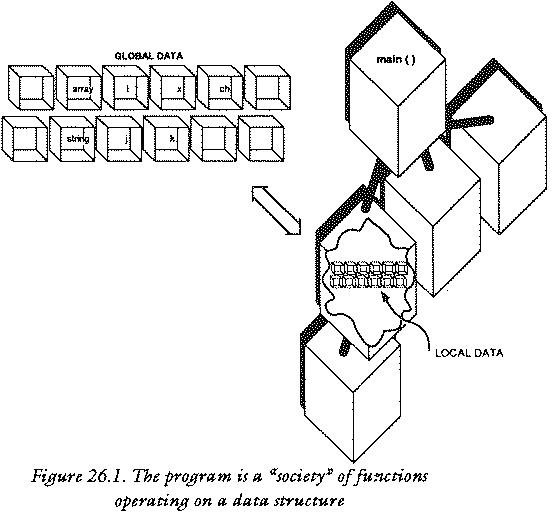
This shows a program as a kind of society of sealed function capsules which work together like a beehive of activity upon a honeycomb of program data. This imaginative idea is not a bad picture of a computer program, but it is not complete either. A program has to manipulate data: it has to look at them, move them around and copy them from place to place. All of these things would be very difficult if data were scattered about liberally, with no particular structure. For this reason C has the facility, within it, to make sealed capsules - not of program code - but of program data, so that all of these actions very simply by grouping variables together in convenient packages for handling. These capsules are called structures.
A structure is a package of one or usually more variables which are grouped under a single name. Structures are not like arrays: a structure can hold any mixture of different types of data: it can even hold arrays of different types. A structure can be as simple or as complex as the programmer desires.
The word struct is a reserved word in C and it represents a new
data type, called an aggregate type. It is not any single type: the
purpose of structures is to offer a tool for making whatever shape or
form of variable package that a programmer wishes. Any particular
structure type is given a name, called a structure-name and the
variables (called members) within a structure type are also given
names. Finally, every variable which is declared to be a particular
structure type has a name of its own too. This plethora of names is
not really as complicated as it sounds.
A structure is declared by making a blank template for a variable package. This is most easily seen with the help of an example. The following statement is actually a declaration, so it belongs with other declarations, either at the head of a program or at the start of a block.
struct PersonalData
{
char name[namesize];
char address[addresssize];
int YearOfBirth;
int MonthOfBirth;
int DayOfBirth;
};
This purpose of this statement is to create a model or template to
define what a variable of type struct PersonalData will look like. It
says: define a type of variable which collectively holds a string called
name, a string called address and three integers called
YearOfBirth, MonthOfBirth and DayOfBirth. Any
variable which is declared to be of type struct PersonalData will
be collectively made up of parts like these. The list of variable
components which make up the structure are called the members of the
structure: the names of the members are not the names of variables, but
are a way of naming the parts which make up a structure variable. (Note:
a variable which has been declared to be of type struct something is
usually called just a structure rather than a structure
variable. The distinction is maintained here in places where confusion
might arise.) The names of members are held separate from the names of
other identifiers in C, so it is quite possible to have variable names
and struct member names which are the same. Older compilers did not
support this luxury.
At this stage, no storage has been given over to a variable, nor has any variable been declared: only a type has been defined. Having defined this type of structure, however, the programmer can declare variables to be of this type. For example:
struct PersonalData x;
declares a variable called x to be of type struct PersonalData. x
is certainly not a very good name for any variable which holds a
person's personal data, but it contrasts well with all the other names
which are abound and so it serves its purpose for now.
Before moving on to consider how structures can be used, it is worth pausing to show the different ways in which structures can be declared. The method shown above is probably the most common one, however there are two equivalent methods of doing the same thing. A variable can be declared immediately after the template definition.
struct PersonalData
{
char name[namesize];
char address[addresssize];
int YearOfBirth;
int MonthOfBirth;
int DayOfBirth;
}
x; /* variable identifier follows type */
Alternatively, typedef can be used to cut down a bit on typing in
the long term. This type definition is made once at the head of the
program and then subsequent declarations are made by using the new name:
typedef struct
{
char name[namesize];
char address[addresssize];
int YearOfBirth;
int MonthOfBirth;
int DayOfBirth;
}
PersonalData;
then declare:
PersonalData x;
Any one of these methods will do.
Both structure types and structure variables obey the rules of scope: that is to say, a structure type declaration can be local or global, depending upon where the declaration is made. Similarly if a structure type variable is declared locally it is only valid inside the block parentheses in which it was defined.
main ()
{ struct ONE
{
int a;
float b;
};
struct ONE x;
}
function ()
{ struct ONE x; /* This line is illegal, since ONE */
/* is a local type definition */
/* Defined only in main() */
}
How does a program use the variables which are locked inside structures? The whole point about structures is that they can be used to group data into sensible packages which can then be treated as single objects. Early C compilers, some of which still exist today, placed very severe restrictions upon what a program could do with structures. Essentially, the members of a structure could be assigned values and pointers to individual structures could be found. Although this sounds highly restrictive, it did account for the most frequent uses of structures. Modern compilers allow more flexible use of structures: programs can assign one structure variable to another structure variable (provided the structures match in type); structure variables can be passed, whole, as parameters to functions and functions can return structure values. This makes structures extremely powerful data objects to have in a program. A structure is assigned to another structure by the following statements.
struct Personal x,y; x = y;
The whole bundle of members is copied in one statement! Structures are passed as parameters in the usual way:
function (x,y);
The function then has to be declared:
function (x,y)
struct PersonalData x,y;
{
}
Finally, a function which returns a structure variable such as:
{ struct PersonalData x,function();
x = function();
}
would be declared in the following way:
struct PersonalData function ()
{
}
Notice that the return type of such a function must also be declared in the function which calls that it, in the usual way. The reader will begin to see that structure names account for a good deal of typing! The typedef statement is a very good way of reducing this burden.
The members of a structure are accessed with the . dot
character. This is a structure member operator. Consider the
structure variable x, which has the type struct PersonalData. The
members of x could be assigned by the following program:
main ()
{ struct PersonalData x;
FillArray ("Some name", x.name);
FillArray ("Some address", x.address);
x.YearOfBirth = 1987;
x.MonthOfBirth = 2;
x.DayOfBirth = 19;
}
where FillArray() is a hypothetical function which copies the string
in the first parameter to the array in the second parameter. The dot
between the variable and the names which follow implies that the
statements in this brief program are talking about the members in the
structure variable x, rather than the whole collective bundle. Members
of actual structure variables are always accessed with this dot
operator. The general form of a member reference is:
structure variable.member name
This applies to any type of structure variable, including those accessed by pointers. Whenever a program needs to access the members of a structure, this dot operator can be used. C provides a special member operator for pointers, however, because they are used so often in connection with structures. This new operator is described below.
Just as arrays of any basic type of variable are allowed, so are arrays of a given type of structure. Although a structure contains many different types, the compiler never gets to know this information because it is hidden away inside a sealed structure capsule, so it can believe that all the elements in the array have the same type, even though that type is itself made up of lots of different types. An array would be declared in the usual way:
int i; struct PersonalData x,array[size];
The members of the arrays would then be accessed by statements like the following examples:
array[i] = x; array[i] = array[j]; array[i].YearOfBirth = 1987; i = array[2].MonthOfBirth;
This listing uses a structure type which is slightly different to PersonalData in that string pointers are used instead of arrays. This allows more convenient handling of real-life strings.
/*********************************************************/
/* */
/* Structures Demo */
/* */
/*********************************************************/
/* Simple program to initialize some structures */
/* and to print them out again. Does no error */
/* checking, so be wary of string sizes etc.. */
#include <stdio.h>
#define NAMESIZE 30
#define ADDRSIZE 80
#define NOOFPERSONS 20
#define NEWLINE() putchar('\n');
/*********************************************************/
typedef struct
{
char *Name;
char *Address;
int YearOfBirth;
int MonthOfBirth;
int DayOfBirth;
}
PersonDat;
/*********************************************************/
main () /* Make some records */
{ PersonDat record[NOOFPERSONS];
PersonDat PersonalDetails();
int person;
printf ("Birth Records For Employees");
printf ("\n---------------------------");
printf ("\n\n");
printf ("Enter data\n");
for (person = 0; person < NOOFPERSONS; person++)
{
record[person] = PersonalDetails();
NEWLINE();
}
DisplayRecords (record);
}
/*********************************************************/
PersonDat PersonalDetails() /* No error checking! */
{ PersonDat dat;
char strbuff[ADDRSIZE], *malloc();
printf ("Name :");
dat.Name = malloc(NAMESIZE);
strcpy (dat.Name,gets(strbuff));
printf ("Address :");
dat.Address = malloc(ADDRSIZE);
strcpy (dat.Address,gets(strbuff));
printf ("Year of birth:");
dat.YearOfBirth = getint (1900,1987);
printf ("Month of birth:");
dat.MonthOfBirth = getint (1,12);
printf ("Day of birth:");
dat.DayOfBirth = getint(1,31);
return (dat);
}
/**********************************************************/
DisplayRecords (rec)
PersonDat rec[NOOFPERSONS];
{ int pers;
for (pers = 0; pers < NOOFPERSONS; pers++)
{
printf ("Name : %s\n", rec[pers].Name);
printf ("Address : %s\n", rec[pers].Address);
printf("Date of Birth: %1d/%1d/%1d\n",rec[pers].DayOfBirth,
rec[pers].MonthOfBirth,rec[pers].YearOfBirth);
NEWLINE();
}
}
/**********************************************************/
/* Toolkit */
/**********************************************************/
getint (a,b) /* return int between a and b */
int a,b;
{ int p, i = a - 1;
for (p=0; ((a > i) || (i > b)); p++)
{
printf ("? : ");
scanf ("%d",&i);
if (p > 2)
{
skipgarb();
p = 0;
}
}
skipgarb();
return (i);
}
/**********************************************************/
skipgarb() /* Skip input garbage corrupting scanf */
{
while (getchar() != '\n')
{
}
}
/* end */
Structures are said to nest. This means that structure templates can contain other structures as members. Consider two structure types:
struct first_structure
{
int value;
float number;
};
and
struct second_structure
{
int tag;
struct first_structure fs;
}
x;
These two structures are of different types, yet the first of the two
is included in the second! An instance of the second structure would
be initialized by the following assignments. The structure variable
name is x:
x.tag = 10; x.fs.value = 20; x.fs.number = 30.0;
Notice the way in which the member operator . can be used over and
over again. Notice also that no parentheses are necessary, because the
reference which is calculated by this operator is worked out from left
to right. This nesting can, in principle, go on many times, though
some compilers might place restrictions upon this nesting
level. Statements such as:
variable.tag1.tag2.tag3.tag4 = something;
are probably okay (though they do not reflect good programming). Structures should nest safely a few times.
A word of caution is in order here. There is a problem with the above scheme that has not yet been addressed. It is this: what happens if a structure contains an instance of itself? For example:
struct Regression
{
int i;
struct Regression tag;
}
There is simply no way that this kind of statement can make sense, unless the compiler's target computer has an infinite supply of memory! References to variables of this type would go on for ever and an infinite amount of memory would be needed for every variable. For this one reason, it is forbidden for a structure to contain an instance of itself. What is not forbidden, however, is for a structure to contain an instance of a pointer to its own type (because a pointer is not the same type as a structure: it is merely a variable which holds the address of a structure). Pointers to structures are quite invaluable, in fact, for building data structures such as linked lists and trees. These extremely valuable devices are described below.
A pointer to a structure type variable is declared by a statement like:
struct Name *ptr;
ptr is then, formally, a pointer to a structure of type Name
only. ptr can be assigned to any other pointer of similar type and it
can be used to access the members of a structure. It is in the second
of these actions that a new structure operator is revealed.
According to the rules which have described so far, a structure
member could be accessed by pointers with the following statements:
struct PersonalData *ptr; (*ptr).YearOfBirth = 20;
This says let the member YearOfBirth of the structure pointed to by
ptr, have the value 20. Notice that *ptr, by itself, means the
contents of the address which is held in ptr and notice that the
parentheses around this statement avoid any confusion about the
precedence of these operators.
There is a better way to write the above statement, however,
using a new operator: ->. This is an arrow made out of a minus sign
and a greater than symbol and it is used simply as follows:
struct PersonalData *ptr; ptr->YearOfBirth = 20;
This statement is identical in every way to the first version, but since
this kind of access is required so frequently, when dealing with
structures, C provides this special operator to make the operation
clearer. In the statements above, it is assumed that ptr has
been assigned to the address of some pre-assigned structure: for
example, by means of a statement such as:
ptr = &x;
where x is a pre-assigned structure.
/*********************************************************/
/* */
/* Structures Demo #2 */
/* */
/*********************************************************/
/* This is the same program, using pointer references */
/* instead of straight variable references. i.e. this */
/* uses variable parameters instead of value params */
#include <stdio.h>
#define NAMESIZE 30
#define ADDRSIZE 80
#define NOOFPERSONS 20
#define NEWLINE() putchar('\n');
/*********************************************************/
typedef struct
{
char *Name;
char *Address;
int YearOfBirth;
int MonthOfBirth;
int DayOfBirth;
}
PersonDat;
/*********************************************************/
main () /* Make some records */
{ PersonDat record[NOOFPERSONS];
int person;
printf ("Birth Records For Employees");
printf ("\n---------------------------");
printf ("\n\n");
printf ("Enter data\n");
for (person = 0; person < NOOFPERSONS; person++)
{
PersonalDetails(&(record[person]));
NEWLINE();
}
DisplayRecords (record);
}
/*********************************************************/
PersonalDetails(dat) /* No error checking! */
PersonDat *dat;
{ char strbuff[ADDRSIZE], *malloc();
printf ("Name :");
dat->Name = malloc(NAMESIZE);
strcpy (dat->Name,gets(strbuff));
printf ("Address :");
dat->Address = malloc(ADDRSIZE);
strcpy (dat->Address,gets(strbuff));
printf ("Year of birth:");
dat->YearOfBirth = getint (1900,1987);
printf ("Month of birth:");
dat->MonthOfBirth = getint (1,12);
printf ("Day of birth:");
dat->DayOfBirth = getint(1,31);
}
/**********************************************************/
DisplayRecords (rec)
PersonDat rec[NOOFPERSONS];
{ int pers;
for (pers = 0; pers < NOOFPERSONS; pers++)
{
printf ("Name : %s\n", rec[pers].Name);
printf ("Address : %s\n", rec[pers].Address);
printf("Date of Birth: %1d/%1d/%1d\n",rec[pers].DayOfBirth,
rec[pers].MonthOfBirth,rec[pers].YearOfBirth);
NEWLINE();
}
}
/**********************************************************/
/* Toolkit */
/**********************************************************/
/* As before */
In the chapter on arrays it was shown how static and external type arrays
could be initialized with values at compile time. Static and external
structures can also be pre-assigned by the compiler so that programs
can set up options and starting conditions in a convenient way.
A static variable of type PersonDat (as in the example programs)
could be declared and initialized in the same statement:
#define NAMESIZE 20
#define ADDRESSSIZE 22
struct PersonDat
{
char *name;
char *address;
int YearOfBirth;
int MonthOfBirth;
int DayOfBirth;
};
main ()
{ static struct PersonalData variable =
{
"Alice Wonderment",
"Somewhere in Paradise",
1965,
5,
12
};
/* rest of program */
}
The items in the curly braces are matched to the members of the structure variable and any items which are not initialized by items in the list are filled out with zeros.
Probably the single most frequent use of struct type variables is in the building of dynamical data structures. Dynamical data are data which are created explicitly by a program using a scheme of memory allocation and pointers. Normal program data, which are reserved space by the compiler, are, in fact, static data structures because they do not change during the course of a program: an integer is always an integer and an array is always an array: their sizes cannot change while the program is running. A dynamical structure is built using the memory allocation function:
malloc()
and pointers. The idea is to create the memory space for a new
structure as and when it is needed and to use a pointer to access the
members of that structure, using the -> operator.
malloc() was described in connection with strings:
it allocates a fixed number of bytes of memory and returns a pointer
to that data. For instance, to allocate ten bytes, one would write
something like this:
char *malloc(), *ptr; ptr = malloc(10);
ptr is then a pointer to the start of that block of 10 bytes. When a
program wants to create the space for a structure, it has a template
for that structure, which was used to define it, but it does not
generally know, in advance, how many bytes long a structure is. In
fact, it is seldom possible to know this information, since a
structure may occupy more memory than the sum of its parts. How then
does a program know how must space to allocate? The C compiler comes
to the rescue here, by providing a compile time operator called
sizeof ()
which calculates the size of an object while a program is compiling. For example:
sizeof(int)
int.
sizeof(char)
sizeof(struct PersonalData) works out the number of bytes needed
to store a single structure variable. Obviously this tool is very
useful for working with malloc(). The memory allocation statement
becomes something like:
ptr = malloc(sizeof(type name));
There is a problem with this statement though: malloc() is declared as
a function which returns a type `pointer to character' whereas, here,
the programmer is interested in pointers of type "pointer to struct
Something". malloc() has to be forced to produce a pointer of the
correct type then and this is done by using the cast operator to mould
it into shape. The cast operator casts pointers with a general form:
(type *) value
Consider the following example of C source code which allocates space
for a structure type called SomeStruct and creates a correctly
aligned pointer to it, called ptr.
struct SomeStruct *ptr; char *malloc(); ptr = (struct SomeStruct *) malloc(sizeof(struct Somestruct));
This rather laboured statement provides both the memory and the location of that memory in a legal and type-sensical way. The next section of this book discusses what we can do with dynamically allocated structures.
A union is like a structure in which all the `members' are stored
at the same address. Clearly they cannot all be there at the same time.
Only one member can be stored in such an object
at any one time, or it would be overwritten by another. Unions
behave like specially sized storage containers which can hold many
different types of data. A union can hold any one of its members but
only at different times. The compiler arranges that a union type
variable is big enough to handle the job.
The real purpose of unions is to prevent memory fragmentation by arranging for a standard size for data in the memory. By having a standard data size we can guarantee that any hole left when dynamically allocated memory is freed will always be reusable by another instance of the same type of union. This is a natural strategy in system programming where many instances of different kinds of variables with a related purpose and stored dynamically.
A union is declared in the same way as a structure. It has a list of members, which are used to mould the type of object concerned.
union IntOrFloat
{
int ordinal;
float continuous;
};
This declares a type template. Variables are then declared as:
union IntOrFloat x,y,z;
At different times the program is to treat x,y and z
as being either integers or float types. When the variables are referred to as
x.ordinal = 1;
the program sees x as being an integer type. At other times
(when x is referred to as x.continuous)
it takes on another aspect: its alter
ego, the float type. Notice that x by itself does not have a value:
only its members have values, x is just a box for the different
members to share.
Unions are coded with the same constructions as structures. The dot .
operator selects the different members for variable and the arrow ->
selects different values for pointers. The form of such statements is:
union_variable.member;
union_pointer->member;
Unions are seldom very useful objects to have in programs, since
a program has no automatic way of knowing what type of member is
currently stored in the union type. One way to overcome this is to
keep a variable which signals the type currently held in the
variable. This is done very easily with the aid of enumerated data.
Consider the following kind of union:
union WhichType
{
int ordinal;
float continuous;
char letter;
};
This could be accompanied by an enumerate declaration such as:
enum Types
{
INT,
FLOAT,
CHAR
};
Variables could then go in pairs:
union WhichType x; enum Types x_status;
which would make union type-handling straightforward:
switch (x_status)
{
case INT : x.ordinal = 12;
break;
case FLOAT : x.continuous = 12.23;
break;
case CHAR : x.letter = '*';
}
These variables could even be grouped into a structure:
struct Union_Handler
{
union WhichType x;
enum Types x_status;
}
var;
which would then require statements such as:
var.x.ordinal = 2; ptr->x.ordinal = 2; var.x_status = CHAR;
and so on...
x is a variable, how would you find
out the value of a member called mem.
ptr is a pointer to a structure, how would you find out the
value of a member called mem.
Uses for struct variables. Structure diagrams.
Data structures are organized patterns of data. The purpose of building a data structure is to create a pattern of information which models a particular situation clearly and efficiently. Take the simplest kind of data structure: the array. Arrays are good for storing patterns of information which look like tables, or share a tabular structure. For example, a chess board looks like a two dimensional array, so a chess game would naturally use a two dimensional array to store the positions of pieces on the chess board. The aim of a data structure is to model real life patterns with program data.
Most real application programs require a more complex data
structure than C variables can offer; often arrays are not suitable
structures for a given application. To see this, consider an
application example in which a program stores a map of the local
countryside. This program has to store information about individual
towns and it has to be able to give directions to the user about how
to get to particular towns from some reference point. In real life,
all of this information is most easily conveyed by means of a map,
with towns' vital statistics written on it. (See figure 1.) The
diagram shows such a simplified map of the surrounding land. This sort
of map is, ideally, just what a computer ought to be able to
store. The handicap is that the map does not look very computerish. If
the map is ever going to be stored in a computer it will need to look
more mechanical. A transformation is needed. In order to make the map
into a more computer-like picture, it must be drawn as a structure
diagram.
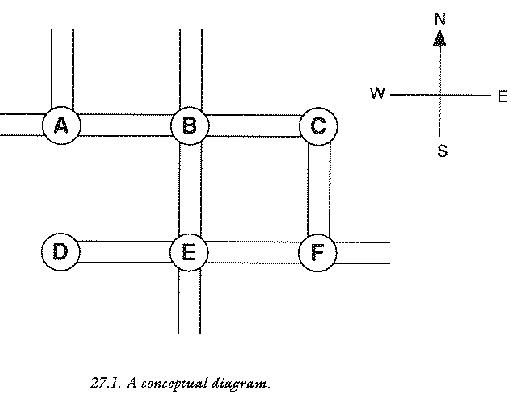
A structure diagram is a picture which shows how something is connected up. Most often a structure diagram shows how a problem is connected up by relating all the parts which go together to make it up. In this case, the structure diagram just shows how program data are related to each other.
Now examine figure 2. This diagram is a data structure diagram: it
is a diagram which shows how boxes of data must relate to one another
in order to solve the problem of the towns map. It has been drawn,
quite deliberately, in a way which is intended to conjure up some
particular thoughts. The arrows tend to suggest that pointers will
play a role in the data structure. The blocks tend to suggest that
sealed capsules or struct type data will also play a role. Putting
these two together creates the idea of a `town structure' containing
pointers to neighouring villages which lie on roads to the North,
South, East and West of the town, as well as the information about the
town itself. This town structure might look something like this:
struct Town
{
struct Town *north;
struct Town *south;
struct Town *east;
struct Town *west;
struct LocalInfo help;
};
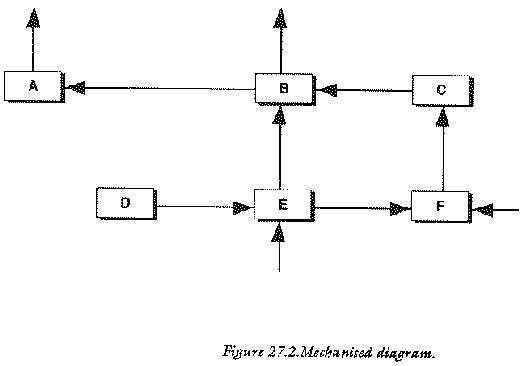
Assume for now that LocalInfo is a structure which contains all the
information about a town required by the program. This part of the
information is actually irrelevant to the structure of the data
because it is hidden inside the sealed capsule. It is the pointers
which are the main items of concern because it is pointers which
contain information that enables a program to find its way around the
map very quickly. If the user of this imaginary application program
wished to know about the town to the north of one particular place,
the program would only have to refocus its attention on the new
structure which was pointed to by the struct member north and
similarly for other directions.
A data structure is built up, like a model, by connecting struct type variables together with pointers: these are the building blocks.
By thinking of struct types and pointers in terms of pictures, one begins to see how structures can be fashioned, in computer memory, to look exactly like the problems which they represent.
What is interesting about data structure diagrams is the way in which they resemble the structure diagrams of C programs, which were drawn in chapter 7. There is a simple reason for this similarity: computer programs are themselves just data structures in which the data are program instructions and the pointers and sealed boxes are function calls. The structure of a computer program is called a hierachy. Sometimes the shape of data structures and programs are identical; when this happens, a kind of optimum efficiency has been reached in conceptual terms. Programs which behave exactly like their data operate very simply. This is the reason why structure diagrams are so useful in programming: a structure diagram is a diagram which solves a problem and does so in a pictorial way, which models the way we think.
The tools of the data structure trade are struct types and pointers. Data structures are built out of dynamically allocated memory, so storage places do not need names: all a program needs to do is to keep a record of a pointer, to a particular storage space, and the computer will be able to find it at any time after that. Pointers are the keys which unlock a program's data. The reader might object to this by saying that a pointer has to be stored in some C variable somewhere, so does a program really gain anything from working with pointers? The answer is yes, because pointers in data structures are invariably chained together to make up the structure. To understand this, make a note of the following terms:
Data structures do not have to be linear chains and they are often not. Structures, after all, can hold any number of pointers to other structures, so there is the potential to branch out into any number of new structures. In the map example above, there were four pointers in each structure, so the chaining was not linear, but more like a latticework.
We need to think about where and how data structures are going to be stored. Remember that pointers alone do not create any storage space: they are only a way of finding out the contents of storage space which already exists. In fact, a program must create its own space for data structures. The key phrase is dynamic storage: a program makes space for structures as new ones are required and deletes space which is does not require. The functions which perform this memory allocation and release are:
malloc() and free()There are some advantages which go with the use of dynamic storage for data structures and they are summarized by the following points:
The remaining parts of this section aim to provide a basic plan or formula for putting data structures together in C. This is done with recourse to two example structures, which become two example programs in the next chapter.
In writing programs which centre around their data, such as word processors, accounts programs or database managers, it is extremely important to plan data structures before any program code is written: changes in program code do not affect a data structure, but alterations to a data structure imply drastic changes to program code. Only in some numerical applications does a data structure actually assist an algorithm rather than vice versa. The steps which a programmer would undertake in designing a data structure follow a basic pattern:
Once the basic mould has been cast for the building blocks, a program actually has to go through the motions of putting all the pieces together, by connecting structures together with pointers and filling them up with information. The data structure is set up by repeating the following actions as many times as is necessary.
struct Town
{
struct Town *north;
struct Town *south;
struct Town *east;
struct Town *west;
struct LocalInfo help;
};
struct Town *ptr,*root;
One of these is used to hold the root of the data structure and the other is used as a current pointer.
root = (struct Town *) malloc(sizeof(struct Town));Be careful to check for errors. root will be NULL if no memory could be allocated.
root->north = NULL;
root->south = NULL;
root->help.age = 56; /* if age is a member */
/* of struct LocalInfo */
This sets the pointers north and south to the value
NULL, which conventionally means that the pointer does
not point anywhere.
ptr = (struct Town *) malloc(sizeof(struct Town)); ptr->north = NULL; ptr->south = NULL; /* etc.. initialize members */ root->north = ptr;
This last statement connects the new structure onto the north branch of root.
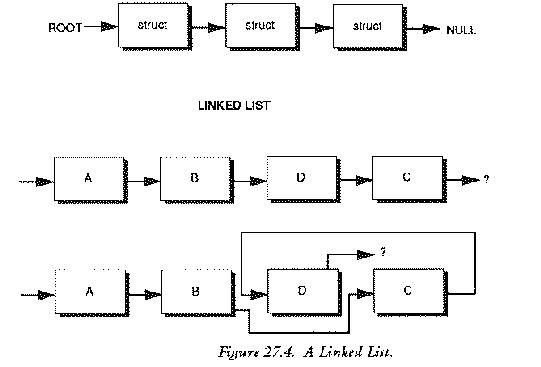
NULL pointer assignments tell the program handling the data
structure when it has come to the edge of the structure: that is when
it has found a pointer which doesn't lead anywhere.
Two data structures of thids kind are very common:
the linked list and the binary tree and both work upon the
principles outlined above (In fact they are just different
manifestations of the same thing.)
A linked list is a linear sequence of structures joined together by pointers. If a structure diagram were drawn of a linked list, all the storage blocks in it would lie in a straight line, without branching out.
struct list
{
double value;
struct list *succ;
};
A linked list has only a single pointer per structure, which points to the successor in the list. If the blocks were labelled A B C D E... then B would be the successor of A; C would be the successor of B and so on. Linked lists have two advantages over one dimensional arrays: they can be sorted easily (see diagram) and they can be made any length at all.
A binary tree is a sequence of structures, each of which branches out into two new ones.
struct BinaryTree
{
/* other info */
struct BinaryTree *left;
struct BinaryTree *right;
}
*tree = NULL;
A binary tree structure has two pointers per struct type. This is useful
for classifying data on a greater than/less than basis.
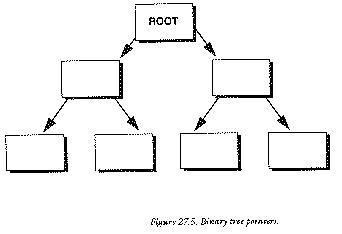
Right and left branches are taken to mean `greater than' and `less than' respectively. The programs which handle these data structures are written in the form of complete, usable application programs. They are simple by professional standards, but they are long by book standards so they are contained in a section by themselves, along with their accompanying programmers' documentation, See Example Programs chapter.
struct BinaryTree *ptr;
The daemon which swallowed its tail.
This section is about program structures which can talk about themselves. What happens to a function which makes a call itself? Examine the function below:
Well_Function ()
{
/* ... other statements ... */
Well_Function ();
}
Well_Function() is said to be a recursive function. It is defined
in terms of itself: it contains itself and it calls itself. It
swallows its own tail! The act of self-reference is called
recursion. What happens to such a function when it is called in a C
program? In the simple example above, something dramatic and fatal
happens. The computer, naturally, begins executing the statements in
the function, inside the curly braces. This much is only normal:
programs are designed to do this and the computer could do no more and
no less. Eventually the program comes upon the statement
Well_Function(); and it makes a call to that function again. It then
begins executing statements in Well_function(), from the beginning, as
though it were a new function, until it comes upon the statement
Well_Function() and then it calls the function again....
This kind of function calling scenario is doomed to continue
without end, as, each time the function is called, it is inevitably
called again. The computer becomes totally consumed with the task of
calling Well_Function() over and over. It is apparently doomed to
repeat the same procedure for ever. Or is it?
We should think about the exact sequence of events which takes place
when a function is called in a program. This will help to cast some
light on the mechanics of recursion and recursive functions. When a
function is called, control passes from one place in a program to
another place. The statements in this new region of the program are
carried out and then control returns to a statement immediately
following the one which made the function call. But how does the
computer know where it must go back to, when it has finished with a
function call? It is suddenly thrown into a wildly different region of
the memory and finds itself executing statements there. How can it get
back again? A diagram does not answer this question: program structure
diagrams hide this detail from view.
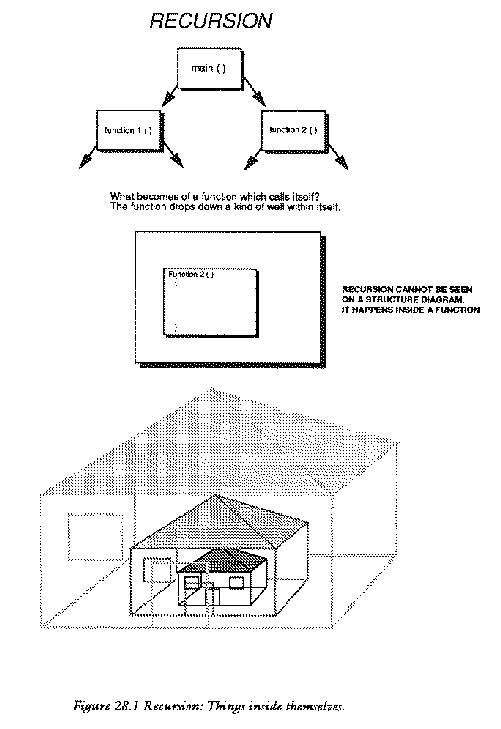
function1()
/ \
/ \
function2() function3()
/ \ / \
The answer to this puzzle is that the computer keeps a record of
the addresses of the places to which it must return, no matter how
many times functions are called. It does this by building a special
data structure called a stack.
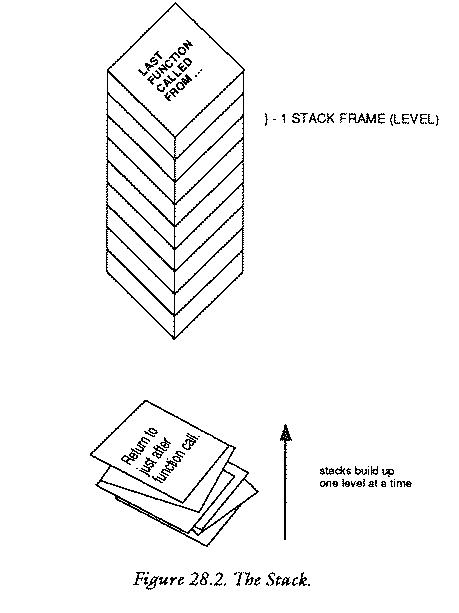
A stack is quite literally a pile of data, organized in the memory. Information is placed on top of a stack and taken from the top. It is called a last in, first out (LIFO) structure because the last thing to go on the top of a stack is always the first thing to come off it. C organizes a stack structure when it runs a program and uses it for storing local variables and for keeping track of where it has to return to. When it calls a function, it leaves itself a reminder, on the top of its program stack, which tells it where it has to go to when it has finished executing that function. C management makes sure that it does not put anything else on top of that reminder to spoil the flow of control. When a function is finished, the program takes the first message from the top of the stack and carries on executing statements at the place specified by the message. Normally this method works perfectly, without any problems at all: functions are called and they return again; the stack grows and shrinks and all is well.
What happens when a recursive function, like Well_Function()
calls itself? The system works as normal. C makes a note of the place it
has to return to and puts that note on top of the stack. It then begins
executing statements. When it comes to the call Well_Function()
again, it makes a new note of where it has to come back to and deposits
it on top of the stack. It then begins the function again and when it
finds the function call, it makes a new note and puts on the top of the
stack.... As this process continues, the memory gets filled up with the
program's messages to itself: the stack of messages gets larger and
larger. Since the function has no chance of returning control to its
caller, the messages never get taken off the stack and it just builds
up. Eventually the computer runs out of memory and the computer crashes
or interrupts the program with a fatal error message.
A stack is made up of frames or levels. Each time a function is called, the program is said to drop down a level. This is the reason for structure comments like:
/****************************************************/ /* Level 1 */ /****************************************************/
in the programs in this book. The main() function is at level 0
because it is the root of the program. If main() calls any functions
at all, control drops down to level one. When a level one function
returns, it hands control back to level zero. These level numbers
actually count the height of the program stack at any point in a
program. The level number is the number of messages or reminders on
the stack.
A function like Well_Function() digs itself a well of infinite
depth. It punches a great hole in a program; it has no place in a
levelled structure diagram. The function is pathological because it causes
the stack fill up the memory of the computer. A better name for this
function would be:
StackOverflow() /* Causes stack to grow out of control */
{
StackOverflow();
}
Recursion does not have to be so dramatically disastrous as the example given. If recursion is tamed, it provides perhaps the most powerful way of handling certain kinds of problem in programming, particularly concerning data structures.
Earlier we remarked that programs and data structures aim to model the situation they deal with as closely as possible. Some problems are made up of many levels of detail (see the introduction to this tutorial) and the details are identical at all levels. Since recursion is about functions which contain themselves at all levels, this tends to suggest that recursion would be useful for dealing with these self-similar problems. Data structures are prime candidates for this because they are made up of identical structure types, connected together in a way which make them look like programs connected up by function calls.
Recursive functions can be tamed by making sure that there is a
safe way exit them, so that recursion only happens under particular
circumstances. The aim is to control the number of times that
recursion takes place by making a decision about what happens in the
function: the decision about whether a function calls itself or
not. For example, it is easy to make Well_Function recurse four
times only, by making a test:
Well_Function(nooftimes)
int nooftimes;
{
if (nooftimes == 0)
{
return (0);
}
else
{
Well_Function(nooftimes-1);
}
}
A call of WellFunction(4) would make this function drop down four
stack levels and then return. Notice the way in which the if..else
statement shields the program from the recursion when nooftimes
equals zero. It effectively acts as a safety net, stopping the
programming from plunging down the level well infinitely.
A completely standard example of controlled recursion is the factorial (or Gamma) function. This is a mathematical function which is important in statistics. (Mathematicians also deal with recursive functions; computer programs are not alone in this.) The factorial function is defined to be the "product" (multiplication) of all the natural (unsigned integer) numbers from 1 to the parameter of the function. For example:
factorial(4) == 1 * 2 * 3 * 4 == 24 factorial(6) == 1 * 2 * 3 * 4 * 5 * 6 == 720
Formally, the factorial function is defined by two mathematical statements:
factorial (n) = n * factorial(n-1)
and
factorial (0) = 1
The first of these statements is recursive, because it defines
the value of factorial(n) in terms of the factorial function of
(n-1). This strange definition seems to want to lift itself by its
very bootstraps! The second statement saves it, by giving it a
reference value. The factorial function can be written down
immediately, as a controlled recursive function:
factorial (n)
unsigned int n;
{
if (n == 0)
{
return (1);
}
else
{
return (n * factorial(n-1));
}
}
To see how this works, try following it through for n equals
three. The statement:
factorial (3);
causes a call to be made to factorial(). The value of n is set to
three. factorial() then tests whether n is zero (which it is not) so
it takes the alternative branch of the if..else statement. This
instructs it to return the value of:
3 * factorial(3-1)
In order to calculate that, the function has to call factorial
recursively, passing the value (3-1) or 2 to the new call. The new
call takes this value, checks whether it is zero (it is not) and tries
to return the value 2 * factorial(1). In order to work this out, it
needs to call factorial again, which checks that n is not 0 (it is
not) and so tries to return 1 * factorial(0). Finally, it calls
factorial(0) which does not call factorial any more, but starts
unloading the stack and returning the values. The expression goes
through the following steps before finally being evaluated:
factorial (3) == 3 * factorial(2)
== 3 * (2 * factorial(1))
== 3 * (2 * (1 * factorial(0)))
== 3 * (2 * (1 * 1)))
== 3 * 2 * 1 * 1
Try to write this function without using recursion and compare the two.
A data structure earns the name recursive if its structure looks identical at every point within it. The simplest recursive structure is the linked list. At every point in a linked list, there are some data of identical type and one pointer to the next structure. The next simplest structure is the binary tree: this structure splits into two at every point. It has two pointers, one which branches left and one which branches to the right. Neither of these structures goes on for ever, so it seems reasonable to suppose that they might be handled easily using controlled recursive functions.
deletetoend() is a function which releases the dynamic memory
allocated to a linked list in one go. The problem it faces is this: if
it deletes the first structure in the list, it will lose information
about where the rest of the list is, because the pointer to the
successor of a structure is held in its predecessor. It must therefore
make a note of the pointer to the next structure in the list, before
it deletes that structure, or it will never be able to get beyond the
first structure in the list. The solution is to delete the list
backwards from last to first using the following recursive routine.
/* structure definition */
struct list
{
/* some other data members */
struct list *succ;
};
/**************************************************************/
struct list *deletetoend (ptr)
struct list *ptr;
{
if (ptr != NULL)
{
deletetoend (ptr->succ);
releasestruct (ptr);
}
return (NULL);
}
/**************************************************************/
releasestruct (ptr) /* release memory back to pool */
struct list *ptr;
{
if (free((char *) ptr) != 0)
{
printf ("DEBUG [Z0/TktDtStrct] memory release failure\n");
}
}
We supply a pointer to the place we would like the list to
end. This need not be the very beginning: it could be any place in the
list. The function then eliminates all structures after that point, up
to the end of the list. It does assume that the programmer has been
careful to ensure that the end of the list is marked by a NULL
pointer. This is the conventional way of denoting a pointer which does
not point anywhere. If the pointer supplied is already NULL then this
function does nothing. If it is not NULL then it executes the statements
enclosed by the if braces. Notice that deletetoend() calls
itself immediately, passing its successor in the list as a
parameter. (ptr->succ) The function keeps doing this until it
finds the end on the list. The very last-called deletetoend()
then reaches the statement releasestruct() which frees the memory
taken up by the last structure and hands it back to the free memory
pool. That function consequently returns and allows the second-last
deletetoend() to reach the releasestruct() statement,
releasing the second last structure (which is now on the end of the
list). This, in turn, returns and the process continues until the entire
list has been deleted. The function returns the value NULL at each
stage, so that when called, deletetoend() offers a very elegant
way of deleting part or all of a linked list:
struct list *newlast; newlast->succ = deletetoend (newlast->succ); ptr = deletetoend (ptr);
newlast then becomes the new end of the list, and its successor is NULLified in a single statement.
Why should programmers want to clutter up programs with techniques as mind boggling as recursion at all? The great advantage of recursion is that it makes functions very simple and allows them to behave just like the thing they are attempting to model. Unfortunately there are few situations in which recursion can be employed in a practical way. The major disadvantage of recursion is the amount of memory required to make it work: do not forget that the program stack grows each time a function call is made. If a recursive function buried itself a thousand levels deep, a program would almost certainly run out of memory. There is also the slight danger that a recursive function will go out of control if a program contains bugs.
Global variables and recursion do not mix well. Most recursive
routines only work because they are sealed capsules and what goes on
inside them can never affect the outside world. The only time that
recursive functions should attempt to alter global storage is when the
function concerned operates on a global data structure, as in the
example above. To appreciate the danger, consider a recursive
function, in which a second function alterGLOBAL() accidentally alters
the value of GLOBAL in the middle of the function:
int GLOBAL = -2;
recursion ()
{
if (++GLOBAL == 0)
{
return (0);
}
alterGLOBAL(); /* another function which alters GLOBAL */
recursion();
}
This function is treading a fine line between safety and digging its own
recursive grave. If alterGLOBAL() makes GLOBAL more
negative, as fast as ++ can make it more positive then GLOBAL
will never be able to satisfy the condition of being zero and it will go
on making recursive calls, never returning. If alterGLOBAL()
makes the mistake of setting GLOBAL to a positive value, then the
++ operator in recursion() can only make GLOBAL
larger and it will never be able to satisfy the condition that
GLOBAL == 0 and so again the function would never be able to
return. The stack would fill up the memory and the program would plunge
down an unending recursive well.
If global variables and parameters are used instead, this
difficulty can be controlled much more easily. alterGLOBAL() cannot
alter a variable in recursion() by accident, if only local variables
are used, because it only works with its own local copies of
parameters and variables which are locked away in a sealed capsule,
out of harm's way.
The aim of this section is to provide two substantial examples of C, which use the data structures described in section 28.
The first program is a utility which allows the user to type sets of floating point data into an editor and to calculate the mean, standard deviation...and so on, of those data. The program is capable of loading and saving the data to disk, as well as being able to handle several sets of data at once. The editor works in insert or overwrite modes. The program is menu driven and its operation should be reasonably self explanatory, so it is presented with rather sparse documentation.
A simple machine independent editor is provided for entering data. The editor first asks the user whether the current number of sets of data is to be altered. The default value is zero so, when data are typed in for the first time, this should be set up, by responding Y for yes. Up to twenty independent sets of data can be used. This number is set at the start and it is held in the memory and saved to disk with data files. If the number of sets is reduced at any time, the top sets are cut off from the calculations, but they are not lost forever, provided the number is changed back to include them before they are saved to disk, since the number of sets is used as an upper bound in a for loop: it does not actually alter the memory. More sets can be added at any time by making this value larger.
A project file can be edited in either insert mode or overwrite
mode. Files which contain no data may only be edited insert mode. The
editor senses this and selects the mode automatically. In insert mode
the user is prompted for values. Type 0.0 in place of an entry to get
out of this mode. In overwrite mode the user is offered each entry in
turn. If a non digit character is typed in (such as a . (dot) or
a - (dash) etc..) the value of an entry is not altered. However,
if a new value is entered, the new value will replace the old one. By
default, the values are offered in turn from 1 to the final
value. However, on selecting overwrite mode, the user is prompted for a
starting value, and the values are offered from the starting number to
the end. This is to avoid the rather tedious process of working through
all the entries which are not required in a system independent way.
When quitting sections in which the user is supposed to enter data, the convention is that typing a zero value (0.0 for a time, 0 in any other instance) is a signal to break out of a section. Typing 0.0 while editing in insert mode causes the editor to quit.
The program includes three library files, which are used for the following purposes.
#include <stdio.h>
#include <ctype.h>
#include <math.h>
The flow of program logic is most easily described by means of a
program structure diagram. The diagram shows the structure of function
calls within the program and this can be related to the listing.
The general scheme of the program is this:
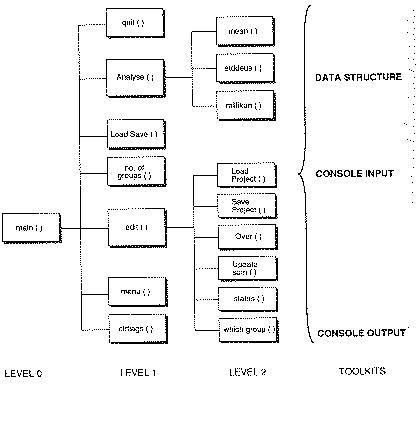
over().
/************************************************************/
/* */
/* Statistical Calculator */
/* */
/************************************************************/
#include <stdio.h>
#include <ctype.h>
#include <math.h>
/***********************************************************/
/** Manifest Constants / Macros / Static Variables **/
/***********************************************************/
#define TRUE 1
#define FALSE 0
#define GRPS 20 /* No grps which can be handled */
#define CAREFULLY 1
#define FAST 0
#define NOTZERO 1
#define ENDMARK -1.1
#define NOTENDMARK 0
#define BIGNUM 1e300
int DATSETS = 0;
short DATATHERE = FALSE; /* list data */
char *FSP = ".........................."; /* project name */
/**********************************************************/
/** STRUCTURES **/
/**********************************************************/
struct list
{
double value;
struct list *succ;
};
struct Vlist
{
struct list *datptr;
int datathere;
}
Data[GRPS];
/***********************************************************/
/** LEVEL 0 : Main Program **/
/***********************************************************/
main ()
{ char getkey();
clrflags();
while (TRUE)
{
Menu();
switch (getkey())
{
case '1' : edit(noofgroups());
break;
case '2' : LoadSave();
break;
case '3' : Analyse();
break;
case 'q' : if (wantout(CAREFULLY)) quit();
}
}
}
/************************************************************/
/** LEVEL 1 **/
/************************************************************/
clrflags() /* Initialize a virtual list */
{ short i;
for (i=1; i<=GRPS; i++);
{
Data[i].datathere = FALSE;
Data[i].datptr = NULL;
}
}
/***********************************************************/
Menu ()
{
CLRSCRN();
printf ("\nStatistical Calculator V1.0\n\n\n");
printf ("1 : Edit Data Files\n\n");
printf ("2 : Project Files\n\n");
printf ("3 : Analyse Files\n\n");
printf ("q : Quit\n\n");
printf ("\nEnter Choice and RETURN : ");
}
/*************************************************************/
edit (no_grps) /* Edit a linked list */
int no_grps;
{ char s,status(),getkey();
int i,stop = FALSE,ctr;
void saveproject();
double over(),t,correct,getfloat();
struct list *ptr,*here,*eolist(),
*install(),*startfrom();
while (TRUE)
{
i = whichgroup();
switch (s = status(i))
{
case 'i':
for (here = eolist(i,&ctr); TRUE; ctr++)
{
updatescrn (i,s);
printf("%d:",ctr);
if ((t = getfloat ()) == 0) break;
here = install (here,t,i);
}
printf ("\n\nFile closed\n\n");
break;
case 'o':
for (ptr=startfrom(&ctr,i); ptr != NULL; ptr = ptr->succ)
{
if (ctr % 4 == 1) updatescrn (i,s);
correct = over(ctr++,ptr->value);
ptr->value = correct;
}
break;
case 's': saveproject();
break;
case 'l': loadproject();
break;
case 'q': stop = wantout(FAST);
}
if (stop) break;
}
}
/************************************************************/
noofgroups () /* Check no. of data groups */
{ char ch,getkey();
printf ("Project currently holds %d groups\n\n",DATSETS);
printf ("Alter groups or Edit? (A/E)");
ch = getkey();
switch (tolower(ch))
{
case 'a' : printf ("\nHow many groups for this file? (0..%d)\n\n",GRPS);
return (DATSETS = getint(0,GRPS));
case 'e' : return (DATSETS);
}
}
/*************************************************************/
LoadSave () /* Project options */
{ char ch,getkey();
CLRSCRN();
printf ("\nCurrent Project %s\n\n\n", FSP);
printf ("Load new project or Save current one (L/S/Quit) ?\n\n");
ch = getkey();
switch (tolower(ch))
{
case 'l' : if (sure())
{
DATATHERE = loadproject ();
}
break;
case 's' : if (sure())
{
saveproject ();
}
case 'q' :
}
}
/************************************************************/
Analyse () /* Work out some typical quantities */
{ char getkey();
double mean(), mn, millikan();
int i;
printf ("Analysis of Data\n\n");
for (i = 1; i <= DATSETS; i++)
{
mn = mean(i);
printf ("Mean value of group %2d : %f\n",i,mn);
stddevs(mn);
printf ("Millikan value %d %lg:\n",i,millikan(i));
NEWLINE();
}
getkey();
}
/************************************************************/
quit () /* Quit program & tidy */
{ short i;
struct list *deletetoend();
for (i = 0; i <= DATSETS; i++)
{
deletetoend (Data[i].datptr);
}
exit(0);
}
/************************************************************/
/* LEVEL 2 */
/************************************************************/
void saveproject ()
{ FILE *dfx;
char *filename(),ch,getkey();
struct list *ptr;
int i;
if ((dfx = fopen (filename(),"w")) == 0)
{
printf ("Cannot write to file\nPress a key\n");
ch = getkey();
return;
}
fprintf (dfx,"%ld\n",DATSETS);
for (i=1; i <= DATSETS; i++)
{
for (ptr = Data[i].datptr; ptr != NULL; ptr = ptr->succ)
{
fprintf (dfx,"%lf \n",ptr->value);
}
fprintf (dfx,"%f\n",ENDMARK);
fprintf (dfx,"%d\n",Data[i].datathere);
}
while (fclose (dfx) != 0)
{
printf ("Waiting to close ");
}
blankline ();
return;
}
/************************************************************/
loadproject () /* Load new list & delete old */
{ FILE *dfx;
char *filename(),ch,getkey();
int r,i;
double t = 1.0;
struct list *ptr,*install(),*deletetoend();
if ((dfx = fopen(filename(),"r")) == NULL)
{
printf ("File cannot be read\nPress any key\n");
ch = getkey();
return (0);
}
fscanf (dfx,"%ld",&DATSETS);
for (i = 1; i <= DATSETS; i++)
{
t = NOTENDMARK;
Data[i].datptr = deletetoend(Data[i].datptr);
Data[i].datathere = FALSE;
for (ptr = Data[i].datptr; t != ENDMARK;)
{
fscanf (dfx,"%lf",&t);
if (t != ENDMARK)
{
ptr = install (ptr,t,i);
}
}
fscanf (dfx,"%ld",&r);
Data[i].datathere = r;
}
while (fclose(dfx) != 0)
{
printf ("Waiting to close file");
}
blankline();
return (TRUE);
}
/**********************************************************/
whichgroup ()
{ int n = 0;
printf ("\n\nEdit account number: ");
n = getint (0,DATSETS);
if (n == 0)
{
printf ("Quit!\n");
}
return (n);
}
/***********************************************************/
char status (i)
int i;
{ char stat;
if (i==0)
{
stat = 'q';
}
else
{
if (Data[i].datathere)
{
printf ("Insert/Overwrite/Load/Save/Quit?");
stat = getkey();
stat = tolower(stat);
}
else
{
stat = 'i';
}
}
return (stat);
}
/************************************************************/
updatescrn (grp,status) /* Update editor screen */
int grp;
char status;
{ int ctr=0;
struct list *ptr;
CLRSCRN();
printf ("\nStatistical Editor V1.0\n\n");
printf ("\nThis project file contains %d groups.\n",DATSETS);
for (ptr = Data[grp].datptr; (ptr != NULL); ptr=ptr->succ)
{
if ((ctr % 3) == 0) NEWLINE();
printf (" (%2d) %12g ",ctr+1,(ptr->value));
ctr++;
}
printf ("\n\nEditing Group %d. Contains %d entries ** ",grp,ctr);
switch (tolower(status))
{
case 'i' : printf ("INSERT MODE **\n"); break;
case 'o' : printf ("OVERWRITE MODE **\n");
}
NEWLINE();
}
/**********************************************************/
double over (n,old) /* Edit overtype mode */
int n;
double old;
{ double correct = 0;
printf ("Entry %-2d : ",n);
scanf("%lf",&correct);
skipgarb();
if (correct == 0)
{
return (old);
}
else
{
return(correct);
}
}
/************************************************************/
double mean (i) /* find mean average */
int i;
{ struct list *ptr;
double sum;
int num;
sum = num = 0;
for (ptr = Data[i].datptr; ptr != NULL; ptr=ptr->succ)
{
sum += ptr->value;
num ++;
}
return (sum/num);
}
/**************************************************************/
stddevs (mean,i) /* find variance/std deviation */
double mean;
int i;
{ double sum,num,var;
struct list *ptr;
sum = num = 0;
for (ptr = Data[i].datptr; ptr != NULL; ptr=ptr->succ)
{
sum += (ptr->value - mean) * (ptr->value - mean);
num ++;
}
var = sum/num; /* "biased" value */
printf ("Variance %d = %f\n",i,var);
printf ("Std deviation %d = %f\n",i,sqrt(var));
}
/************************************************************/
double millikan (i) /* smallest diffnce between 2 data */
int i;
{ double temp,record = BIGNUM;
struct list *ptr1,*ptr2;
for (ptr1 = Data[i].datptr; ptr1 != NULL; ptr1 = ptr1->succ)
{
for (ptr2=Data[i].datptr; ptr2!=ptr1; ptr2=ptr2->succ)
{
temp = (ptr1->value) - (ptr2->value);
if (ABS(temp) < record)
{
record = ABS(temp);
}
}
}
return(record);
}
/************************************************************/
/* LEVEL 3 */
/************************************************************/
char *filename ()
{
do
{
printf ("Enter filename : ");
scanf ("%s",FSP);
skipgarb();
}
while (strlen(FSP) == 0);
return (FSP);
}
/************************************************************/
/* Toolkit data structure */
/************************************************************/
struct list *eolist(i,c) /* Seek end of a linked Vlist */
int i,*c;
{ struct list *ptr,*p = NULL;
*c = 1;
for (ptr = Data[i].datptr; ptr != NULL; ptr = ptr->succ)
{
++(*c);
p = ptr;
}
return (p);
}
/*************************************************************/
struct list *startfrom (ctr,i) /* Find ith node in list */
int *ctr,i;
{ struct list *ptr,*p = NULL;
int j = 0;
printf ("Overtype starting from which entry");
*ctr = getint(1,99);
for (ptr=Data[i].datptr; (ptr != NULL) && (j++ != *ctr); ptr=ptr->succ)
{
p = ptr;
}
return (p);
}
/*************************************************************/
struct list *install (ptr,t,i) /* install item at thispos */
struct list *ptr;
double t;
int i;
{ struct list *thispos, *newstruct();
if ((thispos = newstruct()) == NULL)
{
warning();
printf ("DEBUG **: Free memory pool is empty");
exit(0);
}
if (!Data[i].datathere)
{
Data[i].datptr = thispos;
Data[i].datathere = TRUE;
}
else
{
ptr->succ = thispos;
}
thispos->value = t;
thispos->succ = NULL;
return (thispos);
}
/************************************************************/
struct list *deletetoend (ptr) /* RECURSIVE WELL - returns
NULL for easy deletion of
call ptr */
struct list *ptr;
{
if (ptr != NULL)
{
deletetoend (ptr->succ);
releasestruct (ptr);
}
return (NULL);
}
/************************************************************/
struct list *newstruct () /* Allocate space for new item */
{ char *malloc();
return ((struct list *) malloc(sizeof(struct list)));
}
/***********************************************************/
releasestruct (ptr) /* release memory back to pool */
struct list *ptr;
{
if (free((char *) ptr) != 0)
{
printf ("DEBUG [Z0/TktDtStrct] memory release faliure\n");
}
}
/********************************************************/
/* Toolkit CONSOLE Output */
/********************************************************/
CLRSCRN ()
{
printf ("\f");
}
/*********************************************************/
newline ()
{
printf ("\n");
}
/**********************************************************/
blankline ()
{
printf (" \r");
}
/**********************************************************/
warning ()
{
putchar('\7');
}
/***********************************************************/
/*** Toolkit CONSOLE Input **/
/***********************************************************/
wantout (becareful) /* Exit from a section */
int becareful;
{
if (becareful)
{
printf ("Really quit? (Y/N)\n");
if (yes()) return (TRUE); else return (FALSE);
}
return (TRUE);
}
/*************************************************************/
sure (becareful) /* Are you sure : boolean */
int becareful;
{
if (becareful)
{
printf ("Are you sure? (Y/N)\n");
if (yes()) return (TRUE); else return (FALSE);
}
return (TRUE);
}
/***********************************************************/
yes () /* boolean response Y/N query */
{
while (TRUE)
{
switch (getkey())
{
case 'y' : case 'Y' : return (TRUE);
case 'n' : case 'N' : return (FALSE);
}
}
}
/***********************************************************/
char getkey () /* get single character */
{ char ch;
scanf ("%c",&ch);
skipgarb();
return (ch);
}
/***********************************************************/
getint (a,b) /* return int between a and b */
int a,b;
{ int p, i = a - 1;
for (p=0; ((a > i) || (i > b)); p++)
{
printf ("?");
scanf ("%d",&i);
if (p > 3)
{
skipgarb();
p = 0;
}
}
skipgarb();
return (i);
}
/***********************************************************/
double getfloat () /* return long float */
{ double x = 0;
printf ("? ");
scanf ("%lf",&x);
skipgarb();
return (x);
}
/************************************************************/
skipgarb() /* Skip input garbage corrupting scanf */
{
while (getchar() != '\n');
}
/* end */
A variable cross referencer is a utility which produces a list of all
the identifiers in a C program (variables, macros, functions...) and
lists the line numbers of those identifiers within the source file. This
is sometimes useful for finding errors and for spotting variables,
functions and macros which are never used, since they show up clearly as
identifiers which have only a single reference. The program is listed
here, with its line numbers, and its output (applied to itself) is
supplied afterwards for reference. The structure diagram illustrates the
operation of the program.
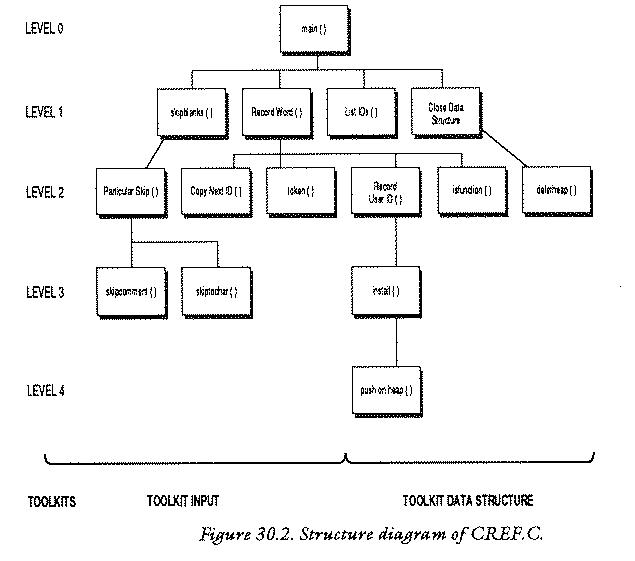
1 /********************************************************/
2 /* */
3 /* C programming utility : variable referencer */
4 /* */
5 /********************************************************/
6
7 /* See notes above */
8
9 #include <stdio.h>
10 #include <ctype.h>
11
12 #define TRUE 1
13 #define FALSE 0
14 #define DUMMY 0
15 #define MAXSTR 512
16 #define MAXIDSIZE 32
17 #define WORDTABLE 33
18
19 int LINECOUNT = 1; /* Contains line no. in file */
20 char BUFFER[MAXIDSIZE]; /* Input BUFFER for IDs */
21 char CH; /* Current input character */
22 char SPECIALCHAR; /* macro/pointer flag */
23
24 /**********************************************************/
25 /* TABLE */
26 /**********************************************************/
27
28 char *WORDTABLE [WORDTABLE] = /* Table of resvd words */
29
30 {
31 "auto" ,
32 "break" ,
33 "case" ,
34 "char" ,
35 "const",
36 "continue",
37 "default" ,
38 "do" ,
39 "double" ,
40 "else" ,
41 "entry" ,
42 "enum" ,
43 "extern" ,
44 "float" ,
45 "for" ,
46 "goto" ,
47 "if" ,
48 "int" ,
49 "long" ,
50 "register",
51 "return" ,
52 "short" ,
53 "signed" ,
54 "sizeof" ,
55 "static" ,
56 "struct" ,
57 "switch" ,
58 "typedef" ,
59 "union" ,
60 "unsigned",
61 "void" ,
62 "volatile",
63 "while" ,
64 };
65
66 /********************************************************/
67 /** STRUCTURES **/
68 /********************************************************/
69
70 struct heap
71
72 {
73 short num;
74 char spec;
75 struct heap *next;
76 };
77
78 /**********************************************************/
79
80 struct BinaryTree
81
82 {
83 char *name;
84 struct heap *line;
85 struct BinaryTree *left;
86 struct BinaryTree *right;
87 }
88
89 *tree = NULL;
90
91 /**********************************************************/
92 /* LEVEL 0 : main program */
93 /**********************************************************/
94
95 main ()
96
97 { FILE *fp;
98 char *filename();
99 struct BinaryTree *CloseDataStruct();
100
101 printf ("\nIdentifier Cross Reference V 1.0\n\n");
102 if ((fp = fopen (filename(),"r")) == NULL)
103 {
104 printf ("Can't read file .. Aborted!\n\n");
105 exit(0);
106 }
107 CH = getc(fp);
108
109 while (!feof(fp))
110 {
111 SkipBlanks (fp);
112 RecordWord (fp);
113 }
114
115 listIDs (tree);
116 CloseDataStruct(tree);
117 printf ("\n%d lines in source file\n",LINECOUNT);
118 }
119
120 /**********************************************************/
121 /* LEVEL 1 */
122 /**********************************************************/
123
124 SkipBlanks (fp) /* Skip irrelevant characters */
125
126 FILE *fp;
127
128 {
129
130 while (!feof(fp))
131
132 {
133 if (iscsymf(CH))
134 {
135 return(DUMMY);
136 }
137 else
138 {
139 ParticularSkip(fp);
140 }
141 }
142 }
143
144 /**********************************************************/
145
146 RecordWord (fp) /* get ID in buffer & tube it to data */
147
148 FILE *fp;
149
150 { int tok;
151
152 CopyNextID (fp);
153
154 if ((tok = token()) == 0) /* if not resved word */
155 {
156 RecordUserID(isfunction(fp));
157 }
158
159 SPECIALCHAR = ' ';
160 }
161
162 /**********************************************************/
163
164 listIDs (p) /* List Binary Tree */
165
166 struct BinaryTree *p;
167
168 { struct heap *h;
169 int i = 0;
170
171 if (p != NULL)
172 {
173 listIDs (p->left);
174 printf ("\n%-20s",p->name);
175
176 for (h = p->line; (h != NULL); h = h->next)
177 {
178 printf ("%c%-5d",h->spec,h->num);
179 if ((++i % 8) == 0)
180 {
181 printf ("\n ");
182 }
183 }
184
185 printf ("\n");
186 listIDs (p->right);
187 }
188 }
189
190 /*********************************************************/
191
192 struct BinaryTree *CloseDataStruct (p) /* Recursive! */
193
194 struct BinaryTree *p;
195
196 {
197 if (p->left != NULL)
198 {
199 CloseDataStruct(p->left);
200 }
201 else if (p->right != NULL)
202 {
203 CloseDataStruct(p->right);
204 }
205
206 deleteheap(p->line);
207 releasetree(p);
208 return (NULL);
209 }
210
211 /*********************************************************/
212 /* LEVEL 2 */
213 /*********************************************************/
214
215 ParticularSkip (fp) /* handle particular characters */
216
217 FILE *fp;
218
219 { char c;
220
221 switch (CH)
222
223 {
224 case '/' : if ((c = getc(fp)) == '*')
225 {
226 skipcomment (fp);
227 }
228 else
229 {
230 CH = c;
231 return (DUMMY);
232 }
233 break;
234
235 case '"' : if (skiptochar (fp,'"') > MAXSTR)
236 {
237 printf ("String too long or unterminated ");
238 printf ("at line %d\n",LINECOUNT);
239 exit (0);
240 }
241 break;
242
243 case '\'': if (skiptochar (fp,'\'') == 1)
244 {
245 if (CH=='\'') CH = getc(fp);;
246 }
247 break;
248
249 case '#' : skiptochar(fp,' ');
250 SPECIALCHAR = '#';
251 break;
252
253 case '\n': ++LINECOUNT;
254 default : CH = getc(fp);
255 SPECIALCHAR = ' ';
256 }
257 }
258
259 /*********************************************************/
260
261 CopyNextID (fp) /* Put next identifier into BUFFER */
262
263 FILE *fp;
264
265 { int i = 0;
266
267 while (!feof(fp) && (iscsym (CH)))
268 {
269 BUFFER[i++] = CH;
270 CH = getc (fp);
271 }
272
273 BUFFER[i] = '\0';
274 }
275
276 /**********************************************************/
277
278 token () /* Token: pos in WORDTABLE */
279
280 { int i;
281
282 for (i = 0; i < WORDTABLE; i++)
283 {
284 if (strcmp(&(BUFFER[0]),WORDTABLE[i]) == 0)
285 {
286 return(i);
287 }
288 }
289 return(0);
290 }
291
292 /*********************************************************/
293
294 RecordUserID (fnflag) /* check ID type & install data */
295
296 int fnflag;
297
298 { char *strcat();
299 struct BinaryTree *install();
300
301 if (fnflag)
302 {
303 strcat (BUFFER,"()");
304 tree = install (tree);
305 }
306 else
307 {
308 tree = install (tree);
309 }
310 }
311
312 /**********************************************************/
313
314 isfunction (fp) /* returns TRUE if ID is a fn */
315
316 FILE *fp;
317
318 {
319 while(!feof(fp))
320 {
321 if (!(CH == ' ' || CH == '\n'))
322 {
323 break;
324 }
325 else if (CH == '\n')
326 {
327 ++LINECOUNT;
328 }
329 CH = getc(fp);
330 }
331
332 if (CH == '(')
333 {
334 return (TRUE);
335 }
336 else
337 {
338 return (FALSE);
339 }
340 }
341
342 /**********************************************************/
343
344 deleteheap (h) /* Release back to free memory pool */
345
346 struct heap *h;
347
348 { struct heap *temp = h;
349
350 while (h!=NULL && temp!=NULL)
351 {
352 temp = h->next;
353 releaseheap(h);
354 h = temp;
355 }
356 }
357
358 /**********************************************************/
359 /** LEVEL 3 **/
360 /**********************************************************/
361
362 skipcomment (fp) /* skip to char after comment */
363
364 FILE *fp;
365
366 { char cs = 'x';
367
368 for (CH = getc(fp); !feof(fp); CH = getc(fp))
369 {
370 switch (CH)
371 {
372 case '\n': ++LINECOUNT;
373 break;
374 case '/' : if (cs == '*')
375 {
376 CH = getc(fp);
377 return(DUMMY);
378 }
379 }
380 cs = CH;
381 }
382 }
383
384 /*********************************************************/
385
386 skiptochar (fp,ch) /* skip to char after ch */
387
388 FILE *fp;
389 char ch;
390
391 { int c=0;
392
393 while (((CH =getc(fp)) != ch) && !feof(fp))
394 {
395 if (CH == '\n')
396 {
397 ++LINECOUNT;
398 }
399 c++;
400 }
401
402 CH = getc(fp);
403 return (c);
404 }
405
406 /*********************************************************/
407
408 struct BinaryTree *install (p) /* install ID in tree */
409
410 struct BinaryTree *p;
411
412 { struct heap *pushonheap();
413 struct BinaryTree *newtree();
414 char *stringin();
415 int pos;
416
417 if (p == NULL) /* new word */
418 {
419 p = newtree();
420 p->name = stringin(BUFFER);
421 p->line = pushonheap (NULL);
422 p->left = NULL;
423 p->right = NULL;
424 return (p);
425 }
426
427 if ((pos = strcmp (BUFFER,p->name)) == 0) /* found word*/
428 {
429 p->line = pushonheap(p->line);
430 return (p);
431 }
432
433 if (pos < 0) /* Trace down list */
434 {
435 p->left = install(p->left);
436 }
437 else
438 {
439 p->right = install(p->right);
440 }
441
442 return (p);
443 }
444
445 /*********************************************************/
446 /* LEVEL 4 */
447 /*********************************************************/
448
449 struct heap *pushonheap (h) /* push nxt ln no.to heap */
450
451 struct heap *h;
452
453 { struct heap *hp,*newheap();
454
455 hp = newheap();
456 hp->num = LINECOUNT;
457 hp->spec = SPECIALCHAR;
458 hp->next = h;
459
460 return (hp);
461 }
462
463 /*********************************************************/
464 /* TOOLKIT file input */
465 /*********************************************************/
466
467 backone (ch,fp) /* backspace one in file */
468
469 char ch;
470 FILE *fp;
471
472 {
473 if (ungetc(ch,fp) != ch)
474 {
475 printf ("\nDebug: Toolkit file input: backone() FAILED\n");
476 exit(0);
477 }
478 }
479
480 /**********************************************************/
481 /* TOOLKIT stdin */
482 /**********************************************************/
483
484 char *filename ()
485
486 { static char *fsp = ".................................";
487
488 do
489 {
490 printf ("Enter filename of source program: ");
491 scanf ("%33s",fsp);
492 skipgarb ();
493 }
494 while (strlen(fsp) == 0);
495 return (fsp);
496 }
497
498 /*********************************************************/
499
500 skipgarb () /* skip garbage upto end of line */
501
502 {
503 while (getchar() != '\n');
504 }
505
506 /**********************************************************/
507 /* TOOLKIT data structure */
508 /**********************************************************/
509
510 char *stringin (array) /* cpy str in arry to ptr loc*/
511
512 char *array;
513
514 { char *malloc(),*ptr;
515 int i;
516
517 ptr = malloc (strlen(array)+1);
518 for (i = 0; array[i] != '\0'; ptr[i] = array[i++]);
519 ptr[i] = '\0';
520 return(ptr);
521 }
522
523 /**********************************************************/
524
525 struct heap *newheap ()
526
527 { char *malloc ();
528 return ((struct heap *) malloc(sizeof(struct heap)));
529 }
530
531 /**********************************************************/
532
533 struct BinaryTree *newtree ()
534
535 { char *malloc ();
536 return ((struct BinaryTree *) malloc(sizeof(struct BinaryTree)));
537 }
538
539 /*********************************************************/
540
541 releaseheap (ptr)
542
543 struct heap *ptr;
544
545 {
546 if (free((char *) ptr) != 0)
547
548 {
549 printf ("TOOLKIT datastruct: link release failed\n");
550 }
551 }
552
553 /**********************************************************/
554
555 releasetree (ptr)
556
557 struct BinaryTree *ptr;
558
559 {
560 if (free((char *) ptr) != 0)
561
562 {
563 printf ("TOOLKIT datastruct: link release failed\n");
564 }
565 }
566 /* end */
567
568
Identifier Cross Reference V 1.0
Enter filename of source program: Cref.c
568
BUFFER 427 420 303 284 273 269 20
BinaryTree 557 536 536 533 413 410 408
299 194 192 166 99 86 85
82
CH 402 395 393 380 376 370 368
368 332 329 325 321 321 270
269 267 254 245 245 230 221
133 107 21
CloseDataStruct() 203 199 192 116 99
CopyNextID() 261 152
FILE 470 388 364 316 263 217 148
126 97
LINECOUNT 456 397 372 327 253 238 117
19
NULL 423 422 421 417 350 350 208
201 197 176 171 102 89
ParticularSkip() 215 139
RecordUserID() 294 156
RecordWord() 146 112
SPECIALCHAR 457 255 250 159 22
SkipBlanks() 124 111
WORDTABLE 284 28
WORDTABLE 282 28 #17
array 518 518 517 512 510
backone() 467
c 403 399 391 230 224 219
ch 473 473 469 467 393 389 386
cs 380 374 366
deleteheap() 344 206
DUMMY 377 231 135 #14
exit() 476 239 105
FALSE 338 #13
feof() 393 368 319 267 130 109
filename() 484 102 98
fnflag 301 296 294
fopen() 102
fp 473 470 467 402 393 393 388
386 376 368 368 368 364 362
329 319 316 314 270 267 263
261 254 249 245 243 235 226
224 217 215 156 152 148 146
139 130 126 124 112 111 109
107 102 97
free() 560 546
fsp 495 494 491 486
getc() 402 393 376 368 368 329 270
254 245 224 107
getchar() 503
h 458 451 449 354 353 352 350
348 346 344 178 178 176 176
176 176 168
heap 543 528 528 525 453 451 449
412 348 346 168 84 75 72
hp 460 458 457 456 455 453
i 519 518 518 518 518 515 286
284 282 282 282 280 273 269
265 179 169
install() 439 435 408 308 304 299
iscsym() 267
iscsymf() 133
isfunction() 314 156
left 435 435 422 199 197 173 85
line 429 429 421 206 176 84
listIDs() 186 173 164 115
main() 95
malloc() 536 535 528 527 517 514
MAXIDSIZE 20 #16
MAXSTR 235 #15
name 427 420 174 83
newheap() 525 455 453
newtree() 533 419 413
next 458 352 176 75
num 456 178 73
p 442 439 439 435 435 430 429
429 427 424 423 422 421 420
419 417 410 408 207 206 203
201 199 197 194 192 186 176
174 173 171 166 164
pos 433 427 415
printf() 563 549 490 475 238 237 185
181 178 174 117 104 101
ptr 560 557 555 546 543 541 520
519 518 517 514
pushonheap() 449 429 421 412
releaseheap() 541 353
releasetree() 555 207
right 439 439 423 203 201 186 86
scanf() 491
skipcomment() 362 226
skipgarb() 500 492
skiptochar() 386 249 243 235
spec 457 178 74
strcat() 303 298
strcmp() 427 284
stringin() 510 420 414
strlen() 517 494
temp 354 352 350 348
tok 154 150
token() 278 154
tree 308 308 304 304 116 115 89
TRUE 334 #12
ungetc() 473
568 lines in source file
This simplified program could be improved in a number of ways. Here are some suggestions for improvement:
Mistakes!
Debugging can be a difficult process. In many cases compiler errors are not generated because the actual error which was present but because the compiler got out of step. Often the error messages give a completely misleading impression of what has gone wrong. It is useful therefore to build a list of errors and probable causes personally. These few examples here should help beginners get started and perhaps give some insight into the way C works.
A missing semicolon is easily trapped by the compiler. Every statement must end with a semi colon. A compound statement which is held in curly braces seldom needs a semi colon to follow.
statement;
but:
{
}; <-- This semi colon is only needed if the curly
braces enclose a type declaration or an
initializer for static array/structure etc.
}This error is harder to spot and may cause a whole host of irrelevant and incorrect errors after the missing brace. Count braces carefully. One way to avoid this is to always fill braces in before the statements are written inside them. So write
{
}
and fill in the statements afterwards. Often this error will generate a message like `unexpected end of file' because it is particularly difficult for a compiler to diagnose.
C distinguishes between small and capital letters. If a program fails at the linking stage because it has found a reference to a function which had not been defined, this is often the cause.
"If a quote is missed out of a statement containing a string then the compiler will usually signal this with a message like:
String too long or unterminated.
This means that a variable is used which has not first been declared, or that a variable is used outside of its sealed capsule.
If abs (x) is a macro and not a function then the following are
incorrect:
abs (function()); abs (x = function());
Only a single variable can be substituted into a macro. This error might generate something like "lvalue required".
All functions return values of int by default. If it is required
that they return another type of variable, this must by declared in
two places: a) in the function which calls the new function, along
with the other declarations:
CallFunction ()
{ char ch, function1(), *function2();
}
The function1() is type char; function2()
is type pointer to
char. This must also be declared where the function is defined:
char function1 ()
{
}
and
char *function2()
{
}
This error might result in the message "type mismatch" or "external variable/function type/attribute mismatch"
There is a rule in C that all maths operations have to be performed with long variables. These are
int long int double long float
The result is also a long type. If the user forgets this and tries to use short C automatically converts it into long form. The result cannot therefore be assigned to a short type afterwards or the compiler will complain that there is a type mismatch. So the following is wrong:
short i,j = 2; i = j * 2;
If a short result is required, the cast operator has to be used to cast the long result to be a short one.
short i,j = 2; i = (short) j * 2;
= and ==A statement such as:
if (a = 0)
{
}
is valid C, but notice that = is the assignment operator and not the
equality operator ==. It is legal to put an assignment inside the if
statement (or any other function) and the value of the assignment is
the value being assigned! So writing the above would always give the
result zero (which is `FALSE' in C) so the contents of the braces {}
would never be executed. To compare a to zero the correct syntax is:
if (a == 0)
{
}
& in scanfThis error can often be trapped by a compiler, but not in all cases. The arguments of the scanf statement must be pointers or addresses of variables, not the contents of the variables themselves. Thus the following is wrong:
int i;
char ch;
scanf ("%c %d",ch,i);
and should read:
int i;
char;
scanf ("%c %d", &ch, &i);
Notice however that the & is not always needed if the identifier in
the expression is already a pointer. The following is correct:
int *i;
char *ch;
scanf ("%c %d", ch, i);
Including the & now would be wrong. If this error is trappable then it
will be something like "Variable is not a pointer".
In many cases these two forms are identical. However, if they are hidden inside another statement e.g.
array [C++] = 0;
then there is a subtle
difference. ++C causes C to be incremented by 1 before
the assignment takes place whereas C++ causes C to be
incremented by 1 after the assignment has taken place. So if you find
that a program is out of step by 1, this could be the cause.
C stores arrays in rows, and as far as the language is concerned the storage locations are next to one another in one place up to the end of the array. This might not be exactly true, in general. A program will be loaded into one or more areas (where ever the operating system can find space) and new variable space will be found wherever it is available, but this will not generally be in whole blocks `side by side' in the memory. The following sort of construction only works for simple data types:
char array[10]; *array = 0; *(array + 1) = 0; ... *(array + 10) = 0;
While it is true that the variable "array" used without its square brackets is a pointer to the first element of the array, it is not necessarily true that the array will necessarily be stored in this way. Using:
char array[10]; array[0] = 0; array[1] = 0; ... array[10] = 0;
is safe. When finding a pointer to, say, the third element, you should not assume that
array + 3 * sizeof (datatype)will be the location. Use:
&(array[3])
Do not assume that the size of a structure is the sum of the sizes of its parts! There may be extra data inside for operating system use or for implementation reasons, like aligning variables with particular addresses.
This problem can be avoided in ANSI C and C++ but not in K&R C. When passing values to a function the compiler will not spot whether you have the wrong number of parameters in a statement, provided they are all of the correct type. The values which are assumed for missing parameters cannot be guaranteed. They are probably garbage and will most likely spoil a program.
scanf/printf is wrongIncorrect I/O is can be the result of poorly matched conversion strings in I/O statements. These are wrong:
float x; float x;
should be
scanf ("%d",&x); scanf ("%f",&x);
or even:
double x; float x;
should perhaps be
scanf ("%f",&x); scanf("%ld",&x);
Another effect which can occur if the conversion specifier is selected as being long when it the variable is really short is that neighbouring variables can receive the scanf values instead! For instance if two variables of the same type happen to be stored next to each other in the memory:
short i,j;
which might look like:
--------------------------------------
| | |
--------------------------------------
i j
and the user tries to read into one with a long int value, scanf will
store a long int value, which is the size of two of these short
variables. Suppose the left hand box were i and the right hand box
were j and you wanted to input the value of i: instead of getting:
--------------------
| 002345 | |
--------------------
i j
scanf might store
0000000000000002345
as
------------------------
| 000000000 | 0000002345 |
------------------------
i j
because the value was long, but this would mean that the number would
over flow out of i into j and in fact j might get
the correct value and i would be set to zero!! Check the
conversion specifiers!!
int, short and charOften when working with characters one also wants to know their ASCII
values. If characters/integers are passed as parameters it is easy to
mistype char for int etc.. The compiler probably won't
notice this because no conversion is needed between int and
char. Characters are stored by their ASCII values. On the other hand if
the declaration is wrong:
function (ch)
int (ch);
{
}
but the character is continually assumed to be a character by the program, a crashworthy routine might be the result.
C does not check the limits of arrays. If an array is sized:
type array[5];
and the you allow the program to write to array[6] or more, C
will not complain. However the computer might! In the worst case this
could cause the program to crash.
C does not necessarily signal mathematical errors. A program
might continue regardless of the fact that a mathematical function
failed. Some mathematical errors (often subtle ones) can be caused
by forgetting to include to file math.h at the start of the
program.
Output which is generated by functions like putchar(),
puts() is buffered. This means that it is not written to the
screen until the buffer is either full or is specifically emptied. This
results in strange effects such as programs which produce no output
until all the input is complete (short programs) or spontaneous bursts
of output at uncoordinated intervals. One cure is to terminate with a
newline \n character which flushes the buffers on each write
operation. Special functions on some systems such as getch() may
also suffer from this problem. Again the cure is to write:
printf ("\n");
ch = getch();
Global variables and recursion should not be mixed. Most recursive routines work only because they are sealed capsules and what goes on inside them can never affect the outside world. The only time that recursive functions should alter global storage is when the function concerned operates on a global data structure. Consider a recursive function:
int GLOBAL;
recursion ()
{
if (++GLOBAL == 0)
{
return (0);
}
alterGLOBAL(); /* another function which alters GLOBAL */
recursion();
}
This function is treading a fine line between safety and digging its
own recursive grave. All it would take to crash the program, would be
the careless use of GLOBAL in the function alterGLOBAL() and the
function would never be able to return. The stack would fill up the
memory and the program would plunge down an unending recursive well.
Complex bugs can be difficult to locate. Here are some tips for fault finding:
Failing these measures, try to find someone who programs in C regularly on the computer system concerned.
Problems which defy reasonable explanations are called pathological or `sick'. Sometimes these will be the result of misconceptions about C functions, but occasionally they may be the result of compiler bugs, or operating system design peculiarities. Consider the following example which was encountered while writing the simple example in the chapter on Files and Devices, subsection `Low Level File Handling': in that program a seemingly innocent macro defined by
#define CLRSCRN() putchar('\f');
caused the C library functions creat() and remove() to
fail is remarkable ways on an early Amiga C compiler! The problem was
that a single call to CLRSCRN() at the start of the function
DelFile() caused both of the library functions (in very different
parts of the program) above to make recursing function calls the
function DelFile(). The deletion of CLRSCRN() cured the
problem entirely! In general it is worth checking carefully the names
of all functions within a program to be sure that they do not infringe
upon library functions. For example, read() and write()
are names which everyone wishes to use at some point, but they are the
names of standard library functions, so they may not be used. Even
capitalizing (Read() / Write()) might not work: beware that special
operating system libraries have not already reserved these words as
library commands.
It is almost impossible to advise about these errors. A programmer can only hope to try to eliminate all possibilities in homing in on the problem. To misquote Sherlock Holmes: "At the end of the day, when all else fails and the manuals are in the waste paper basket, the last possibility, however improbable, has to be the truth."
Programs written according to the style guidelines described in
this book should be highly portable. Nevertheless, there are almost
inevitably problems in porting programs from one computer to
another. The most likely area of incompatibility betwee compilers
regards filing operations, especially scanf(). Programmers attempting
to transfer programs between machines are recommended to look at all
the scanf() statements first and to check all the conversion
specifiers with a local compiler manual. scanf() is capable of
producing a full spectrum of weird effects which have nothing to do
with I/O.
Here are some more potential problems to look out for:
printf() and scanf()
as some compilers choose slightly different conventions
for these.
Spot the errors in the following:
function (string,i)
{
char *string;
int i;
}
while (a < b)
{
while (b == 0)
{
printf ("a is negative");
}
struct Name
{
int member1;
int member2;
}
auto
break
case
char
continue
default
do
double
else
entry
extern
float
for
goto
if
int
long
register
return
short
sizeof
static
struct
switch
typedef
union
unsigned
while
enum
void
const
signed
volatile
#include
#define
#undef
#if
#ifdef
#ifndef
#else
#endif
#line
#error
Header files contain macro definitions, type definitions and variable/ function declarations which are used in connection with standard libraries. They supplement the object code libraries which are linked at compile time for standard library functions. Some library facilities are not available unless header files are included. Typical names for header files are:
stdio.h
ctype.h
math.h
'x' '\n'
e or E
preceding them. e.g. 2.14E12 3.2e-2
"This is a string" and have type pointer
to character.
char
int
short int
long int
float
long float
double
void
auto
const
extern
static
register
volatile
Idenitifiers may contain the characters:
0..9, A..Z, a..z and _
(the underscore character).
Identifiers may not begin with a number. (The compiler assumes that an
object beginning with a number is a number.)
A single statement is any valid string in C which ends with a semi colon. e.g.
a = 6;
printf ("I love C because...");
A compound statement is any number of single statements groued together in curly braces. The curly braces do not end with a semi colon and stand in place of a single statement. Any pair of curly braces may contain local declarations after the opening brace. e.g.
{
a = 6;
}
{ int a;
a = 6;
printf ("I love C because...");
}
Summary of Operators and Precedence
The highest priority operators are listed first.
Operator Operation Evaluated
() parentheses left to right
[] square brackets left to right
++ increment right to left
-- decrement right to left
(type) cast operator right to left
* the contents of right to left
& the address of right to left
- unary minus right to left
~ one's complement right to left
! logical NOT right to left
* multiply left to right
/ divide left to right
% remainder (MOD) left to right
+ add left to right
- subtract left to right
>> shift right left to right
<< shift left left to right
> is greater than left to right
>= greater than or equal to left to right
<= less than or equal to left to right
< less than left to right
== is equal to left to right
!= is not equal to left to right
& bitwise AND left to right
^ bitwise exclusive OR left to right
| bitwsie includive OR left to right
&& logical AND left to right
|| logical OR left to right
= assign right to left
+= add assign right to left
-= subtract assign right to left
*= multiply assign right to left
/= divide assign right to left
%= remainder assign right to left
>>= right shift assign right to left
<<= left shift assign right to left
&= AND assign right to left
^= exclusive OR assign right to left
|= inclusive OR assign right to left
char ch;
isalpha(ch)
isupper(ch)
islower(ch)
isdigit(ch)
isxdigit(ch)
isspace(ch)
ispunct(ch)
isalnum(ch)
isprint(ch)
isgraph(ch)
iscntrl(ch)
isascii(ch)
iscsym(ch)
toupper(ch)
tolower(ch)
toascii(ch)
Control characters are invisible on the screen. They have special purposes usually to do with cursor movement and are written into an ordinary string or character by typing a backslash character \ followed by some other character. These characters are listed below.
\b
\f
\n
\r
\t
\v
\"
\'
\\
\ddd
printf ()
scanf ()
getchar()
putchar()
gets ()
puts ()
fprintf()
fscanf()
fgets()
fputs()
fopen()
fclose()
getc()
ungetc();
putc()
fgetc()
fputc()
feof()
fread()
fwrite()
ftell()
fseek()
rewind()
fflush()
open()
close()
creat()
read()
write()
rename()
unlink()
remove()
lseek()
printf conversion specifiersd
u
x
o
s
c
f
e
g
f or e, whichever is shorter
The letter l (ell) can be prefixed before these for long types.
scanf conversion specifersThe conversion characters for scanf are not identical
to those for printf
and it is important to distinguish the long types here.
d
ld
x
o
h
f
lf
e
le
c
s
These functions require double parameters and return double
values unless otherwise stated. It is important to include
math.h.
ABS(x)
fabs(x)
ceil(x)
floor(x)
exp(x)
log(x)
log10(x)
pow(x,y)
sqrt(x)
sin(x)
cos(x)
tan(x)
x in radians)
asin(x)
x in radians
acos(x)
x in radians
atan(x)
x in radians
atan2(x,y)
x/y in radians
sinh(x)
cosh(x)
tanh(x)
gotoThis word is redundant in C and encourages poor programming style. For this reason it has been ignored in this book. For completeness, and for those who insist on using it (may their programs recover gracefully) the form of the goto statement is as follows:
goto label;
label is an identifier which occurs somewhere else in the given
function and is defined as a label by using the colon:
label : printf ("Ugh! You used a goto!");
Here is a list of all the reserved words in C. The set of reserved words above is used to build up the basic instructions of C; you can not use them in programs your write
Please note that this list is somewhat misleading. Many more words are out of bounds. This is because most of the facilities which C offers are in libraries that are included in programs. Once a library has been included in a program, its functions are defined and you cannot use their names yourself.
C requires all of these reserved words to be in lower case. (This does mean that, typed in upper case, the reserved words could be used as variable names, but this is not recommended.)
(A "d" by the word implies that it is used as part of a declaration.)
auto d if
break int d
case long d
char d register d
continue return
default short d
do sizeof
double d static d
else struct
entry switch
extern d typedef d
float d union d
for unsigned d
goto while
also in modern implementations:
enum d
void d
const d
signed d
volatile d
If you are already familiar with Pascal (Algol..etc) or BBC BASIC, the following table will give you a rough and ready indication of how the main words and symbols of the three languages relate.
C Pascal BASIC
= := =
== = =
*,/ *,/ *,/
/,% div, mod DIV, MOD
printf (".."); writeln ('..'); PRINT ".."
write ('..');
scanf ("..",a); readln (a); INPUT a
read (a);
for (x = ..;...;) for x := ...to FOR x = ...
{ begin
} end; NEXT x
while (..) while ...do N/A
{ begin
} end;
do N/A N/A
{
}
while (..);
N/A repeat REPEAT
until (..) UNTIL ..
if (..) ..; if ... then ... IF .. THEN..
else ...; else ....; ELSE
switch (..) case .. of N/A
{
case :
} end;
/* .... */ { ..... } REM .....
* ^ ? ! $
struct record N/A
union N/A N/A
The conditional expressions if and switch are essentially
identical to Pascal's own words if and case but there is no
redundant "then". BASIC has no analogue of the switch
construction. The loop constructions of C are far superior to those of
either BASIC or Pascal however. Input and Output in C is more flexible
than Pascal, though correspondingly less robust in terms of program
crashability. Input and Output in C can match all of BASICs string
operations and provide more, though string variables can be more
awkward to deal with.
This table lists the decimal, octal, and hexadecimal numbers for characters 0 - 127.
Decimal Octal Hexadecimal Character
0 0 0 CTRL-@
1 1 1 CTRL-A
2 2 2 CTRL-B
3 3 3 CTRL-C
4 4 4 CTRL-D
5 5 5 CTRL-E
6 6 6 CTRL-F
7 7 7 CTRL-G
8 10 8 CTRL-H
9 11 9 CTRL-I
10 12 A CTRL-J
11 13 B CTRL-K
12 14 C CTRL-L
13 15 D CTRL-M
14 16 E CTRL-N
15 17 F CTRL-O
16 20 10 CTRL-P
17 21 11 CTRL-Q
18 22 12 CTRL-R
19 23 13 CTRL-S
20 24 14 CTRL-T
21 25 15 CTRL-U
22 26 16 CTRL-V
23 27 17 CTRL-W
24 30 18 CTRL-X
25 31 19 CTRL-Y
26 32 1A CTRL-Z
27 33 1B CTRL-[
28 34 1C CTRL-\
29 35 1D CTRL-]
30 36 1E CTRL-^
31 37 1F CTRL-_
32 40 20
33 41 21 !
34 42 22 "
35 43 23 #
36 44 24 $
37 45 25 %
38 46 26 &
39 47 27 '
40 50 28 (
41 51 29 )
42 52 2A *
43 53 2B +
44 54 2C ,
45 55 2D -
46 56 2E .
47 57 2F /
48 60 30 0
49 61 31 1
50 62 32 2
51 63 33 3
52 64 34 4
53 65 35 5
54 66 36 6
55 67 37 7
56 70 38 8
57 71 39 9
58 72 3A :
59 73 3B ;
60 74 3C <
61 75 3D =
62 76 3E >
63 77 3F ?
64 100 40 @
65 101 41 A
66 102 42 B
67 103 43 C
68 104 44 D
69 105 45 E
70 106 46 F
71 107 47 G
72 110 48 H
73 111 49 I
74 112 4A J
75 113 4B K
76 114 4C L
77 115 4D M
78 116 4E N
79 117 4F O
80 120 50 P
81 121 51 Q
82 122 52 R
83 123 53 S
84 124 54 T
85 125 55 U
86 126 56 V
87 127 57 W
88 130 58 X
89 131 59 Y
90 132 5A Z
91 133 5B [
92 134 5C \
93 135 5D ]
94 136 5E ^
95 137 5F _
96 140 60 `
97 141 61 a
98 142 62 b
99 143 63 c
100 144 64 d
101 145 65 e
102 146 66 f
103 147 67 g
104 150 68 h
105 151 69 i
106 152 6A j
107 153 6B k
108 154 6C l
109 155 6D m
110 156 6E n
111 157 6F o
112 160 70 p
113 161 71 q
114 162 72 r
115 163 73 s
116 164 74 t
117 165 75 u
118 166 76 v
119 167 77 w
120 170 78 x
121 171 79 y
122 172 7A z
123 173 7B {
124 174 7C |
125 175 7D }
126 176 7E ~
127 177 7F DEL
The programming style used in this book can be taught to Emacs with the following site-lisp file:
;;;
;;; C, perl and C++ indentation, Burgess style. (Thomas Sevaldrud)
;;;
(defconst burgess-c-style
'((c-tab-always-indent . t)
(c-hanging-braces-alist . ((substatement-open before after)
(brace-list-open)))
(c-hanging-colons-alist . ((member-init-intro before)
(inher-intro)
(case-label after)
(label after)
(access-label after)))
(c-cleanup-list . (scope-operator))
(c-offsets-alist . ((arglist-close . c-lineup-arglist)
(defun-block-intro . 1)
(substatement-open . 3)
(statement-block-intro . 0)
(topmost-intro . -1)
(case-label . 0)
(block-open . 0)
(knr-argdecl-intro . -)))
;(c-echo-syntactic-information-p . t)
)
"Burgess Programming Style")
;; Customizations for all of c-mode, c++-mode, and objc-mode
(defun burgess-c-mode-common-hook ()
;; add my personal style and set it for the current buffer
(c-add-style "BURGESS" burgess-c-style t)
;; offset customizations not in burgess-c-style
(c-set-offset 'member-init-intro '++)
;; other customizations
;; keybindings for C, C++, and Objective-C. We can put these in
;; c-mode-map because c++-mode-map and objc-mode-map inherit it
(define-key c-mode-map "\C-m" 'newline-and-indent)
)
(add-hook 'c-mode-common-hook 'burgess-c-mode-common-hook)
;;;
;;; Lite hack for � slippe � skrive inn kompileringskommandoen i c,
;;; (hvis ikke Makfile eksisterer)
;;; samt en fancy heading hvis det er en ny fil.
;;;
(add-hook 'c-mode-hook
(lambda ()
; (local-set-key "\C-c\C-c" 'compile)
(cond ((not (file-exists-p (buffer-file-name)))
(insert-string
(concat "/*" (make-string 75 ?*) "*/\n"
"/*" (make-string 75 ? ) "*/\n"
(format "/* File: %-67s */\n" (buffer-name))
"/*" (make-string 75 ? ) "*/\n"
(format "/* Created: %-64s */\n" (current-time-string))
"/*" (make-string 75 ? ) "*/\n"
"/* Author: > */\n"
"/*" (make-string 75 ? ) "*/\n"
"/* Revision: $Id$ */\n"
"/*" (make-string 75 ? ) "*/\n"
"/* Description: */\n"
"/*" (make-string 75 ? ) "*/\n"
"/*" (make-string 75 ?*) "*/\n"
"\n#include <stdio.h>\n"))))
(outline-minor-mode 1)
(or (file-exists-p "makefile")
(file-exists-p "Makefile")
(set (make-local-variable 'compile-command)
(concat "gcc -o "
(substring
(file-name-nondirectory buffer-file-name)
0
(string-match
"\\.c$"
(file-name-nondirectory buffer-file-name)))
" "
(file-name-nondirectory buffer-file-name))))))
;;;
;;; Samme for C++
(add-hook 'c++-mode-hook
(lambda ()
; (local-set-key "\C-c\C-c" 'compile)
(cond ((not (file-exists-p (buffer-file-name)))
(insert-string
(concat "/*" (make-string 75 ?=) "*/\n"
"/*" (make-string 75 ? ) "*/\n"
(format "/* File: %-67s */\n" (buffer-name))
"/*" (make-string 75 ? ) "*/\n"
(format "/* Created: %-64s */\n" (current-time-string))
"/*" (make-string 75 ? ) "*/\n"
"/* Author: */\n"
"/*" (make-string 75 ? ) "*/\n"
"/* Revision: $Id$ */\n"
"/*" (make-string 75 ? ) "*/\n"
"/* Description: */\n"
"/*" (make-string 75 ? ) "*/\n"
"/*" (make-string 75 ?=) "*/\n"
"/* */\n"
"/*" (make-string 75 ?=) "*/\n"
"\n#include <iostream.h>\n"))))
(outline-minor-mode 1)
(or (file-exists-p "makefile")
(file-exists-p "Makefile")
(set (make-local-variable 'compile-command)
(concat "g++ -o "
(substring
(file-name-nondirectory buffer-file-name)
0
(string-match
"\\.C$"
(file-name-nondirectory buffer-file-name)))
" "
(file-name-nondirectory buffer-file-name))))))
;;; Mark hacks
( setq perl-mode-hook
'(lambda()
(setq perl-indent-level 0)
(setq perl-continued-statement-offset 3)
(setq perl-continued-brace-offset -3)
(setq perl-brace-offset 3)
(setq perl-brace-imaginary-offset 0)
(setq perl-label-offset -3)
(define-key perl-mode-map "\C-m" 'newline-and-indent)
)
)
( setq java-mode-hook
'(lambda()
(setq java-indent-level 0)
(setq java-continued-statement-offset 3)
(setq java-continued-brace-offset -4)
(setq java-brace-offset 3)
(setq java-brace-imaginary-offset 0)
(setq java-label-offset -4)
(setq java-statement-block-intro . +)
(setq java-knr-argdecl-intro . 3)
(setq java-substatement-open . 0)
(setq java-label . 0)
(setq java-statement-case-open . 0)
(setq java-statement-cont . 0)
(define-key java-mode-map "\C-m" 'newline-and-indent)
)
)
Chapter 1
1) A tool which translates high level language into machine language.
2) By typing the name of an executable file.
3) By typing something like "cc filename"
4) NO!
5) Compiler errors and runtime errors.
Chapter 3
1) printf ("Wow big deal");
2) printf ("22");
3) printf ("The 3 wise men");
printf ("The %d wise men",3);
4) Most facilities are held in libraries
Chapter 4
1) To provide a basic set of facilities to the user
2) The filename used by a computer to reference a device
3) accounts.c
4) accounts.x (or perhaps accounts.EXE)
5) By typing the name in 4)
Chapter 5
1) #include <filename> or #include "filename"
2) stdio.h
3) No. Only macro names can be used if the header file is not included.
4) Header file.
Chapter 7
1) A group of statements enclosed by curly braces {}.
2) Comments, preprocessor commands, functions, declarations, variables,
statements. (This is a matter of opinion, of course.)
3) Not necessarily. It starts wherever main() is.
4) It signifies the end of a block, the return of control to somethng else.
5) The semi-colon (;)
Chapter 8
1) The compiler thinks the rest of the program is all one comment!
Chapter 9
1) function (a,b)
int a,b;
{
return (a*b);
}
2) No.
3) The value is discarded.
4) The result is garbage.
5) By using "return".
Chapter 10
1) A name for some variable, function or macro
2) a,c,f
3) int i,j;
4) double is twice the length of float and can hold significantly larger values.
5) int can have values + or -. Unsigned can only be + and can hold
slightly larger + values than int.
6) I = 67;
7) int
8) At the function defintion and in the calling function.
9) printf ("%d",(int)23.1256);
10) No.
Chapter 11
1) With variable parameters or with return()
2) Where a function is definned, after its name: e.g.
function (...)
<-- here
{
}
3) Yes.
4) No and it is illegal.
5) * means "the contents of" and & means "the address of"
6) No.
Chapter 12
1) A global variable can be accessed by any part of a program.
2) A local variable canonly be accessed by a select part of a program.
3) Local variables cannot leak out. Nothing outside them can reach local variables.
4) Variable parameters do. Value parameters use their own local copies, so they do not.
5) int i,j;
main ()
{ float x,y;
another(x,y);
}
another(x,y)
float x,y;
{
}
There are 6 storage spaces altogether.
Chapter 13
1) #define birthday 19
2) #include <math.h>
3) false
4) false
Chapter 14
1) A variable which holds the address of another variable
2) With a * character. e.g. int *i;
3) Any type at all!
4) doubleptr = (double *)chptr;
5) Because number has not been initialized. This expression initializes
the place that number points to, not number itself. (See main text)
Chapter 15
printf
1) #include <stdio.h>
main ()
{
printf ("%2e",6.23);
}
2) This depends on individual compilers
3) a) No conversion string
b) Conversion string without matching value
c) Probably nothing
d) Conversion string without matching value
scanf
1) space, newline or tab
5) true.
Low level I/O
1) The statement is possible provided putchar() is not implemented as a
macro. It copies the input to the output: a simple way of writing on the
screen. (Note however that the output is buffered so characters may not
be seen on the output for some time!)
2) ch = getchar();
putchar (ch);
Chapter 16
1) The thing(s) an operator acts upon.
2) printf ("%d",5 % 2);
3) rem = 5 % 2;
4) variable = 10 - -5;
5) if (1 != 23)
{
printf ("Thank goodness for mathematics");
}
Chapter 18
1) Three: while, do..while, for
2) while : at the start of each loop
do : at the end of each loop
for : at the start of each loop
3) do..while
4) #include <stdio.h>
#define TRUE 1
main ()
{ char ch;
while (true)
{
ch = getchar();
putchar (ch);
}
Chapter 19
1) The array identifier (without square brackets) is a pointer to the
first element in the array.
2) You pass the array identifier, without square brackets.
No! Arrays are always variable parameters.
3) double array[4][5];
Valid array bounds from array[0][0] to array[3][4]
Chapter 20
1) Arrays of characters. Pointers to arrays of characters.
2) static char *strings[];
Could then initialize with braces {} and item list. (See main text)
3) See the Morse code example.
Chapter 22
1) double
2) Probably true. This is implementation dependent. The actual types are
double, long float and int.
3) The length of a string (excluding NULL byte)
4) Joins two strings.
5) Overflow, underflow, domain error, Loss of accuracy and division by zero.
Chapter 23
1) ++, -- and any assignment or unary operator
2) It could make a program too difficult to read
3) No. The function would return before the vaue could be incremented.
Chapter 23
1) FILE is defined by stdio.h It is reserved only when this file is
included. It is not a built in part of the language.
2) FILE *fp;
3) False. They are meant for comparitive purposes only. It does not make
sense to do arithmetic with enumerated data.
4) Yes. It provides a generic pointer. i.e. one which can be assigned to
any other pointer type.
5) volatile
6) typedef double real;
7) True.
Chapter 24
1) Nothing -- only the way it is used. Yes, every variable is a bit
pattern. It is normal to use integer or character types for bit
patterns.
2) Inclusive OR is true if all possiblilities are true
simultaneously. Exclusive OR is false if all possibilites are true
simultaneously.
3) Some kind of flag message perhaps. A bit pattern for certain.
4) a) 00000111 & 00000010 == 00000010 == 2
b) 00000001 & 00000001 == 00000001 == 1
c) 00001111 & 00000011 == 00000011 == 3
d) 00001111 & 00000111 == 00000111 == 7
e) 00001111 & 00000111 & 00000011 == 00000011 = 3
5) a) 00000001 | 00000010 == 00000011 == 3
b) 00000001 | 00000010 | 00000011 == 00000011 == 3
6) a) 1 & (~1) == 00000001 & 11111110 == 0
b) 23 & ~23 == 00011111 & 11100000 == 0
c) similarly 0: n & (NOT n) is always zero
Chapter 26
1) a) a string which labels a file
b) a variable of type *fp which points to a FILE structure
c) the number of a file "portal" in the I/O array
2) High level filing performs translations to text. Low level files untranslated bit data.
3) fp = fopen ("filename","r");
4) fd = open ("filename",O_WRONLY);
6) fprintf ()
Chapter 27
1) A structure can hold several values at the same time. A union holds
only one value at any one time.
2) A part of a structure, or a possible occupant of a union.
3) x.mem
4) ptr->mem
5) False.
Chapter 28
1) A diagram which shows how structures are put together.
2) With pointers.
3) False. Pointers are used to reference variables and data structures
are built in such a way as to require only one name for a whole
structure.
4) With pointers. ptr->member etc...
5) ptr=(struct Binary Tree *)malloc(sizeof(struct Binary Tree));
Chapter 29
1) A function which is defined in terms of itself.
2) A data structure run by the C-language for keeping track of function calls and for storing local data.
3) A lot of memory is used as stack space.
Chapter 31
1) Declarations are in the wrong place.
2) Missing closing brace }
3) Missing semi-colon after closing brace };
& operator: Pointers
getenv() function: envp
printf
printf
scanf
fprintf()
fscanf()
getc() and fgetc()
ungetc()
putc() and fputc()
fgets() and fputs()
fread() and fwrite()
rewind()
fflush()
open()
close()
creat()
write()
lseek()
unlink() and remove()
= and ==
& in scanf
scanf/printf is wrong
int, short and char